Participant
November 21, 2022
Question

Remove purple colour from face

  • November 21, 2022
  • 3 replies
  • 4343 views

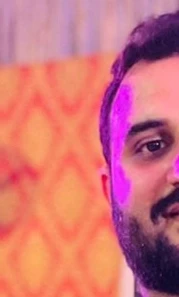
Is there any way to remove purple color from the face in such a way that this coloured area matches the surrounding skin colour? I am using Adobe Photoshop CS 6.


This purple colour is due to a beam of light.
 

This topic has been closed for replies.

3 replies

Legend
November 21, 2022

I would first use the Brush tool in color mode to paint over the purple with skin color and get it close to the orange from the skin. Then possibly use a selection from the other side as a replacement.

PECourtejoie
Community Expert
Community Expert
November 21, 2022

Hi, for such issues, I'd try to use content from the other side of the head, (selection, Jump to new layer: CTRL+J, then flip, and transform to fit, mask) or cloning from another image where the beam did not shine on the face.

You could try to use the clone tool on a separate layer, and try using different blending modes?

Participant
November 21, 2022

Can you elaborate this procedure by enlisting all steps one by one?

Mylenium
Legend
November 21, 2022

Other than elaborate clone painting I can't really think of much. The purple is completely blown out, meaning there is no recognizable skin texture left which would allow for trying color corrections. That may work in the beard/ hair, though, but not the actual skin.


Mylenium
