
Mohamed Hameed21513110
Inspiring
November 27, 2021
Question

Remove White Space or Delete space between Layers

  • November 27, 2021
  • 5 replies
  • 2023 views

Hi
I want a code that removes the white spaces between layers

like this attachment
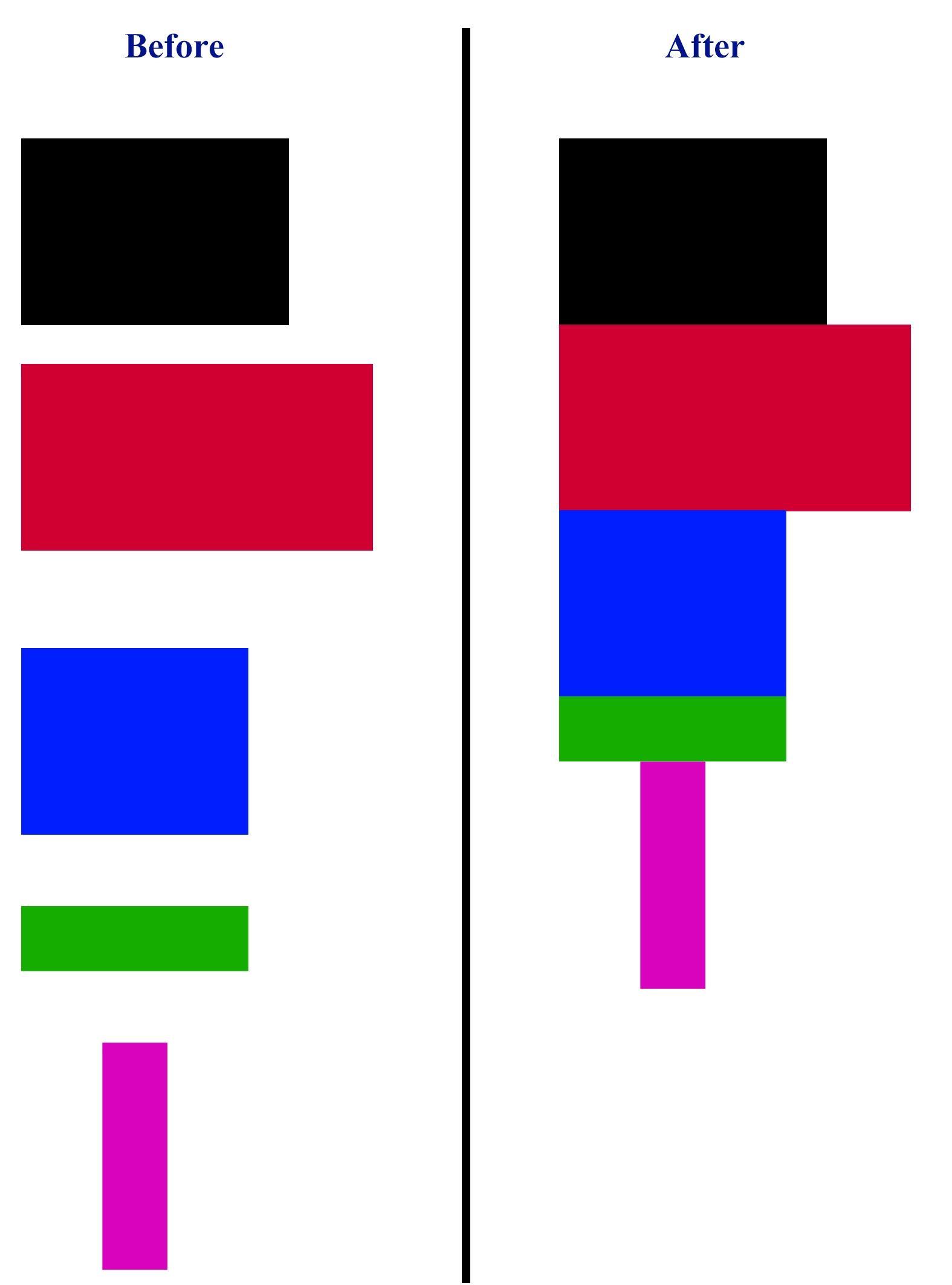
This topic has been closed for replies.

5 replies

Kukurykus
Legend
November 28, 2021

Moderator please merge this thread with Photoshop script how to select multi layers by size ( CM or inch)


The linked thread started by same author has already contained scripting method for described problem.

Stephen Marsh
Community Expert
Community Expert
November 28, 2021
JJMack
Community Expert
Community Expert
November 28, 2021

Have you ever considered learning how to script Photoshop yourself? That way you can arrange your layer the want you want them arranged if is possible.. You keep adding new threads asking other to arrange your layers for you with Photoshop scripts.   I think this is the third or fourth thread you have started in that  many days.  You do not seem to believe the its a complex task to optional arrange image layers that have different size on a canvas with no white space between images.   Not only is it a complex puzzle it may well be an impossible puzzle for the pieces can not be be fitted on the canvas that way  because different aspect ratios and images  sizes make it an possible puzzle to solve. It simply may be impossible.


https://community.adobe.com/t5/photoshop-ecosystem-discussions/photoshop-script-how-to-select-multi-layers-by-size-cm-or-inch/m-p/12546421/page/2#M602125 

JJMack
Mohamed Hameed21513110
Inspiring
November 28, 2021

Hi JJMack
I want you to know before I write any problem with me on this site
I search a lot, maybe the topic is easy and I am difficult things
In general, I'm sorry if you think that what I write is for me, I thought that the Adobe community is a helpful community for everyone who wants a solution to a problem they may encounter
And you see that every problem I write may be impossible, but when I search for it, I see that there are people who know how to solve this problem, so why do I see that you are criticizing me when I see that there are people who help me
I also want you to know that arranging the layers without spaces, even if the sizes of the pieces differ, is easy and possible, and I found the solution, but in a different way
I used to think that here I find the simple way to things, and I also see that every problem that a person writes is searched by other people. The problem is solved, not only for one person, but for other people looking for this problem.

JJMack
Community Expert
Community Expert
November 28, 2021

Everyone that makes composites, collages ect. Do have the issues you have been asking about and if you have been seaching for solutions you should see this. The there many solution for spacing issues on the web.  However there are no solution for automatic optimize arranging random number of randone size image onea camcsa without white space while sometimes it can be done I would think the most of the time there  is no perfect  solution.


In generals users want to display in some particular sequence and layout in that order and find that is it is easily done using same size  image.  They also find the Portrait and Landscape images that have sane  but reverse aspect ratio cans also be arrange  neatly on canvas withe the right amount of each  aspect ration images.


So it is possible to layout many different size image on a canvas  with the right number of image that have particular sizes and aspect ratios.   That is images for s known planed layout pattern.   This is normally  Addressed by creating Templates for the layouts you want then you populating these templates with your images.  


If you download and look at my free Photoshop Photo Collage and Mockup Toolkit you will see with templates  you can address layout issues and the scripts  in the toolkit can address using different size  images within some reasonable Aspect Ratio ranges.  Virtual centered Aspect Ratio cropss are usually acceptable in these layouts. Photo Collage and Mockup Toolkit 


JJMack
Stephen Marsh
Community Expert
Community Expert
November 28, 2021

This script from Paul Riggott is more complex, it would probably take a little more work to change:


https://github.com/Paul-Riggott/PS-Scripts/blob/master/Distribute%20Layers.jsx


Mohamed Hameed21513110
Inspiring
November 28, 2021

Stephen_A_Marsh Thank you for your interest

i test this code

https://github.com/Paul-Riggott/PS-Scripts/blob/master/Distribute%20Layers.jsx

but get this result

this code (above code ) get this result

Delete most except for one..why


Stephen Marsh
Community Expert
Community Expert
November 28, 2021

Trevor Morris has a script that comes close. It requires 3 or more layers to be selected/targeted in the layers panel before the script is run.


https://morris-photographics.com/photoshop/scripts/distribute-vertically.html


Simply change the gap variable to 0 (zero) as below:


// Distribute Layer Spacing Vertical - Adobe Photoshop Script
// Description: evenly distributes the selected layers vertically
// Requirements: Adobe Photoshop CS3, or higher
// Version: 0.2.0, 17/Apr/2011
// Author: Trevor Morris (trevor@morris-photographics.com)
// Website: http://morris-photographics.com/
// ============================================================================
// Installation:
// 1. Place script in:
//    PC(32):  C:\Program Files (x86)\Adobe\Adobe Photoshop CS#\Presets\Scripts\
//    PC(64):  C:\Program Files\Adobe\Adobe Photoshop CS# (64 Bit)\Presets\Scripts\
//    Mac:     <hard drive>/Applications/Adobe Photoshop CS#/Presets/Scripts/
// 2. Restart Photoshop
// 3. Choose File > Scripts > Distribute Layer Spacing Vertical
// ============================================================================

// enable double-clicking from Mac Finder or Windows Explorer
#target photoshop

// bring application forward for double-click events
app.bringToFront();

///////////////////////////////////////////////////////////////////////////////
// main - evenly distributes the selected layers vertically
///////////////////////////////////////////////////////////////////////////////
function main() {
	// get selected layers
	var doc = activeDocument;
	var selectedLayers = getSelectedLayersIndex(doc);

	// check for Background layer
	if (selectedLayers[0] == 0) {
		alert('The Background layer cannot be repositioned, so it will be deselected.', 'Background layer deselected', false);
		selectedLayers.shift();
	}

	// remove layer groups from selection
	var len = selectedLayers.length;
	var layerGroup = sTID('layerSectionStart');
	for (var i = 0; i < len; i++) {
		if (getLayerTypeByIndex(selectedLayers[i]) == layerGroup) {
			selectedLayers.splice(i, 1);
			len--;
			i--;
		}
	}

	// display alert for less than three selected layers
	if (len < 3) {
		alert('This command requires three or more selected layers.', 'Too few layers', false);
		return;
	}

	// initialize local variables
	var min = Number(doc.height);
	var max = 0, height = 0, top = 0, bottom = 0, index = 0;
	var bounds = [];

	// get layer bounds and total height
	for (var i = 0; i < len; i++) {
		index = selectedLayers[i];
		bounds = getLayerBoundsByIndex(index);
		top = Number(bounds[0]);
		bottom = Number(bounds[2]);
		min = Math.min(min, top);
		max = Math.max(max, bottom);
		selectedLayers[i] = [index, top];
		height += bottom - top;
	}

	// sort layers based on vertical position
	selectedLayers.sort(numberorder);
	function numberorder(a, b) {return a[1] - b[1];}

	// determine spacing between layers
	var gap = 0;
	selectLayerByIndex(selectedLayers[0][0]);

	// evenly distributes layers vertically
	var layer, pLock, aLock;
	for (var i = 1; i < (len - 1); i++) {
		// get bottom bounds of layer to top
		bottom = Number(doc.activeLayer.bounds[3]) + gap;

		// select layer; get top bounds
		selectLayerByIndex(selectedLayers[i][0]);
		top = selectedLayers[i][1];

		// unlock layer
		layer = doc.activeLayer;
		if (layer.allLocked || layer.positionLocked) {
			aLock = layer.allLocked;
			layer.allLocked = false;
			pLock = layer.positionLocked;
			layer.positionLocked = false;

			// reposition layer
			layer.translate(0, Math.round(bottom - top));

			// relock layer
			layer.positionLocked = pLock;
			layer.allLocked = aLock;
		}
		else {
			// reposition layer
			layer.translate(0, Math.round(bottom - top));
		}
	}

	// reselect layers
	for (var i = 0; i < len; i++) {
		selectLayerByIndex(selectedLayers[i][0], true);
	}
}

///////////////////////////////////////////////////////////////////////////////
// xtools functions
// Copyright: (c)2011, xbytor
// License: http://creativecommons.org/licenses/LGPL/2.1
// Contact: xbytor@gmail.com
///////////////////////////////////////////////////////////////////////////////
// modified by Trevor Morris
function selectLayerByIndex(index, append) {
	var desc = new ActionDescriptor();
	var ref = new ActionReference();
	ref.putIndex(cTID('Lyr '), index);
	desc.putReference(cTID('null'), ref);
	if (append) {
		desc.putEnumerated(sTID('selectionModifier'), sTID('selectionModifierType'), sTID('addToSelection'));
//		desc.putBoolean( cTID('MkVs'), false );
	}
	executeAction(cTID('slct'), desc, DialogModes.NO);
}

function getLayerTypeByIndex(idx) {
	var desc = getLayerDescriptorByIndex(idx);
	return desc.getEnumerationValue(sTID('layerSection'));
}

function getLayerDescriptorByIndex(idx) {
	var ref = new ActionReference();
	ref.putIndex(cTID('Lyr '), idx);
	return executeActionGet(ref);
}

///////////////////////////////////////////////////////////////////////////////
// getSelectedLayersIndex - get the index of all selected layers
// credit: Mike Hale
///////////////////////////////////////////////////////////////////////////////
function getSelectedLayersIndex(doc) {
	var selectedLayers = [];
	var ref = new ActionReference();
	ref.putEnumerated(cTID('Dcmn'), cTID('Ordn'), cTID('Trgt'));
	var desc = executeActionGet(ref);
	if (desc.hasKey(sTID('targetLayers'))) {
		desc = desc.getList(sTID('targetLayers'));
		var c = desc.count; 
		for (var i = 0; i < c; i++) {
			try {
				doc.backgroundLayer;
				selectedLayers.push(desc.getReference(i).getIndex());
			}
			catch(e) {
				selectedLayers.push(desc.getReference(i).getIndex() + 1);
			}
		}
	}
	else {
		var ref = new ActionReference();
		ref.putProperty(cTID('Prpr'), cTID('ItmI'));
		ref.putEnumerated(cTID('Lyr '), cTID('Ordn'), cTID('Trgt'));
		try {
			doc.backgroundLayer;
			selectedLayers.push(executeActionGet(ref).getInteger(cTID('ItmI')) - 1);
		}
		catch(e) {
			selectedLayers.push(executeActionGet(ref).getInteger(cTID('ItmI')));
		}
	}
	return selectedLayers;
}

///////////////////////////////////////////////////////////////////////////////
// getLayerBoundsByIndex - get layer bounds by index
// credit: Mike Hale
// source: http://ps-scripts.com/bb/viewtopic.php?f=9&t=3029
///////////////////////////////////////////////////////////////////////////////
function getLayerBoundsByIndex(index) {
	var ref = new ActionReference();
	ref.putIndex(cTID('Lyr '), index);
	var desc = executeActionGet(ref).getObjectValue(sTID('bounds'));
	var bounds = [];
	for (var b = 0; b < 4; b++) {
		bounds.push(desc.getUnitDoubleValue(desc.getKey(b)));
	}
	return bounds;
}

function cTID(s) {return app.charIDToTypeID(s);}
function sTID(s) {return app.stringIDToTypeID(s);}


///////////////////////////////////////////////////////////////////////////////
// isCorrectVersion - check for Adobe Photoshop CS3 (v10) or higher
///////////////////////////////////////////////////////////////////////////////
function isCorrectVersion() {
	if (parseInt(version, 10) >= 10) {
		return true;
	}
	else {
		alert('This script requires Adobe Photoshop CS3 or higher.', 'Wrong version', false);
		return false;
	}
}

///////////////////////////////////////////////////////////////////////////////
// isOpenDocs - ensure at least one document is open
///////////////////////////////////////////////////////////////////////////////
function isOpenDocs() {
	if (documents.length) {
		return true;
	}
	else {
		alert('There are no documents open.', 'No documents open', false);
		return false;
	}
}

///////////////////////////////////////////////////////////////////////////////
// showError - display error message if something goes wrong
///////////////////////////////////////////////////////////////////////////////
function showError(err) {
	if (confirm('An unknown error has occurred.\n' +
		'Would you like to see more information?', true, 'Unknown error')) {
			alert(err + ': on line ' + err.line, 'Script Error', true);
	}
}


///////////////////////////////////////////////////////////////////////////////
// test initial conditions prior to running main function
///////////////////////////////////////////////////////////////////////////////
if (isCorrectVersion() && isOpenDocs()) {
	// remember unit settings; switch to pixels
	displayDialogs = DialogModes.NO;
	var originalRulerUnits = preferences.rulerUnits;
	preferences.rulerUnits = Units.PIXELS;

	try {
		activeDocument.suspendHistory('Distribute Spacing Vertical', 'main()');
	}
	catch(e) {
		// don't report error on user cancel
		if (e.number != 8007) {
			showError(e);
		}
	}

	// restore original ruler units
	displayDialogs = DialogModes.NO;
	preferences.rulerUnits = originalRulerUnits;
}
