
Inspiring
July 3, 2019
질문

Removing dirt & stains from a photo of white brick wall in Photoshop?

  • July 3, 2019
  • 2 답변들
  • 7079 조회

Are there any photoshop techniques that will make these white walls look uniform and remove the dark splotches?

https://www.storesmart.com/Information/building-sample.jpg
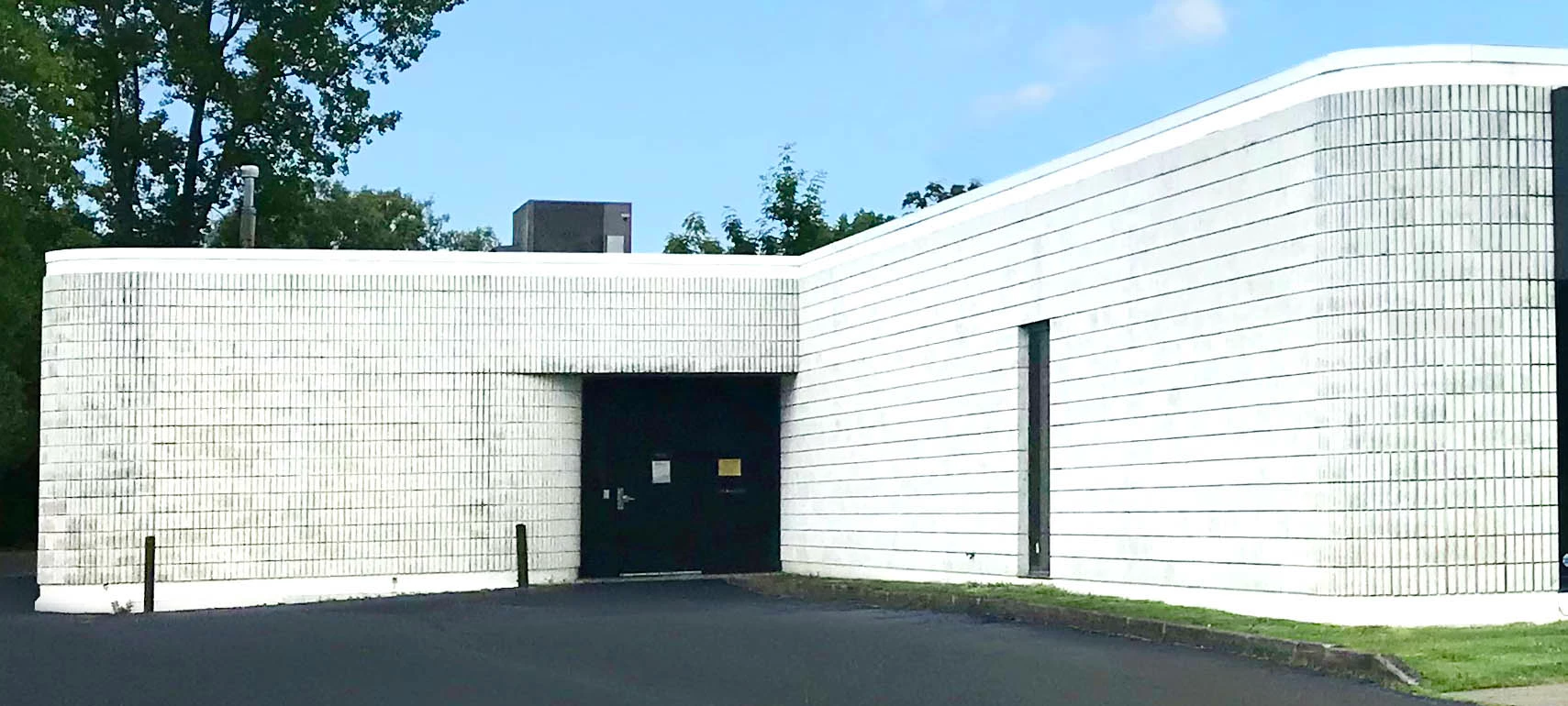
Thanks for any help with this.

{Thread renamed by moderator}

    2 답변

    Legend
    July 3, 2019

    Look up frequency separation. This image is a prime candidate for editing after separation.

    Inspiring
    July 3, 2019

    Thanks for your response. I've had a quick look into frequency separation. I'm not quite sure what this technique gains me.

    Instead of removing the dark dirty spots from the plain ol' photo, I'm removing the dark dirty spots from the high frequency layer.

    Seems like, one way or the other, I'm stuck with the large task of editing that dirty brick texture.

    Legend
    July 3, 2019

    Try the low frequency layer.

    Sahil.Chawla
    Adobe Employee
    Adobe Employee
    July 3, 2019

    Hi there,

    As you're looking to remove stains from the wall, you can either select the wall using the Pen Tool then use Curves to enhance the shadows and highlights to make the stains fade away.

    OR

    Create your own white wall using this guide: https://photoshopcafe.com/tutorials/brick/brick.htm

    Please let us know how it goes.
    Regards,
    Sahil