
shawnc58192803
Participant
December 26, 2019
Answered

Render Lighting Effects not working?

  • December 26, 2019
  • 3 replies
  • 55946 views

I have been trying to add a lighting effect to an image, but whenever I go to filters>render>lightingeffects it pulls up a black screen. I've found that turning up the ambience lets me at least see the image, but beyond that nothing works. All the other sliders seem to have zero effect on the image. I've updated by graphics card, made sure I was working in 8 bit channel and RGB, I've even ticked the legacy compositing box. I'm using windows. I've been searching all night for answers and cannot find any. Is there anything that I'm missing? Is anyone else experiencing this issue? Please help!
This topic has been closed for replies.
Correct answer gener7

Hold down the Alt key in the Lighting effects dialog and you will see the Cancel button change to Reset. Click on Reset and restart Ps for good measure.


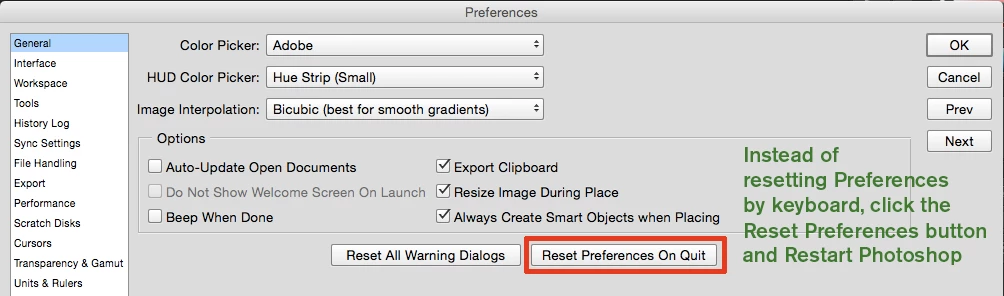
If that does not work, Reset Photoshop Preferences as shown below.

3 replies

Participant
November 2, 2021

Lighting effects has become very buggy. It works on my MacBook, but not on my iMac. I've tried all of the measures detailed in various places in the Adobe Support Community, and have gone through lengthly troubleshooting sessions with support reps, but continue to experience the same problems. The solution here is to ditch Photoshop, at least for lighting effects, and buy a copy of Affinity Photo, which costs $54.99 (period—no monthly payments) and has a lighting effects filter which is arguably better than Photoshop's, and which actually works.


Adobe recommends buying a suite of their new Substance 3D products, costing $19.99 and $39.99 per month, depending on what you need—they are not included in the Creative Cloud Suite, and no discount is offered for Creative Cloud users. It's unclear to me whether those products even permit you to apply lighting effects to a 2D image. 


Adobe is a monopoly, and behaves accordingly.

Participant
March 17, 2022

Lighting effects have completely stopped working for me, which really sucks. I used to use this tool a lot and now I feel completely inhibited in my work with this feature utterly useless. I have tried literally everything on here and absolutely NOTHING works whatsoever... I am at a loss. 

I hope this somehow gets fixed. At some point.  

(I'm on Windows 10, using the newest update of Photoshop cc2022)

Participating Frequently
May 21, 2022

I'm using a MacBook Pro with plenty of power etc and Photoshop CC2022 v23.3.2.  I thought it was me doing something wrong.  The Lighting Effects doesn't work at all.  Sometimes gives a blank white document.

davescm
Community Expert
Community Expert
December 26, 2019

Hi

If the reset described by gener7 does not work , then you might want to add your comments to the bug report here:

https://feedback.photoshop.com/photoshop_family/topics/photoshop-lighting-effects-does-not-work-directly-after-upgrade-in-ps-21-0-macos-and-windows

Dave

PECourtejoie
Community Expert
Community Expert
February 19, 2020

But I would also try to update to Ps 21.1, that fixes a problem with the lighting effects on canvas controls: https://helpx.adobe.com/photoshop/kb/fixed-issues.html#photoshop-desktop-fixed-issues

Christian~F
Participating Frequently
February 20, 2020

They have NOT fixed this issue with the 21.1 update.

gener7
Community Expert
gener7Community ExpertCorrect answer
Community Expert
December 26, 2019

Hold down the Alt key in the Lighting effects dialog and you will see the Cancel button change to Reset. Click on Reset and restart Ps for good measure.


If that does not work, Reset Photoshop Preferences as shown below.

shawnc58192803
Participant
December 26, 2019

Thanks so much, it's finally working!