
toddb61972624
Participant
June 22, 2017
Answered

Rendering 3D Text Makes a Line Show Up Behind Text

  • June 22, 2017
  • 5 replies
  • 1048 views

I have Photoshop CC 2017 and am a newer user. I have followed tutorials and created a 3D text image. Everything looks good on it, but I render the image to clean it up some and that is when a line shows up behind the text, which seems to be connecting all the letters together. Why is this happening and how do I get rid of the line?
This topic has been closed for replies.
Correct answer davescm

Yes of course

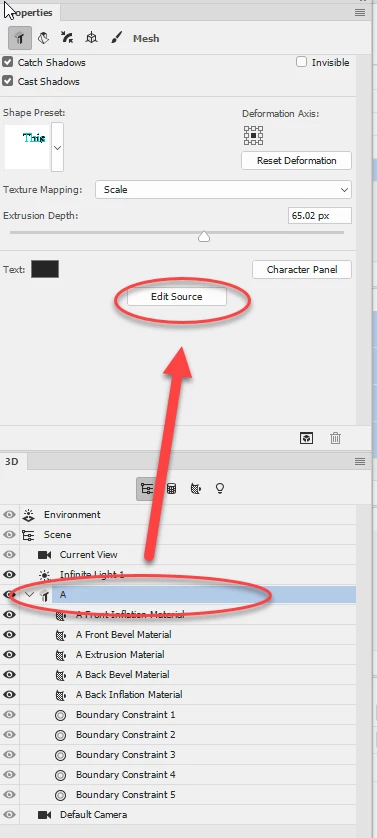
With the object selected in the 3D panel - go to the properties panel and click "Edit Source". This will open a psb file in the same way as opening a smart object.  Edit the text then close and save that psb file.

Your model will change. You will of course need to render again.

Dave

5 replies

toddb61972624
Participant
June 26, 2017

davescm​ That is it. Thanks again!

toddb61972624
Participant
June 26, 2017

davescm​ On a different note, do you know if there is an easy way of changing the text after creating the 3D text? Like, I would like the change "Soccer" to "Darts" without having to create it from scratch.

davescm
Community Expert
davescmCommunity ExpertCorrect answer
Community Expert
June 26, 2017

Yes of course

With the object selected in the 3D panel - go to the properties panel and click "Edit Source". This will open a psb file in the same way as opening a smart object.  Edit the text then close and save that psb file.

Your model will change. You will of course need to render again.

Dave

toddb61972624
Participant
June 26, 2017

davescm​ I did both of those suggestions and rendered again and no line! Thank you so much for your help.

toddb61972624
Participant
June 26, 2017

davescm​ I have attached a screenshot of the before rendering. Then I included a screenshot of the photo in the InDesign flyer I am creating to show the line behind the text. It appears the line is showing up before rendering, as that red line is there. That appears to be the issue here.

davescm
Community Expert
Community Expert
June 26, 2017

That red line prior to render is just the 0 axis marker on the groundplane.

I can't tell if your model is cutting through the groundplane.

Try these two things.

Select the model layer in the 3D panel and in the properties panel select co-ordinates (at the top) then click on "Move to Ground"

Also just to test, go to Environment in the 3D panel and in properties change Groundplane shadows Opacity to 0%

Dave

davescm
Community Expert
Community Expert
June 22, 2017

Can you show a screen shot of the rendered line and the full screen prior to render (this one with the move tool selected so we see the objects and groundplane)  It could be a few things but without seeing both those we will be guessing.

Dave