

Answered
Rendering Video in Photoshop has bad quality
Ukr / Rus / Eng
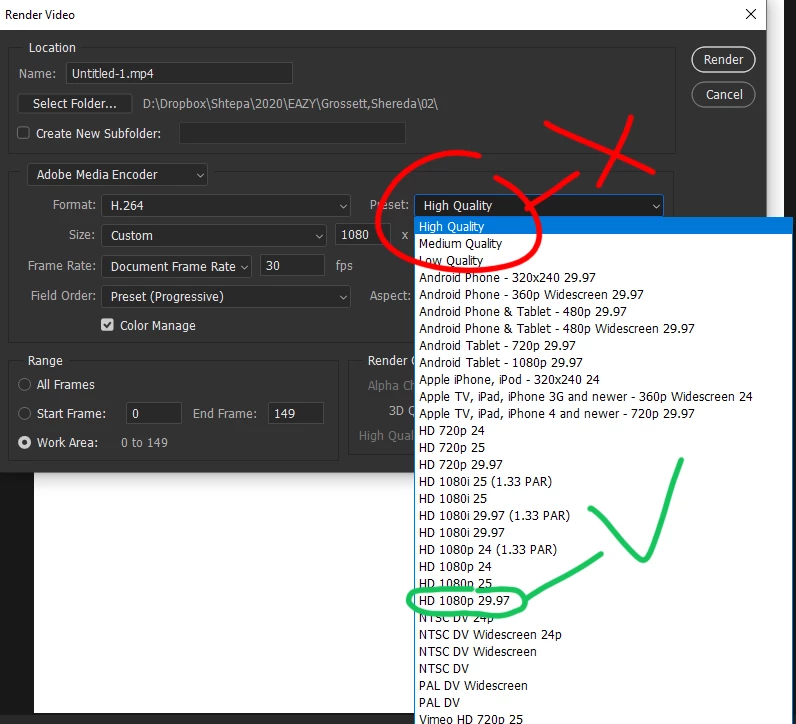
I am trying to render a video which consists of a still image and a video. Both of them are high quality and look good on preview. After combining them in photoshop and rendering to video, the video quality is horrible.
How can I keep the initial quality of the image and video and render to .mp4 format.
On another PC with similar performance video has good quality.
My PC
QuadCore Intel Core i7-7700HQ, 3600 MHz
nVIDIA GeForce GTX 1060 with Max-Q Design
16 RAM
In Photoshop CC 16, 17, 18 does not have this problem.
Please do not advise use After Effects or Premiere pro or some other video editor. I need to fix this problem in Photoshop.
Thanks!

 AdChoices