Known Participant
February 2, 2017
Resuelto

Replacing missing fonts withTypekit in Photoshop - Message is confusing
  • February 2, 2017
  • 1 respuesta
  • 1280 visualizaciones

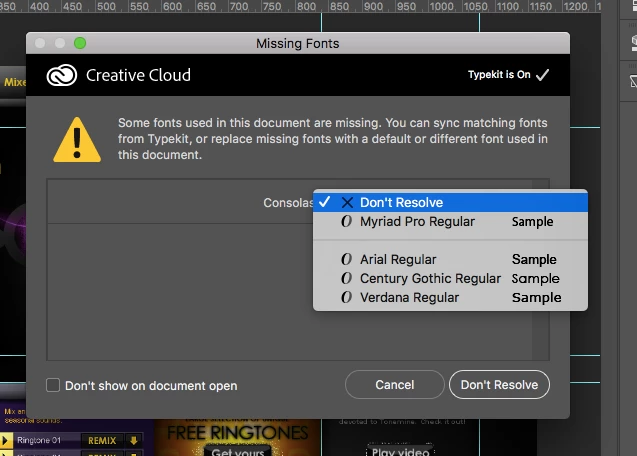
That's the alert I'm getting, and I find it confusing. It says I can sync matching fonts from Typekit, or replace missing fonts with a default or different font. I've selected Typekit to be "On", but don't see an option for it to automatically match the fonts from Typekit.

Instead, it's giving me the option to select from several fonts, which doesn't seem to make sense, as I'd like Typekit to pick the best match.

Este tema ha sido cerrado para respuestas.
Mejor respuesta de S_Gans

Unfortunately, Typekit doesn't have all fonts. So, if your image came in with a font that's not installed on your computer, it's giving you that option - IF the font is available in Typekit, and if Typekit doesn't have that font, it's offering alternatives (looks like it knows it's replacing a sans serif font, so it's offering you it's most popular). My recommendation would be to choose "Don't Resolve". Then, go to Typekit (Type Menu>Add Fonts from Typekit) and try to find a variation on the font, or an alternative font of your choosing with which to replace the missing font. Then, you can sync directly from Typekit to your computer and replace the text.

If it's a REALLY specific font, or something funky, I recommend getting the actual font from the person who created the document.

1 respuesta

S_Gans
Community Expert
S_GansCommunity ExpertRespuesta
Community Expert
February 2, 2017

Unfortunately, Typekit doesn't have all fonts. So, if your image came in with a font that's not installed on your computer, it's giving you that option - IF the font is available in Typekit, and if Typekit doesn't have that font, it's offering alternatives (looks like it knows it's replacing a sans serif font, so it's offering you it's most popular). My recommendation would be to choose "Don't Resolve". Then, go to Typekit (Type Menu>Add Fonts from Typekit) and try to find a variation on the font, or an alternative font of your choosing with which to replace the missing font. Then, you can sync directly from Typekit to your computer and replace the text.

If it's a REALLY specific font, or something funky, I recommend getting the actual font from the person who created the document.

Adobe Community Expert / Adobe Certified Instructor
_d_2Autor
Known Participant
February 3, 2017

Thank you very much. That's quite a helpful response. Appreciate your clarity and specific input.

Doug

S_Gans
Community Expert
Community Expert
February 3, 2017

Glad it helped!

Adobe Community Expert / Adobe Certified Instructor