



Exit
  • Global community
    • Language:
      • Deutsch
      • English
      • Español
      • Français
      • Português
  • 日本語コミュニティ
  • 한국 커뮤니티
3

Resize Smart Object via Selectable Interpolation Method Script

Community Expert ,
Sep 29, 2024 Sep 29, 2024

Inspiration for the following script from the following idea/feature request (currently locked):


It's a pretty basic v1.0 release at the moment. It only works to resize by %, however, the original and resized values in pixels are displayed. The resize anchor point is defaulted to the middle-centre (this can be changed in the code).
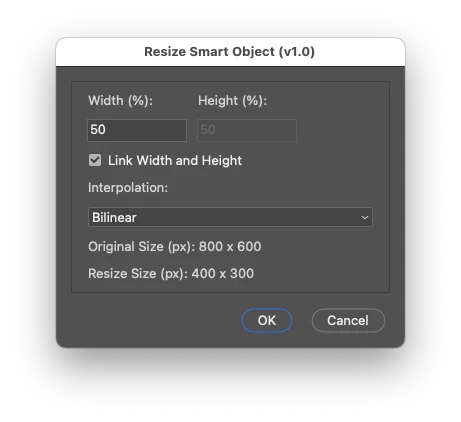
 
2024-09-30_00-03-40.png
/*
Resize Smart Object via Selectable Interpolation scriptUI GUI.jsx
v1.0 - 29th September 2024, Stephen Marsh
https://community.adobe.com/t5/photoshop-ecosystem-discussions/resize-smart-object-via-selectable-interpolation-method-script/m-p/14887508
Inspiration from:
https://community.adobe.com/t5/photoshop-ecosystem-ideas/p-ability-to-choose-a-smart-object-s-interpolation-method-2013/idi-p/12249327
Added a GUI as the original script had issues with the simple interactive transform in v2024 (25.12.0):
https://community.adobe.com/t5/photoshop-ecosystem-bugs/action-manager-transform-bug-dialogmodes-all-v25-12-0/idi-p/14884361
*/

#target photoshop

// Check if there's an active document
if (app.documents.length > 0) {

    // Get and set the ruler units
    var savedRuler = app.preferences.rulerUnits;
    app.preferences.rulerUnits = Units.PIXELS;

    var activeDocument = app.activeDocument;
    var activeLayer = activeDocument.activeLayer;

    // Check if the active layer is a smart object
    if (activeLayer.kind === LayerKind.SMARTOBJECT) {

        // Store the original visibility state of the layer
        var originalVisibility = activeLayer.visible;

        // Make the layer visible if it's currently invisible
        if (!originalVisibility) {
            activeLayer.visible = true;
        }

        // Get original layer bounds in pixels using UnitValue
        var originalBounds = activeLayer.bounds;
        var originalWidth = new UnitValue(originalBounds[2].value - originalBounds[0].value, "px"); // Right - Left
        var originalHeight = new UnitValue(originalBounds[1].value - originalBounds[3].value, "px"); // Top - Bottom

        // Ensure height is calculated correctly
        if (originalHeight.value < 0) {
            originalHeight = new UnitValue(-originalHeight.value, "px"); // Convert to positive if negative
        }

        // Store the original interpolation method
        var originalInterpolation = app.preferences.interpolation;

        // Create ScriptUI dialog
        var dialog = new Window("dialog", "Resize Smart Object (v1.0)");

        // Create a panel to group all content except buttons
        var contentPanel = dialog.add("panel");
        contentPanel.alignChildren = "left";

        // Create group for width and height fields
        var sizeGroup = contentPanel.add("group");
        sizeGroup.orientation = "row";

        // Width column
        var widthGroup = sizeGroup.add("group");
        widthGroup.orientation = "column";
        widthGroup.add("statictext", undefined, "Width (%):").alignment = "left";
        var widthInput = widthGroup.add("editnumber", undefined, "100");
        widthInput.characters = 10;

        // Height column
        var heightGroup = sizeGroup.add("group");
        heightGroup.orientation = "column";
        heightGroup.add("statictext", undefined, "Height (%):").alignment = "left";
        var heightInput = heightGroup.add("editnumber", undefined, "100");
        heightInput.characters = 10;

        // Checkbox for linking width and height
        var linkCheckbox = contentPanel.add("checkbox", undefined, "Link Width and Height");
        linkCheckbox.value = true; // Initially checked

        // Interpolation dropdown
        contentPanel.add("statictext", undefined, "Interpolation:").alignment = "left";
        var interpolationDropdown = contentPanel.add("dropdownlist", undefined, [
            "Bicubic (best for smooth gradients)", "Bicubic Automatic", "Bicubic Sharper (best for reduction)", "Bicubic Smoother (best for enlargement)",
            "Bilinear", "Nearest Neighbor (preserve hard edges)", "Preferences Setting"
        ]);
        interpolationDropdown.selection = 4; // Default to Bilinear

        // Original size display
        contentPanel.add("statictext", undefined, "Original Size (px): " + Math.round(originalWidth.value) + " x " + Math.round(originalHeight.value));

        // Resize size display
        var resizeDisplay = contentPanel.add("statictext", undefined, "Resize Size (px): 0 x 0");

        // Update the height when width is modified (and vice versa) if checkbox is checked
        function syncFields(source, target) {
            if (linkCheckbox.value) {
                target.text = source.text;
                updateResizeDisplay();
            }
        }

        function updateResizeDisplay() {
            var widthValue = parseFloat(widthInput.text);
            var heightValue = parseFloat(heightInput.text);
            var newWidth = new UnitValue((originalWidth.value * widthValue) / 100, "px");
            var newHeight = new UnitValue((originalHeight.value * heightValue) / 100, "px");
            resizeDisplay.text = "Resize Size (px): " + Math.round(newWidth.value) + " x " + Math.round(newHeight.value);
        }

        widthInput.onChange = function () {
            syncFields(widthInput, heightInput);
            updateResizeDisplay();
        };

        heightInput.onChange = function () {
            syncFields(heightInput, widthInput);
            updateResizeDisplay();
        };

        // Disable or enable the height field based on the checkbox state
        function updateHeightFieldState() {
            if (linkCheckbox.value) {
                heightInput.enabled = false; // Disable height input
                heightInput.text = widthInput.text; // Update visually
                updateResizeDisplay(); // Update resize display
            } else {
                heightInput.enabled = true; // Enable height input
            }
        }

        linkCheckbox.onClick = updateHeightFieldState;

        // Initial state check
        updateHeightFieldState();

        // Add OK and Cancel buttons
        var buttonGroup = dialog.add("group");
        buttonGroup.alignment = "right";

        var okButton = buttonGroup.add("button", undefined, "OK", {
            name: "ok"
        });
        var cancelButton = buttonGroup.add("button", undefined, "Cancel", {
            name: "cancel"
        });

        // Add button event logic
        cancelButton.onClick = function () {
            dialog.close();
        };

        okButton.onClick = function () {
            var widthValue = parseFloat(widthInput.text);
            var heightValue = parseFloat(heightInput.text);

            // Check if both width and height are 100
            if (widthValue >= 100 && heightValue >= 100) {
                alert("Both width and height cannot be 100% or greater. Please enter values less than 100%.");
                return; // Keep the dialog open
            }

            var interpolationMethod = interpolationDropdown.selection.text;

            // Set interpolation method based on selection
            switch (interpolationMethod) {
                case "Bicubic (best for smooth gradients)":
                    app.preferences.interpolation = ResampleMethod.BICUBIC;
                    break;
                case "Bicubic Automatic":
                    app.preferences.interpolation = ResampleMethod.BICUBICAUTOMATIC;
                    break;
                case "Bicubic Sharper (best for reduction)":
                    app.preferences.interpolation = ResampleMethod.BICUBICSHARPER;
                    break;
                case "Bicubic Smoother (best for enlargement)":
                    app.preferences.interpolation = ResampleMethod.BICUBICSMOOTHER;
                    break;
                case "Bilinear":
                    app.preferences.interpolation = ResampleMethod.BILINEAR;
                    break;
                case "Nearest Neighbor (preserve hard edges)":
                    app.preferences.interpolation = ResampleMethod.NEARESTNEIGHBOR;
                    break;
                case "Automatic":
                    app.preferences.interpolation = ResampleMethod.AUTOMATICINTERPOLATION;
                    break;
            }

            // Debugging alert before closing the dialog
            //alert("Before Closing: Interpolation Method = " + app.preferences.interpolation);

            // Resize the smart object layer
            /*
            AnchorPosition.TOPLEFT | AnchorPosition.TOPCENTER | AnchorPosition.TOPRIGHT | AnchorPosition.MIDDLELEFT | AnchorPosition.MIDDLECENTER | AnchorPosition.MIDDLERIGHT | AnchorPosition.BOTTOMLEFT | AnchorPosition.BOTTOMCENTER | AnchorPosition.BOTTOMRIGHT
            */
            activeLayer.resize(widthValue, heightValue, AnchorPosition.MIDDLECENTER);

            // Restore the original interpolation method
            app.preferences.interpolation = originalInterpolation;

            // Restore the original visibility of the layer
            activeLayer.visible = originalVisibility;

            dialog.close();
        };

        // Debugging alert for interpolation method before showing the dialog
        //alert("Before Dialog: Interpolation Method = " + app.preferences.interpolation);

        // Show the dialog
        dialog.center();
        dialog.show();

        // Debugging alert after closing the dialog, show the current interpolation method
        //alert("After Dialog: Interpolation Method = " + app.preferences.interpolation);

        // Restore the ruler units
        app.preferences.rulerUnits = savedRuler;

    } else {
        alert("The active layer is not a Smart Object...");
    }
} else {
    alert("A document must be open to run this script!");
}


https://prepression.blogspot.com/2017/11/downloading-and-installing-adobe-scripts.html


TOPICS
Actions and scripting , macOS , Windows
576
Translate
Report
Community guidelines
Be kind and respectful, give credit to the original source of content, and search for duplicates before posting. Learn more
community guidelines
Adobe
Community Expert ,
Sep 30, 2024 Sep 30, 2024

Nice approach! 

Translate
Report
Community guidelines
Be kind and respectful, give credit to the original source of content, and search for duplicates before posting. Learn more
community guidelines
Community Expert ,
Sep 30, 2024 Sep 30, 2024

This 1.1 version adds a dropdown to select the anchor point, rather than having it hard coded.

Updated to v1.2 for interpolation menu bugfix


Resize Smart Object v1-1.png


/*
Resize Smart Object via Selectable Interpolation scriptUI GUI.jsx
v1.0 - 29th September 2024, Stephen Marsh
v1.1 - 30th September 2024, Added a dropdown to select the resize anchor point
v1.2 - 26th April 2025, Bugfix on certain interpolation method selections
https://community.adobe.com/t5/photoshop-ecosystem-discussions/resize-smart-object-via-selectable-interpolation-method-script/m-p/14887508
Inspiration from:
https://community.adobe.com/t5/photoshop-ecosystem-ideas/p-ability-to-choose-a-smart-object-s-interpolation-method-2013/idi-p/12249327
Added a GUI as the original script had issues with the simple interactive transform in v2024 (25.12.0):
https://community.adobe.com/t5/photoshop-ecosystem-bugs/action-manager-transform-bug-dialogmodes-all-v25-12-0/idi-p/14884361
*/

#target photoshop

// Check if there's an active document
if (app.documents.length > 0) {

    // Get and set the ruler units
    var savedRuler = app.preferences.rulerUnits;
    app.preferences.rulerUnits = Units.PIXELS;

    var activeDocument = app.activeDocument;
    var activeLayer = activeDocument.activeLayer;

    // Check if the active layer is a smart object
    if (activeLayer.kind === LayerKind.SMARTOBJECT) {

        // Store the original visibility state of the layer
        var originalVisibility = activeLayer.visible;

        // Make the layer visible if it's currently invisible
        if (!originalVisibility) {
            activeLayer.visible = true;
        }

        // Get original layer bounds in pixels using UnitValue
        var originalBounds = activeLayer.bounds;
        var originalWidth = new UnitValue(originalBounds[2].value - originalBounds[0].value, "px"); // Right - Left
        var originalHeight = new UnitValue(originalBounds[1].value - originalBounds[3].value, "px"); // Top - Bottom

        // Ensure height is calculated correctly
        if (originalHeight.value < 0) {
            originalHeight = new UnitValue(-originalHeight.value, "px"); // Convert to positive if negative
        }

        // Store the original interpolation method
        var originalInterpolation = app.preferences.interpolation;

        // Create ScriptUI dialog
        var dialog = new Window("dialog", "Resize Smart Object (v1.2)");

        // Create a panel to group all content except buttons
        var contentPanel = dialog.add("panel");
        contentPanel.alignChildren = "left";

        // Create group for width and height fields
        var sizeGroup = contentPanel.add("group");
        sizeGroup.orientation = "row";

        // Width column
        var widthGroup = sizeGroup.add("group");
        widthGroup.orientation = "column";
        widthGroup.add("statictext", undefined, "Width (%):").alignment = "left";
        var widthInput = widthGroup.add("editnumber", undefined, "100");
        widthInput.characters = 10;

        // Height column
        var heightGroup = sizeGroup.add("group");
        heightGroup.orientation = "column";
        heightGroup.add("statictext", undefined, "Height (%):").alignment = "left";
        var heightInput = heightGroup.add("editnumber", undefined, "100");
        heightInput.characters = 10;

        // Checkbox for linking width and height
        var linkCheckbox = contentPanel.add("checkbox", undefined, "Link Width and Height");
        linkCheckbox.value = true; // Initially checked

        // Interpolation dropdown
        contentPanel.add("statictext", undefined, "Interpolation:").alignment = "left";
        var interpolationDropdown = contentPanel.add("dropdownlist", undefined, [
            "Bicubic (best for smooth gradients)", "Bicubic Automatic", "Bicubic Sharper (best for reduction)", "Bicubic Smoother (best for enlargement)",
            "Bilinear", "Nearest Neighbor (preserve hard edges)", "Preferences Setting"
        ]);
        interpolationDropdown.selection = 4; // Default to Bilinear

        // Anchor Point dropdown
        contentPanel.add("statictext", undefined, "Anchor Point:").alignment = "left";
        var anchorDropdown = contentPanel.add("dropdownlist", undefined, [
            "Top Left", "Top Center", "Top Right",
            "Middle Left", "Middle Center", "Middle Right",
            "Bottom Left", "Bottom Center", "Bottom Right"
        ]);
        anchorDropdown.selection = 4; // Default to Middle Center

        // Original size display
        contentPanel.add("statictext", undefined, "Original Size (px): " + Math.round(originalWidth.value) + " x " + Math.round(originalHeight.value));

        // Resize size display
        var resizeDisplay = contentPanel.add("statictext", undefined, "Resize Size (px): 0 x 0");

        // Update the height when width is modified (and vice versa) if checkbox is checked
        function syncFields(source, target) {
            if (linkCheckbox.value) {
                target.text = source.text;
                updateResizeDisplay();
            }
        }

        function updateResizeDisplay() {
            var widthValue = parseFloat(widthInput.text);
            var heightValue = parseFloat(heightInput.text);
            var newWidth = new UnitValue((originalWidth.value * widthValue) / 100, "px");
            var newHeight = new UnitValue((originalHeight.value * heightValue) / 100, "px");
            resizeDisplay.text = "Resize Size (px): " + Math.round(newWidth.value) + " x " + Math.round(newHeight.value);
        }

        widthInput.onChange = function () {
            syncFields(widthInput, heightInput);
            updateResizeDisplay();
        };

        heightInput.onChange = function () {
            syncFields(heightInput, widthInput);
            updateResizeDisplay();
        };

        // Disable or enable the height field based on the checkbox state
        function updateHeightFieldState() {
            if (linkCheckbox.value) {
                heightInput.enabled = false; // Disable height input
                heightInput.text = widthInput.text; // Update visually
                updateResizeDisplay(); // Update resize display
            } else {
                heightInput.enabled = true; // Enable height input
            }
        }

        linkCheckbox.onClick = updateHeightFieldState;

        // Initial state check
        updateHeightFieldState();

        // Add OK and Cancel buttons
        var buttonGroup = dialog.add("group");
        buttonGroup.alignment = "right";

        var cancelButton = buttonGroup.add("button", undefined, "Cancel", {
            name: "cancel"
        });

        var okButton = buttonGroup.add("button", undefined, "OK", {
            name: "ok"
        });

        // Add button event logic
        cancelButton.onClick = function () {
            dialog.close();
        };

        okButton.onClick = function () {
            var widthValue = parseFloat(widthInput.text);
            var heightValue = parseFloat(heightInput.text);

            // Check if both width and height are 100
            if (widthValue >= 100 && heightValue >= 100) {
                alert("Both width and height cannot be 100% or greater. Please enter values less than 100%.");
                return; // Keep the dialog open
            }

            var interpolationMethod = interpolationDropdown.selection.text;

            // Set interpolation method based on selection
            switch (interpolationMethod) {
                case "Bicubic (best for smooth gradients)":
                    app.preferences.interpolation = ResampleMethod.BICUBIC;
                    break;
                case "Bicubic Automatic":
                    app.preferences.interpolation = ResampleMethod.BICUBICAUTOMATIC;
                    break;
                case "Bicubic Sharper (best for reduction)":
                    app.preferences.interpolation = ResampleMethod.BICUBICSHARPER;
                    break;
                case "Bicubic Smoother (best for enlargement)":
                    app.preferences.interpolation = ResampleMethod.BICUBICSMOOTHER;
                    break;
                case "Bilinear":
                    app.preferences.interpolation = ResampleMethod.BILINEAR;
                    break;
                case "Nearest Neighbor (preserve hard edges)":
                    app.preferences.interpolation = ResampleMethod.NEARESTNEIGHBOR;
                    break;
                case "Automatic":
                    app.preferences.interpolation = ResampleMethod.AUTOMATICINTERPOLATION;
                    break;
            }

            // Select anchor point
            var anchorPoint = anchorDropdown.selection.index;
            var anchorPosition;
            switch (anchorPoint) {
                case 0:
                    anchorPosition = AnchorPosition.TOPLEFT;
                    break;
                case 1:
                    anchorPosition = AnchorPosition.TOPCENTER;
                    break;
                case 2:
                    anchorPosition = AnchorPosition.TOPRIGHT;
                    break;
                case 3:
                    anchorPosition = AnchorPosition.MIDDLELEFT;
                    break;
                case 4:
                    anchorPosition = AnchorPosition.MIDDLECENTER;
                    break;
                case 5:
                    anchorPosition = AnchorPosition.MIDDLERIGHT;
                    break;
                case 6:
                    anchorPosition = AnchorPosition.BOTTOMLEFT;
                    break;
                case 7:
                    anchorPosition = AnchorPosition.BOTTOMCENTER;
                    break;
                case 8:
                    anchorPosition = AnchorPosition.BOTTOMRIGHT;
                    break;
            }

            // Resize the smart object layer
            activeLayer.resize(widthValue, heightValue, anchorPosition);

            // Restore the original interpolation method
            app.preferences.interpolation = originalInterpolation;

            // Restore the original visibility of the layer
            activeLayer.visible = originalVisibility;

            dialog.close();
        };

        // Show the dialog
        dialog.center();
        dialog.show();

        // Restore the ruler units
        app.preferences.rulerUnits = savedRuler;

    } else {
        alert("The active layer is not a Smart Object...");
    }
} else {
    alert("A document must be open to run this script!");
}


  1. Copy the code text to the clipboard
  2. Open a new blank file in a plain-text editor (not in a word processor)
  3. Paste the code in
  4. Save as a plain text format file – .txt
  5. Rename the saved file extension from .txt to .jsx
  6. Install or browse to the .jsx file to run (see below)
    https://prepression.blogspot.com/2017/11/downloading-and-installing-adobe-scripts.html 
Translate
Report
Community guidelines
Be kind and respectful, give credit to the original source of content, and search for duplicates before posting. Learn more
community guidelines
Contributor ,
Sep 30, 2024 Sep 30, 2024
LATEST

Hi

This is great, really useful i think.

One thing that would be useful though is if applying a second time if the script could read the original size from the smart layer scale rather than assuming as soon at the script it run it hasn't been scaled already. To be honest the current function could also be useful so maybe a tick box taking original scale from current layer would be better

Translate
Report
Community guidelines
Be kind and respectful, give credit to the original source of content, and search for duplicates before posting. Learn more
community guidelines