
Known Participant
March 31, 2019
Answered

Resizing a US Letter PS doc to an A4, pixel ? & bleed ?

  • March 31, 2019
  • 5 replies
  • 12396 views

Hi, I have a template for a certificae that is

Specification

  • CMYK Color Mode
  • 300 DPI Resolution
  • Size 11x8.5 0.25 bleed

So one question I have is I have searched for px size of a letter paper & it's:

"Since every inch contains 300 pixels, that means that your 8.5”x11” file should be:2550 pixels wide (300 pixels/inch * 8.5 inches) and. 3300 pixels tall (300 pixels/inch * 11 inches"

so 2550 x 3300 exactly is US letter size in pixels.

What puzzles me is when I look in the image size dialog box for my Letter template it's 8573 × 6668 px at 300 dpi?

There is an extra 1/4 " each way but no way that could make so many more pixels. What am I missing?
When I create a new PS doc. that is 11.25 x 8.75 the pixels are 3375 x 2625
So this is a mystery to me... Help?

The other question I have is if I resize the edited template down to fit A4 paper how to do it best.
I was thinking to resize the height down to a bit bigger than what I searched is the pixel size of A4 paper which is 3508 x 2480
I just did that to my template & I get a file 3189 x 2480

Then just copy & paste it into a new doc that is a bit bigger than 3508 x 2480' like a quarter of an inch more each way as the original template is for the bleed.

Does this sound good? I seem to be loosing a ton of pixels this way but I can't see why I have so many in the 1st place.

Thanks for any help.
I don't know anything about bleed, does that amount depend on the printer? So same bleed is needed for desktop printer as local print shop store?
Thanks!
This topic has been closed for replies.
Correct answer rob day

I don't know anything about bleed, does that amount depend on the printer? So same bleed is needed for desktop printer as local print shop store?

Bleed is the extra amount added to a page that will get trimmed off during finishing. It’s impossible to trim a stack of sheets exactly on the trim line, so if an image fills the page it needs to extend beyond the trim to allow for the inaccuracy.

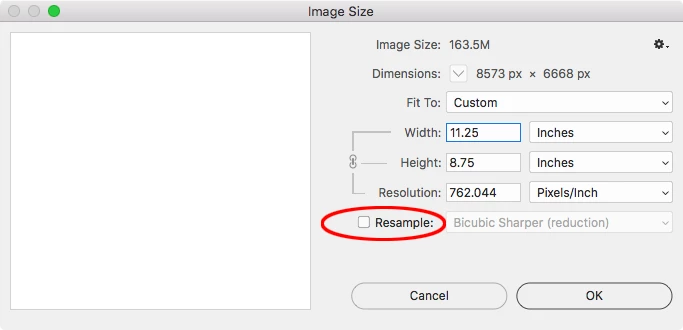
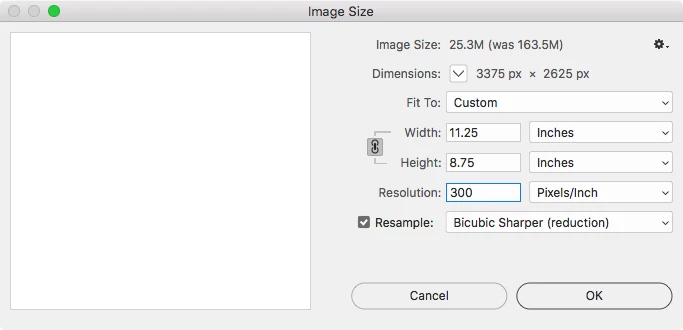
The Image Size dialog lets you resize the output dimension:

JJMack​ is showing the Image Size set to resize–Resample is unchecked. That constrains the Resolution to the output size (reduce the Width and Height and the pixels get smaller). With the correct Width and Height set, you can check Resample and set the Resolution to 300ppi (pixels get removed)

5 replies

tridoshaAuthor
Known Participant
April 5, 2019

Thanks all, I learned a lot here.

Best wishes

tridoshaAuthor
Known Participant
April 1, 2019

I'm wondering if I resize down to a file size that Photopea can manage then save to maybe a .tif that might be better quality that the pdf. it would mean a bigger file, Maybe a png would be good too.
I'll test tomorrow & see what I can do.
could always WeSendit to the people rather than email a file to print.

Thanks for any thought

D Fosse
Community Expert
Community Expert
April 1, 2019

I'll try once more:

You have pixels per centimeter, not pixels per inch.

rob day
Community Expert
Community Expert
March 31, 2019

The other question I have is if I resize the edited template down to fit A4 paper how to do it best.

I was thinking to resize the height down to a bit bigger than what I searched is the pixel size of A4 paper which is 3508 x 2480

A4 has a slightly different aspect ratio, so you would use Canvas Size to change the output dimensions, so A4 plus .125" bleed trims the Height and expands the Width:

tridoshaAuthor
Known Participant
March 31, 2019

Thanks Rob, I realized changing the canvas size is the way to go once I started on it.
I worked out 1/4" at  300 dpi must be 75 px
So I created the canvas to be 2555 x 3383 & it looks OK.
I'm asking a friend in Europe to try printing a pdf version of it & see how it prints.

If they use A4 paper it prob. won't need to be trimed to fit an A4 frame surely.

I'll look at Macs kind reply about loosing all those pixlels a bit later. I really want to understand that
I did resize down & checked that resample box.
The template needs to be customized with a new name every time someone completes a course & they don't have PS & would use Photopea. I found the browser crashed trying to edit the original template which was over 200 MB but it will edit the resized down file OK. So it's good I resample to loose pixels as long as it prints OK

Thanks for your help

D Fosse
Community Expert
Community Expert
March 31, 2019

This all becomes much simpler if you read the "pixels per inch" unit literally. It means exactly what it says, no hidden meaning.

So you're on the right track. It's just a standard equation. Once you have any two, you can calculate the third. Or let Photoshop's Image Size do it for you.

rob day
Community Expert
rob dayCommunity ExpertCorrect answer
Community Expert
March 31, 2019

I don't know anything about bleed, does that amount depend on the printer? So same bleed is needed for desktop printer as local print shop store?

Bleed is the extra amount added to a page that will get trimmed off during finishing. It’s impossible to trim a stack of sheets exactly on the trim line, so if an image fills the page it needs to extend beyond the trim to allow for the inaccuracy.

The Image Size dialog lets you resize the output dimension:

JJMack​ is showing the Image Size set to resize–Resample is unchecked. That constrains the Resolution to the output size (reduce the Width and Height and the pixels get smaller). With the correct Width and Height set, you can check Resample and set the Resolution to 300ppi (pixels get removed)

tridoshaAuthor
Known Participant
April 1, 2019

Hi Rob, I didn't know pixels could get smaller, i thought a pixel is a pixel...
I thought they just got more dense.

I did check that resample box to spread the pixels out a bit so there are less of them but I thought 300 dpi would still be good to print. So it's interesting you mention it's not always.
I made the height what I wanted in pixels like this screenshot:

& while it was resizing I got this progress bar:

Which surprised me as I liked the colors I had.

rob day
Community Expert
Community Expert
April 1, 2019

Hi Rob, I didn't know pixels could get smaller, i thought a pixel is a pixel...

At 300 pixels per inch a pixel will measure 1/300", at 72 ppi a pixel would be more than 4x larger at 1/72".

And, yes don’t use Pixels for Width and Height, or Pixels/Centimeter for Resolution. Set the desired output dimensions in Inches (via the W&H dropdowns), and the desired output Resolution as Pixels/Inch.

Because you are using Pixels/Centimeter, the image size setup you are showing in #11 would output at 10.95 x 8.52 centimeters, which is 4.311 x 3.353 inches.

JJMack
Community Expert
Community Expert
March 31, 2019

tridosha  wrote

What puzzles me is when I look in the image size dialog box for my Letter template it's 8573 × 6668 px at 300 dpi?

What does the Image Size Dialog and Image window rulers show your template size in inches is. Should be

at a 762.044 DPI it would be 11,25 x 7.75

JJMack
tridoshaAuthor
Known Participant
April 1, 2019

Thanks JJ, my template image size box shows it's letter size plus the 1/4" bleed extra at 300 dpi, pls see screenshot:

D Fosse
Community Expert
Community Expert
April 1, 2019

You have pixels per centimeter, not pixels per inch!