

wong168
Known Participant
October 14, 2018
Question

resolution showing in px per inch and not px per cm in action item

  • October 14, 2018
  • 4 replies
  • 2784 views

hi,

i have jpg files originally set the resolution in 72 px per cm, but lately i found out the jpg files were changed to 762 px per inch for unknown reason...

i tried to change the jpg files back to 72 px per cm by creating an action to change the image size by using an action item...
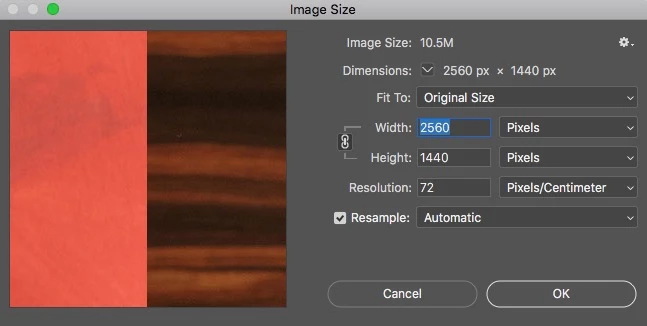
after recording the action, i checked on the action item details and found out the resolution as indicated in 182.88 px per inch and not as 72 px per cm...
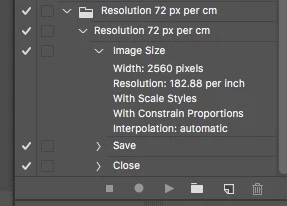
i understood 182.88 px per inch is the same as 72 px per cm, one in imperial system and one in metric system...

i did set the preference units in metric in the preference of units and ruler ... did i missed other settings so i can have all display in metric system...

if not, why the actions item is not recorded as my setting in 70 px per cm...

any comment and solution?...

cheers,

    This topic has been closed for replies.

    4 replies

    wong168
    wong168Author
    Known Participant
    October 15, 2018

    i am all confused on the options to select in recording & saving an action with different results...

    if i do this manually (one file at a time) in setting the resolution with 72 px per cm, i will get the resolution with 72 px per cm on my jpg file with no problem ... the issue happened if i recorded as action and run a batch of files to save time ... this is why i do not understand and confused ... do i have to do it one file at a time in order to avoid this issue? ... it will take me months to finish all the files....

    cheers,

    Stephen Marsh
    Community Expert
    Community Expert
    October 15, 2018

    Using CC2018, I just changed the resolution of a test image to 72ppcm, then used Save As and then checked with ExifTool:

    [IFD0]          XResolution                    : 72

    [IFD0]          YResolution                    : 72

    [IFD0]          ResolutionUnit                 : cm

    [IFD1]          XResolution                    : 72

    [IFD1]          YResolution                    : 72

    [IFD1]          ResolutionUnit                 : inches

    [Photoshop]    XResolution                     : 182.88

    [Photoshop]    DisplayedUnitsX                 : cm

    [Photoshop]    YResolution                     : 182.88

    [Photoshop]    DisplayedUnitsY                 : cm

    Stephen Marsh
    Community Expert
    Community Expert
    October 15, 2018

    Stephen_A_Marsh  wrote

    I believe that you are on a “wild goose chase”

    That's what I think too. I believe the OP assigns some significance to the way resolution is expressed, which it doesn't have. It makes no difference to the final result.


    Agreed, however sometimes one has to go through the exercise of fruitlessly learning/seeing for themselves, rather than accepting what others are saying.

    Stephen Marsh
    Community Expert
    Community Expert
    October 14, 2018

    I first set my ruler units to CM, then recorded changing the PPCM value without resampling:

    However if you then go into prefs and change the ruler units to Inches, you can see the PPCM value in the action panel dynamically change to reflect the new ruler units of PPI.

    I saved the action file and then used xtools to convert the action to both a .jsx and .xml file and the actual resolution was reported as 304.800003051758 ppi – which lines up with D Fosse’s statement in post #3.

    So it looks to be just how things work, just as points is the internal unit used for PDF, independent of whether one uses inches or metric.

    wong168
    wong168Author
    Known Participant
    October 14, 2018

    why photoshop provided the options to pick and its internal calculations are ppi only? ... why give users option? ... is it something strange? why not just have ONLY unit measurement in inch ... NO OPTION? ... why?...

    D Fosse
    Community Expert
    Community Expert
    October 14, 2018

    I'd recommend using pixels per inch even if you're in a "metric" country (like me). It's the universal standard used everywhere, and introducing pixels per cm will most likely just cause confusion.

    wong168
    wong168Author
    Known Participant
    October 14, 2018

    my question is why the adobe photoshop action is not recorded as px per cm? ... is it true that adobe photoshop actions limited to only using px per inch? ... if yes, why adobe photoshop allow user to set the preference either in inch or cm? ...

    cheers,

    D Fosse
    Community Expert
    Community Expert
    October 14, 2018

    I think Photoshop's internal calculations are always ppi.

    Why is it important? You get exactly the resolution you need either way, this is just notation.