
Inspiring
February 24, 2025
Answered

Restrict crop to image

  • February 24, 2025
  • 3 replies
  • 391 views

I have an image I want to crop to a specific dimension. In my case, I want to keep the crop aligned to the right side of the image with the top and bottom edges also aligned. Is there a way to do this in Photoshop? Note I'm not changing the height, but moving the crop rectangle to the far right.

Thank you

David
Correct answer Bojan Živković11378569

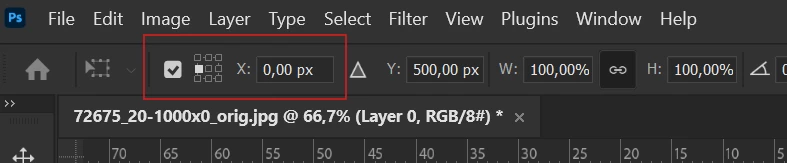
Depending on what you are looking for, there can be multiple solutions. If you want to move the crop rectangle and ensure it aligns with the edge, try placing a guide at the left edge, the crop rectangle should stick to it when moved freely. Another option mentioned is using selection. There is a setting in the options bar to define selection dimensions in advance before drawing or creating it. Later, use free transform selection to move it to the edge, using the guide as an anchor, or change the anchor to the left edge and then type 0 (zero) for the X position (screenshot below).


3 replies

Bojan Živković11378569
Community Expert
Community Expert
February 24, 2025

Depending on what you are looking for, there can be multiple solutions. If you want to move the crop rectangle and ensure it aligns with the edge, try placing a guide at the left edge, the crop rectangle should stick to it when moved freely. Another option mentioned is using selection. There is a setting in the options bar to define selection dimensions in advance before drawing or creating it. Later, use free transform selection to move it to the edge, using the guide as an anchor, or change the anchor to the left edge and then type 0 (zero) for the X position (screenshot below).


DaBrownCOAuthor
Inspiring
February 25, 2025

Thanks Bojan. I did end up using guides, which helped. I still wasn't able to line things up exactly, but I worked things out.

I had created a jpeg previously from a crop of the main image, but had failed to save the cropped image as a tif so that's what I was wanting to do. Whether that was necessary only time will tell. I took the dimensions off that jpeg and that may have been part of my problem too.

Stephen Marsh
Community Expert
Community Expert
February 24, 2025

In addition to setting the crop options and moving the crop to the right canvas edge, another option is to use the Image > Canvas Size command with the anchor set the the right centre. One can also create and transform a selection to the desired size and position and use Image > Crop.

Trevor.Dennis
Community Expert
Community Expert
February 24, 2025