
Participant
June 28, 2024
Question

RGB JPGs open as CMYK in Photoshop

  • June 28, 2024
  • 4 replies
  • 937 views

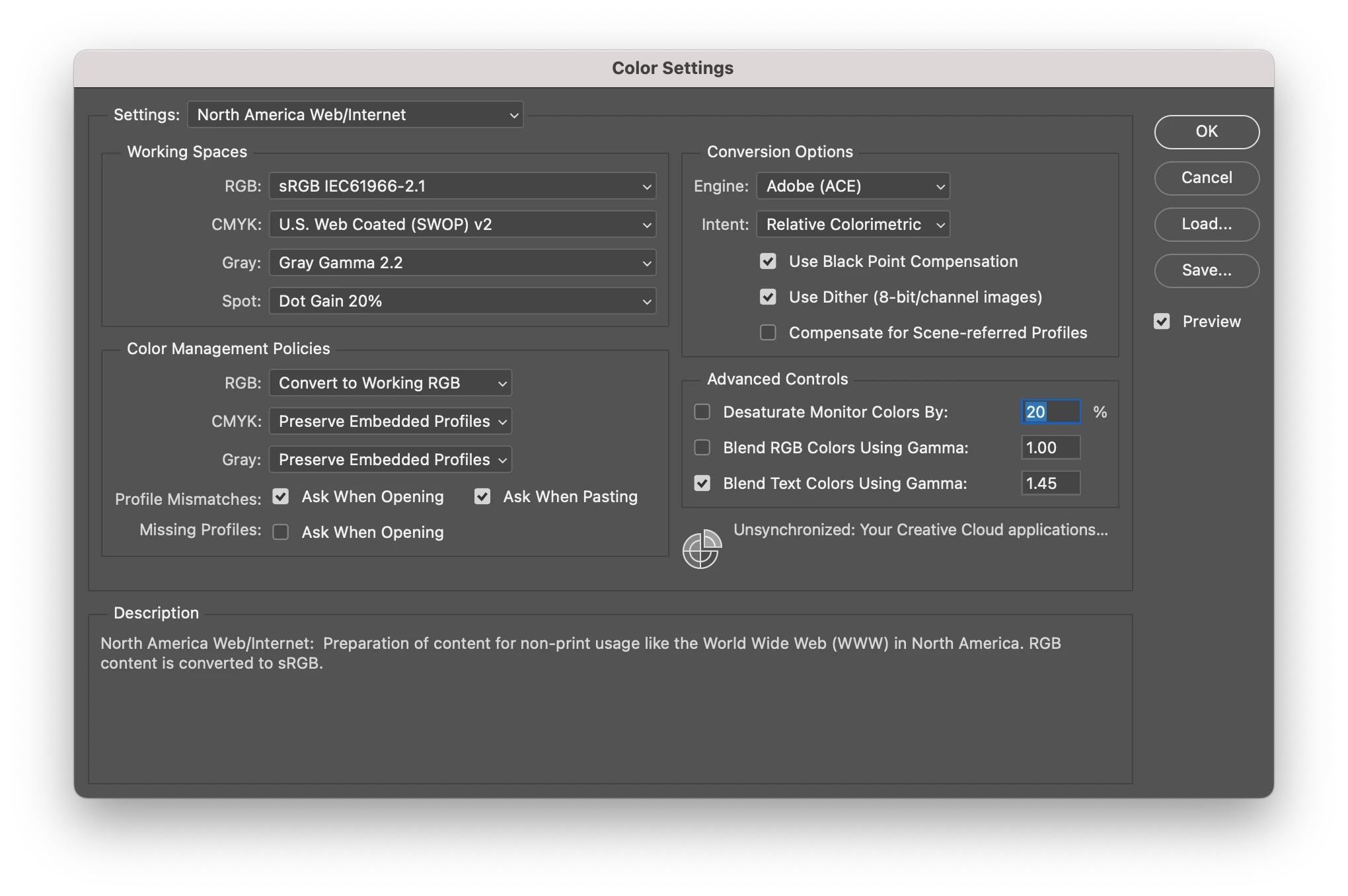
Why do my RGB JPGs convert to CMYK images when opened in Photoshop [2024]? Some are images that were downloaded from my iphone while others are images from my colleagues that were specifically created as RGB. Everything I open turns into CMYK! Is there some setting I have accidentally changed? I even tried reverting back to older versions of PS [2022], which didn't help. As you can see, under Color Settings > Color Management Policies, I have 'Preserve Embedded Profiles' checked. [macOS Sonoma 14.5]
This topic has been closed for replies.

4 replies

rob day
Community Expert
Community Expert
June 29, 2024

Hi @meaganzmomma , Also, could you have Proof Colors turned on? The default Proof Setup is Working CMYK, so in that case the title bar would show (RGB/8/CMYK) and the appearance would be soft proofed in your US Web Coated (SWOP) Working Space


D Fosse
Community Expert
Community Expert
June 30, 2024

Yes, but proof doesn't turn on automatically. If you accidentally turn it on, it's off by the next file. It doesn't stick.


Again, this is the only reliable indicator:

Stephen Marsh
Community Expert
Community Expert
June 30, 2024
quote

Again, this is the only reliable indicator:


By @D Fosse


Or Image > Mode or Channels panel will unequivocally show RGB or CMYK.  :]

mglush
Community Expert
Community Expert
June 29, 2024

Hi!

Can you show us a screen shot of your window with all the panels that you are using, and especially the top with the document title information?

Also, have you checked if you have proof colors turned on in the Window menu?

Michelle

Stephen Marsh
Community Expert
Community Expert
June 28, 2024

Check > File > Scripts > Script Events Manager 


What is under the Image > Mode menu? What about the Channels panel?


Perhaps you are inadvertently softproofing?

D Fosse
Community Expert
Community Expert
June 28, 2024

There is nothing in Photoshop that is capable of automatically converting to a different mode. It simply can't happen. Where do you see it's converted to CMYK?


You do, however, have a setting that automatically converts to your working RGB.  That setting is risky and not recommended. It should be set to "preserve embedded profiles". That's the default, the safe setting, and the way modern color management is intended to work.


A profile conversion is potentially destructive, and should always be initiated as needed, on a case by case basis, never automatically.

NB, colourmanagement
Community Expert
Community Expert
June 30, 2024

@D Fosse Yep, same from a Mac users point of view, "There is nothing in Photoshop that is capable of automatically converting to a different mode. It simply can't happen"

@meaganzmomma what do you see in the small profile indicator window @D Fosse included a screenshot of? 


I hope this helps
neil barstow, colourmanagement net - adobe forum volunteer - co-author: 'getting colour right'
google me "neil barstow colourmanagement" for lots of free articles on colour management
Help others by clicking "Correct Answer" if the question is answered.
Found the answer elsewhere? Share it here. "Upvote" is for useful posts.

Stephen Marsh
Community Expert
Community Expert
July 8, 2024

@meaganzmomma 


Are you out there? The silence is deafening...