
Participant
December 1, 2017
Answered

Right click hold issue with Wacom pen (Win10)

  • December 1, 2017
  • 2 replies
  • 4518 views

Hello! Using Wacom Intuos Pro and Photoshop CC2018. Single right click is working normally, but holding does not. I'm used to adjusting brush size  holding Alt and right click + moving cursor, though on this new computer it does not work. The adjustment size circle does show up very briefly when single-rightclicked. Haven't touched any settings in Wacom interface/Photoshop. Otherwise tablet works fine. Thanks!
    This topic has been closed for replies.
    Correct answer JJMack

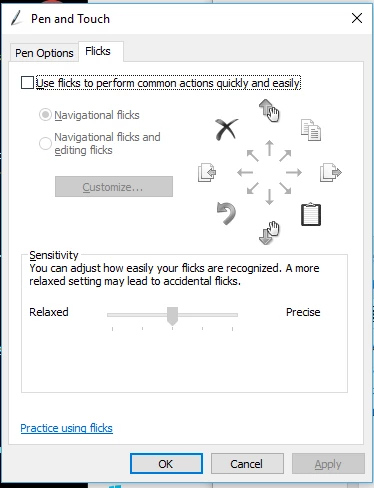
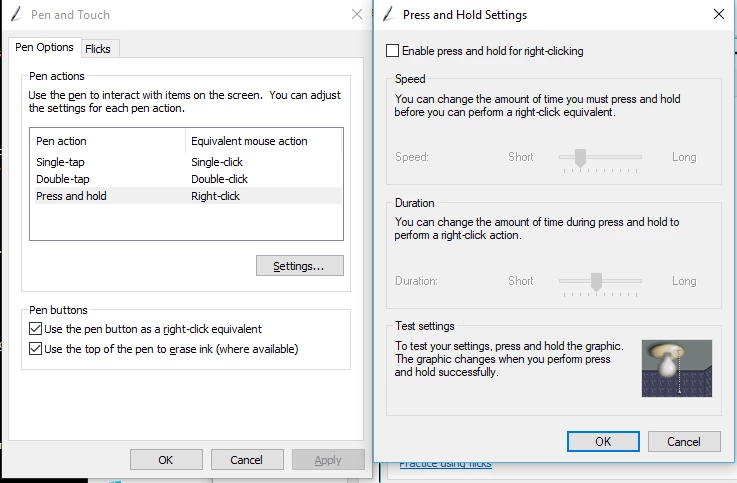
    Are you using Wondows or Mac.  I have not such problems on windows. There are issues posted about Alt keys function in CC 20918 should be fixed by first update to CC 2018.  You can aslo try usind wacon preferences to chsn POhoroshop botton pen button fro right click to left Alt+Right Click.  On Windows 10 I use Wibtods control panel and configured  pen and touch support. Disable flicks abd presss and hold.

    2 replies

    Participating Frequently
    September 5, 2024

    in 2024 we have the same problem.
    Adobe? When you finnaly fix this???
    It is such a paint to paint somehting in Substance painter. 
    So bad feeling with wacom pen and your app. Right click white circle always appears on the top!

    JJMack
    Community Expert
    JJMackCommunity ExpertCorrect answer
    Community Expert
    December 1, 2017

    Are you using Wondows or Mac.  I have not such problems on windows. There are issues posted about Alt keys function in CC 20918 should be fixed by first update to CC 2018.  You can aslo try usind wacon preferences to chsn POhoroshop botton pen button fro right click to left Alt+Right Click.  On Windows 10 I use Wibtods control panel and configured  pen and touch support. Disable flicks abd presss and hold.

    JJMack