October 7, 2023
Answered

Right click rasterize smart object isn't working anymore

  • October 7, 2023
  • 3 replies
  • 6481 views

Hello, 
The right click rasterize on smart object doesn't work anymore. I used to just slide a photo in photoshop tap it with my brush and transform it into a rasterized layer. 
If I tap with the brush now it automatically creates a new layer and right clicking on the Smart Object doesn't have any Rasterize options either, now instead I need to go to layer -> Rasterize -> Smart Object, which is a hugh inconvinience and takes a lot of time.

I figured this changed happened because of a new update, so is there any way to turn the old way back on? Or is there a faster way to rasterize a smart object instead of going through the layer menu every time?

Kind Regards,
René
Correct answer Abambo

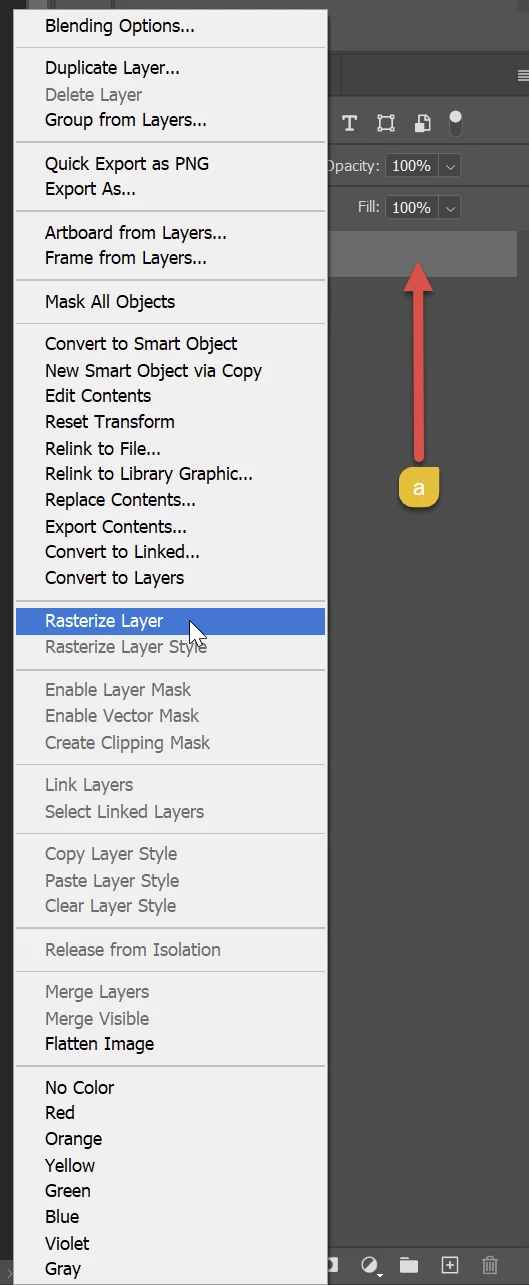
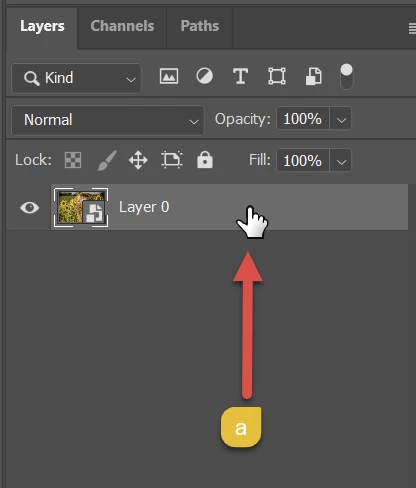
You need to right-click on the name part (a) of the layer.

By right-clicking on the image part, you get a different context menu.

3 replies

Participant
April 3, 2025

Why do these guys keep changing things... Pathetic. This is why I hate to Update. 

Mike_Gondek10189183
Community Expert
Community Expert
October 7, 2023

It would not make sense to brush onto a smart object and for it to rasterize that and as far back as 2020 that did not work.


As to why rasterize layer is not showing for you would need to see a screenshot to confirm you have the layer selected and see what is missing. Can you please post a screenshot like this?


October 7, 2023

Usually I take some quick pictures of my sketches and drag it into photoshop, which turns them into smart objects by default. With my cintiq I could simply tap the picture with a brush and get the option to rasterize it, allowing me to quickly cut parts of the page I don't need, and keep the parts that I wanted to use. But as of today it started to creates a new layer when I tapped the picture. I tried richt clicking on the layer but it gave me a different pop up window, I searched for 30min and still couldn't find where the rasterize layer option was (other than Layer - Rasterize -Smart Object). Just learned from Abambo here that I can right click the name of the layer to get the rasterize layer option.

Is it possible to disable the option where it automatically creates a new layer when I tap on a smart object with the brush tool? 
and would it be possible to turn on the rasterize layer pop up again instead of the automatic new layer when tapping? I think it works much faster than right clicking the name for every picture.

Abambo
Community Expert
Community Expert
October 7, 2023

If you do not need the smart layer, you should get your sketches as standard layers into Photoshop. What format are your sketches?

ABAMBO | Hard- and Software Engineer | Photographer
Abambo
Community Expert
AbamboCommunity ExpertCorrect answer
Community Expert
October 7, 2023

You need to right-click on the name part (a) of the layer.

By right-clicking on the image part, you get a different context menu.

ABAMBO | Hard- and Software Engineer | Photographer
October 7, 2023

Thank you! I think since I right clicked the layer which didn't give me the option to rasterize I didn't think about right clicking the name. I was so used to tapping the picture and it would just give me the option to rasterize that it caught me by surprise.