Known Participant
August 22, 2017
Answered

Rotating a line with an arrowhead?

  • August 22, 2017
  • 1 reply
  • 700 views

Hi,

I am using Photoshop 2017.1.1 Release.  I frequently use the Line tool and add arrowheads to either the Start or the End.  After drawing an Arrow in this way, I usually want to (1) move it to another location and/or (2) rotate it to change its orientation while keeping the overall shape and size of the arrow the same.

  • I am able to accomplish (1) by using the Path Selection tool to select and then drag my arrow to a new location.  When I do this, I get a message saying "This operation will turn a live shape into a regular path. Continue?".  If I choose to continue, I can drag the arrow wherever I want without changing its size or orientation.
  • I cannot figure out how to accomplish (2).  If anyone can tell me how to do this, I would greatly appreciate it.

Thanks in advance,
Paul

    This topic has been closed for replies.
    Correct answer davescm

    Hi

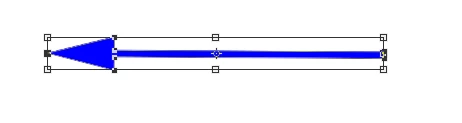
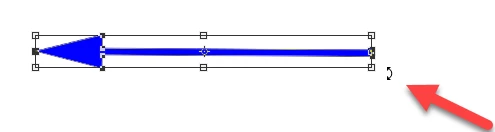
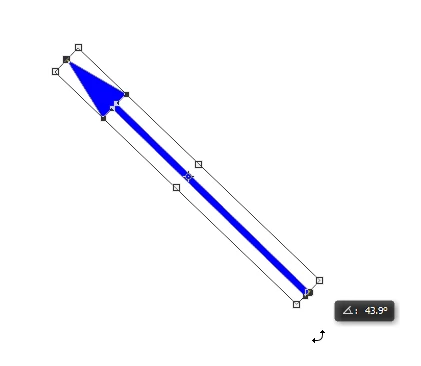
    Use Ctrl+T (Windows)  and when the bounding box appears put your cursor near a corner (not on the corner) so that a small curved arrow appears then click and drag to rotate.

    So arrow :

    Crtl+T :

    Hover cursor near corner

    Click and drag

    Enter

    I hope that helps

    Dave

    1 reply

    davescm
    Community Expert
    davescmCommunity ExpertCorrect answer
    Community Expert
    August 22, 2017

    Hi

    Use Ctrl+T (Windows)  and when the bounding box appears put your cursor near a corner (not on the corner) so that a small curved arrow appears then click and drag to rotate.

    So arrow :

    Crtl+T :

    Hover cursor near corner

    Click and drag

    Enter

    I hope that helps

    Dave

    Known Participant
    August 23, 2017

    Thank you Dave !  That was a big help !!