Participant
May 3, 2019
Answered

Rounded Corners to an Image

  • May 3, 2019
  • 2 replies
  • 56782 views

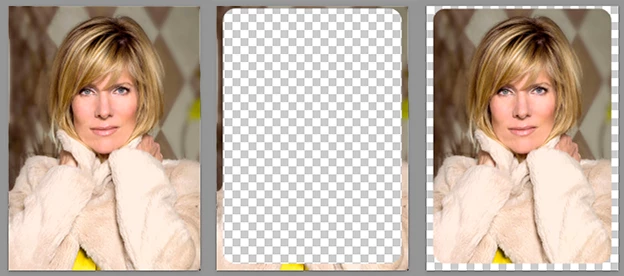
Can someone please tell me how I can round these edges. I have tried a few different ways but I think it is way easier then what I am doing. I am adding this to a shirt so I'd like it to have rounded edges.
    Correct answer Norman Sanders

    1. If the layer is locked, trash the lock.  Foreground Color: Black

    2. Add a Layer Mask by clicking on the Mask symbol at the bottom of the Layers panel. The mask will be adjacent to the image.

    3. Choose the Rounded Rectangle Tool. (It is nested with the tools above the Hand Tool}

    4. In the Options bar choose Pixels and on the far right of the bar choose Radius It is adjustable. Start with 75 px.

    5. Draw the rectangle. (Fig 2)

    6. Choose Image > Adjustments > Invert (Fig 3)

    2 replies

    Norman Sanders
    Norman SandersCorrect answer
    Legend
    May 3, 2019

    1. If the layer is locked, trash the lock.  Foreground Color: Black

    2. Add a Layer Mask by clicking on the Mask symbol at the bottom of the Layers panel. The mask will be adjacent to the image.

    3. Choose the Rounded Rectangle Tool. (It is nested with the tools above the Hand Tool}

    4. In the Options bar choose Pixels and on the far right of the bar choose Radius It is adjustable. Start with 75 px.

    5. Draw the rectangle. (Fig 2)

    6. Choose Image > Adjustments > Invert (Fig 3)

    lesley_hilton
    Known Participant
    June 11, 2019

    I chose Rounded Rectangle, but what is the Options Bar? I found Pixels somewhere, but no option to adjust corner radius.

    I'm trying to adjust the radius of my corners.

    Photoshop version 19.1.5

    lesley_hilton
    Known Participant
    June 11, 2019

    This is what you need to select


    I don't have that option in my tool bar. Maybe I deleted it by mistake? If so, how do I get it back?

    Sahil.Chawla
    Adobe Employee
    Adobe Employee
    May 3, 2019

    Hi Kristin,

    As you're looking to round the corners of this image, please have a look at this article and see if it helps: Edit rounded rectangles |


    Or you can try this method:

    After making the selection I pressed Ctrl+J to make a copy of the selected area of the original layer. for macOS the shortcut for Layer via Copy is Cmd+J

    Regards,
    Sahil