
Participating Frequently
June 13, 2019
Answered

Rounding corners of a shape

  • June 13, 2019
  • 7 replies
  • 1173 views

Hi, I have some rectangles in a complex sequence that were actually produced in excel which were exported into Photoshop for a design.

I would ideally like to be able to round the corners of each cell/rectangle. Is there a way to do this or to automate it?

I appreciate it's probably not the best way to go about things but not sure of a better way. Any thoughts appreciated - thanks.
    This topic has been closed for replies.
    Correct answer davescm

    Hi

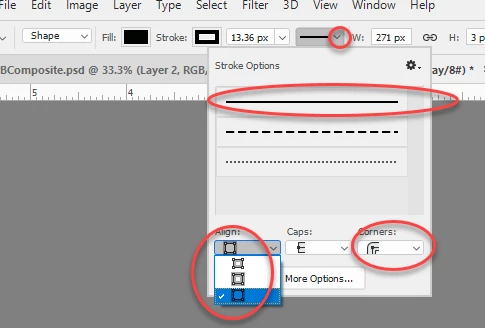
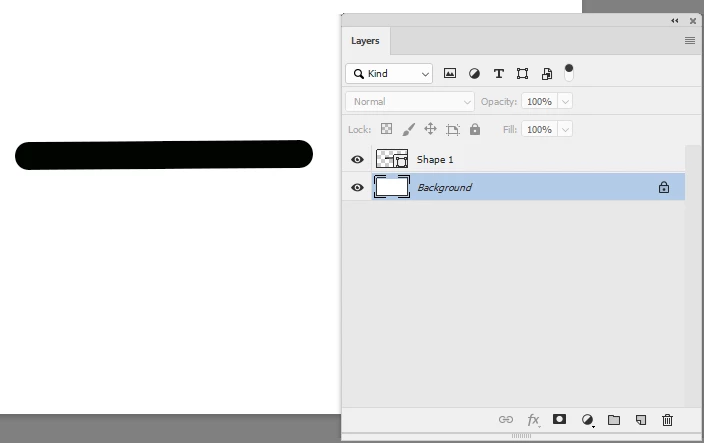
    Even without Illustrator you can quickly make that with Photoshop shapes. Use the line tool and set fill and stroke to black. Now importantly set the stroke to outside and rounded corners.

    7 replies

    Participating Frequently
    June 13, 2019

    So many great answers - much work to do! I will follow all guidance and see how I go... lots to get my head round - thanks!

    jane-e
    Community Expert
    Community Expert
    June 13, 2019

    siderealxxx  wrote

    So many great answers - much work to do! I will follow all guidance and see how I go

    Please post back and let us know what works and if you have more questions.

    Inspiring
    June 13, 2019

    If you cut and paste a chart from Excel/PowerPoint/Word into Illustrator it is a vector path. Within Illustrator you can alter the corners option or corner widget. Below is the corner option:

    Myra Ferguson
    Community Expert
    Community Expert
    June 13, 2019

    While it would be easier in Illustrator, you can round the corners in Photoshop with pixels by blurring it and then adjusting the curves.

    I took your screenshot and applied Gaussian blur (Filter > Blur > Gaussian Blur) with a Radius of 2 pixels.

    Then I used curves to create more contrast.

    And this is the result.

    You can play with the amount of blur and the curve to adjust the result.

    Participating Frequently
    June 13, 2019

    Thanks for the info. I don't have/know Illustrator but will bear it in mind as the project evolves. Cheers

    davescm
    Community Expert
    davescmCommunity ExpertCorrect answer
    Community Expert
    June 13, 2019

    Hi

    Even without Illustrator you can quickly make that with Photoshop shapes. Use the line tool and set fill and stroke to black. Now importantly set the stroke to outside and rounded corners.

    jane-e
    Community Expert
    Community Expert
    June 13, 2019

    Hi siderealxxx

    To add to davescm s excellent method of redrawing in PS:

    Use a grid and / or guides to assist in drawing.

    If you have the Excel file, check to see if a row height was set. The default is 16 px if it was not.

    It appears that the width was done by selecting multiple cells and adding a black fill. Look to see what the column width is. Here I gave it a width of 6 px.

    To use a grid:

    1. See the grid
      View > Show > Grid
    2. Use the grid
      View > Snap to > Grid
    3. Set the grid
      Prefs > Guides, Grids, and Slices: set to the units you need. (Don't choose what I did.)

    Alternatively, you can use guides. Either:

    1. Drag them from the rulers to match your sample
      or
    2. View > New Guide Layout
      This shows the columns matching. When I try to match the rows, they fall apart, meaning the row heights may not be identical in Excel.
    3. Here's the image showing the irregular heights of your current image.

    ~ Jane

    Participating Frequently
    June 13, 2019

    Hi - thanks for the replies. I can provide a demo screenshot here... I assume it's pixels not vector. Each line would need to be rounded at the edges...!

    June 13, 2019

    Don't think it's possible in Photoshop, you could image trace it in Illustrator and round the shapes.

    To be honest you would be better creating the shapes from scratch using vector shapes in either Photoshop or Illustrator

    davescm
    Community Expert
    Community Expert
    June 13, 2019

    What format are the rectangular shapes? Are they vectors or pixel layers? It makes a big difference.
    If you are not sure, a screenshot with the layers panel shown and the layer with the shape selected would help.

    Dave

    June 13, 2019

    Hi

    It may help if you provided a screenshot