

Claudia35215217vn4h
Participant
February 2, 2024
Question

SAME PICTURE, SAME COLOR PROFILE DIFFERENT RESULTS

  • February 2, 2024
  • 1 reply
  • 299 views

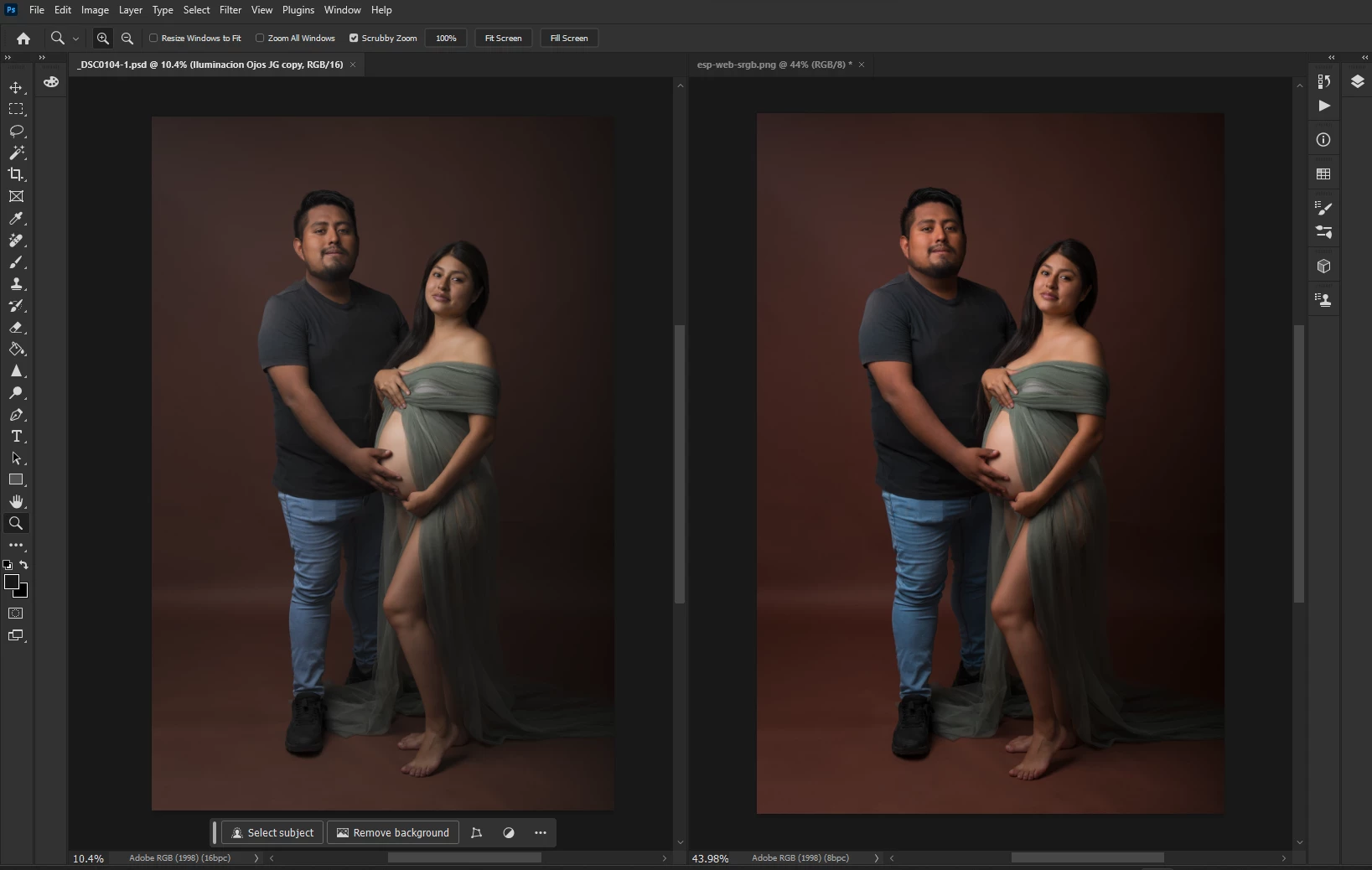
Hi there! I'm facing a big problem, I have this picture,on the left the RAW edited from camera raw, on the right, the same picture exported with the profile embeded, they don't look similar, my color settings in RGB is ADOBE 1998, the same used in the pictures, any ideas what is wrong?
 

This topic has been closed for replies.

1 reply

D Fosse
Community Expert
Community Expert
February 3, 2024

The difference between them corresponds exactly to the difference between sRGB and Adobe RGB. That is the difference. The one on the right says "srgb" in the title bar - are you sure you haven't assigned instead of converting at some point?


I'd retrace the steps here. Somewhere the wrong profile has been assigned. Your color settings don't matter - what matters is the profile embedded in the file. They both have Adobe RGB embedded according to the screenshot, but I don't know the history. If Adobe RGB was assigned instead of converted to, you'd get this.


(I can also see that you have edited the original before exporting, so you have done a bit more than you're telling.)

Claudia35215217vn4h
Participant
February 3, 2024

Got your point! and I tried it!, export it with embeded (no srgb convert),  when I compare them in photoshop (left), they look similar, BUT,  when I open the exported picture with the windows visualizer (right bottom) looks very saturated - also in my phone - or even in google (right top) looks slighty vivid but darker in the shadows than the photoshop. Is there something i'm missing? my client keeps complaing that her pictures are very saturated (she's visualizing this in her phone and laptop.


D Fosse
Community Expert
Community Expert
February 3, 2024

OK, now everything looks correct - except Windows Photos, which is very odd.


Windows Photos is now fully color managed (as are all web browsers) and they should all match Photoshop and display identically. Some years ago that wasn't the case, but unless you have a very old Windows version that you haven't updated in years, that's not it.


Maybe Photos is choking on your monitor profile. The monitor profile is the second link in this color management chain. Both profiles need to be present and correct, the embedded document profile and the monitor profile at system level. One is converted into the other, on the fly, and these converted numbers are sent to your display.


So are you using a calibrator to make your monitor profiles? Which one? If you're not, you will get manufacturer profiles distributed through Windows Update, and many display/laptop manufacturers simply can't get this right. Defective monitor profiles is a quite common problem - and it will often affect applications differently. That's often a smoking gun.


It would also help to know what display you're using. If it's a wide gamut model, you must have full color management at all times to see it correctly.


How your client sees this is not something you can control. That's down to their system setup. What you can do is get the file right on your end, and as long as you're embedding the profile and prepare the file correctly, that ends your responsibility.