
Inspiring
March 21, 2017
Answered

Save a pdf from photoshop with layers

  • March 21, 2017
  • 2 replies
  • 26639 views

Hi there,

I'm creating an illustration and it can have a spot colour on a separate layer. However, the client requires the submitted format to be a pdf with layers, with the spot colour on a separate layer.

I can't figure out how to save a pdf from photoshop and have it save the layers.

I'm on a Mac running Photoshop CS5.

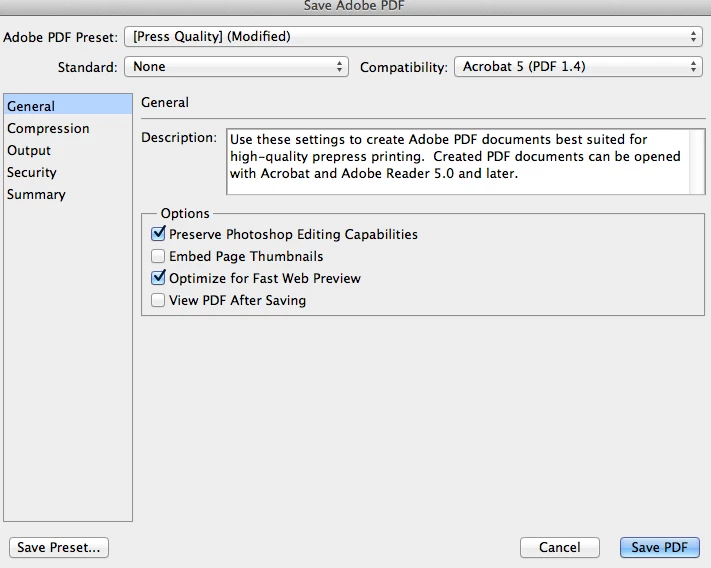
If I do a save as, and choose Photoshop PDF, and then check on Layers, and then save, it pops up with a box that says "The settings you choose in the Save Adobe PDF dialog can override your current settings in the Save As dialog box." Then it opens up the Adobe PDF dialog box, but there is no option to save layers in that window.

I've attached a screenshot. Thank you!

Update: I also tried to just import a layered PSD into InDesign and then re-export to a layered to PDF from InDesign but that didn't work either.
Correct answer S_Gans

Acrobat can't interpret Photoshop layers into PDF layers. It can do that with InDesign, AutoCAD, or Visio.
I know you tried it by placing your PSD into InDesign, but what they want is for you to save out each Photoshop layer as a separate InDesign layer, then output to PDF. So - what I mean is that it doesn't interpret the Photoshop layers at all, but it does interpret InDesign layers.
Perhaps this article'll help? PDF layers, Adobe Acrobat DC

I also wish PDF's could understand Photoshop and Illustrator layers! Perhaps we should put that in as a feature request at: Feature Request/Bug Report Form

2 replies

philipj70727125
Participant
May 9, 2018

If you have CS5 Illustrator open the psd file in that so that it imports the layers as objects. You can now save as a pdf from Illustrator. For a smaller file size uncheck the 'Preserve Illustrator Editing Capabilites'. The pdf can be opened in Adobe Acrobat Reader and the layers selectively viewed.

TeoVincent4
Participant
February 9, 2021

Thanks S_Gans you are most helpful! Also Philipj70727125!

I'm surprised there seems no simply software made by a 3rd party to effortlessly show/hide layers in pdf files or maybe a compatible pdf2 file?

I'm looking to enhance opportunities with pdf files and this is one feature that I think should be easily accessible, how can it not be a simple patch or new feature?

If I need to I'll investigate your answers: InDesign, AutoCAD, or Visio, then CSS Illustrator.

Someone should develop easy layers in pdf files, I'd like to help with many uses I've designed already.

I hope this is appropriate to suggest / ask and thanks very much to the Adobe community for these forums.

-Teo

jane-e
Community Expert
Community Expert
February 9, 2021

Hi

Both InDesign and Illustrator have a checkbox to include layers while making a PDF. Photoshop does not. Also, FYI, layers were not supported in Acrobat until version 6, so saving to Acrobat 5 (as in your screen shot) or earlier cannot include layers. You can make a feature request to the product developers here:

https://feedback.photoshop.com/


According to this post, PS can support up to 8000 layers, depending on your computer specs. I have no idea if there is a maximum number of layers in Acrobat.

https://community.adobe.com/t5/photoshop-elements/file-size-layers/td-p/9035020


~ Jane


S_Gans
Community Expert
S_GansCommunity ExpertCorrect answer
Community Expert
March 21, 2017

Acrobat can't interpret Photoshop layers into PDF layers. It can do that with InDesign, AutoCAD, or Visio.
I know you tried it by placing your PSD into InDesign, but what they want is for you to save out each Photoshop layer as a separate InDesign layer, then output to PDF. So - what I mean is that it doesn't interpret the Photoshop layers at all, but it does interpret InDesign layers.
Perhaps this article'll help? PDF layers, Adobe Acrobat DC

I also wish PDF's could understand Photoshop and Illustrator layers! Perhaps we should put that in as a feature request at: Feature Request/Bug Report Form

Adobe Community Expert / Adobe Certified Instructor
Inspiring
March 23, 2017

Thanks S_Gans. This is so helpful to know!

S_Gans
Community Expert
Community Expert
March 23, 2017

You're so welcome! I'm sorry it wasn't a happier answer, though!

Adobe Community Expert / Adobe Certified Instructor