

umaynome
Inspiring
September 6, 2021
Answered

save as .ico file type gone with 2021 PS.

  • September 6, 2021
  • 3 replies
  • 13296 views

Hello,


I was using .ico file type by telegraphics http://www.telegraphics.com.au/sw/product/ICOFormat#icoformat  and all was okay until i had a need for this extension and using now PS 2021 version 22.5.0 and the save as .ico isnt present.


I DL the icon file for 64 bit again and can anyone tell me the exact path i need to place this file in now or maybe if there is a newer option for PS 21? You would think PS would make this part of the save as file types.


Thanks

U
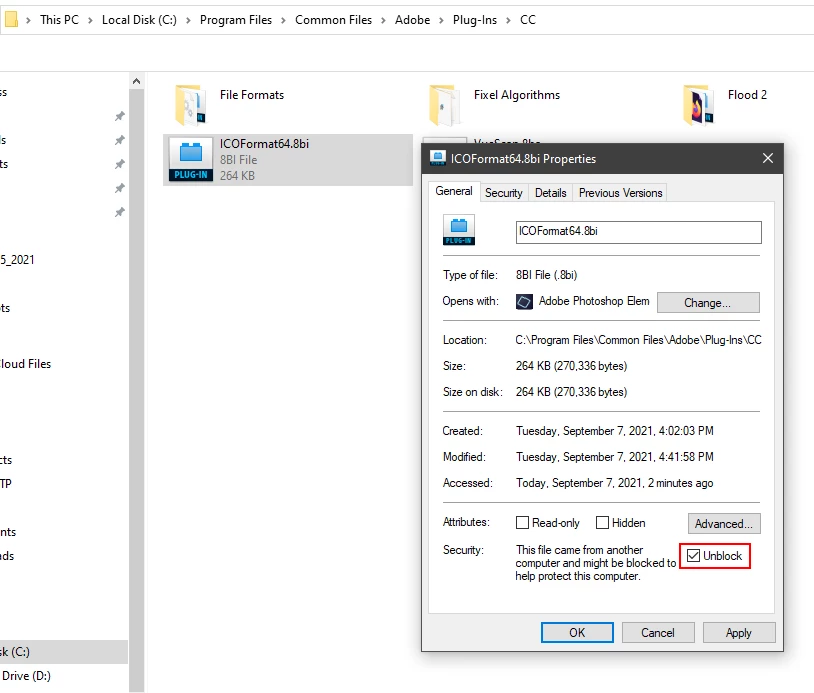
Correct answer Jeff Arola

Right click on the ICOFormat64.8bi go to Properties>General and check Unblock.


3 replies

Participant
January 26, 2024

The link is no longer good

Jeff Arola
Community Expert
Community Expert
January 26, 2024
Jeff Arola
Community Expert
Jeff ArolaCommunity ExpertCorrect answer
Community Expert
September 7, 2021

Right click on the ICOFormat64.8bi go to Properties>General and check Unblock.


Jeff Arola
Community Expert
Community Expert
September 7, 2021

Put the ICOFormat64.8bi in


C:\Program Files\Common Files\Adobe\Plug-Ins\CC


umaynome
umaynomeAuthor
Inspiring
September 7, 2021

That is exactly where i have it and I guess where i put it when it was working, now it isnt an save option with PS 2021 22.5


I am using a online convertor as a work around.


This is on a windows 10 pc 64 bit