
Participant
June 6, 2021
Answered

save as .pdf gone?

  • June 6, 2021
  • 4 replies
  • 26237 views

I have the latest version of Photoshop (22.4.1), desktop, Windows 10. The option to save a file as a .pdf appears to be gone. I cannot find it in the file>save as>format menu, nor is it in the export menu. Am I missing something here, or is it that Photoshop no longer will save as a .pdf?  Thank you.
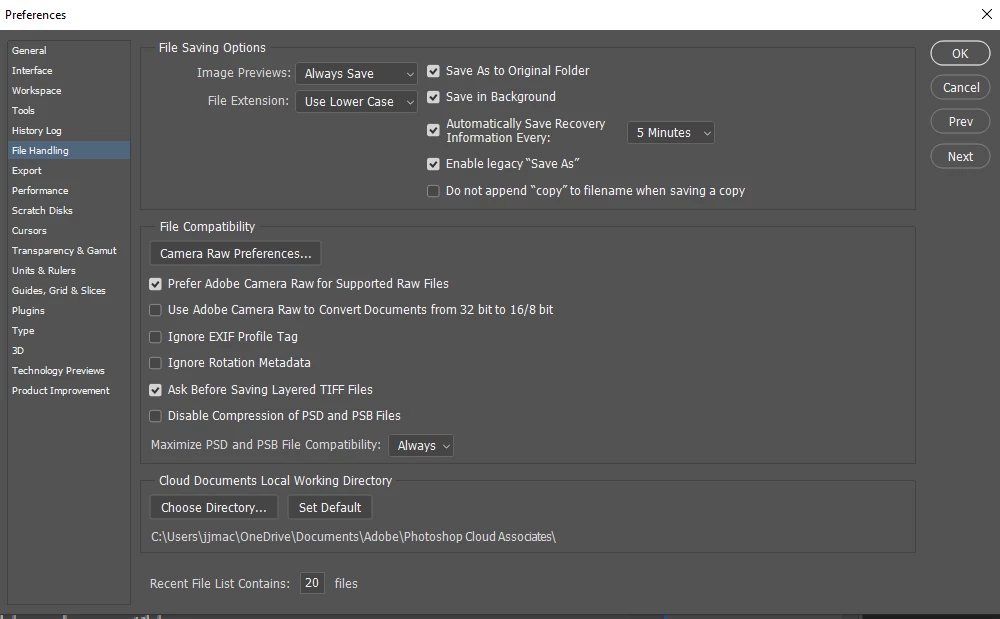
Correct answer JJMack

Its back in 22.4.2 legacy "Save As" file handling Preference.

4 replies

Participant
September 15, 2021

No idea why this would even be removed in the first place, extremely frustrating for a user.

PECourtejoie
Community Expert
Community Expert
September 15, 2021

Hi, Miles, as explained earlier, it is a change that has been mandated by an operating system maker. 

Photoshop, as an application, has to follow the "rules" set up by the operating system.

JJMack
Community Expert
JJMackCommunity ExpertCorrect answer
Community Expert
June 8, 2021

Its back in 22.4.2 legacy "Save As" file handling Preference.

JJMack
Known Participant
October 19, 2021

Hi JJ:

Thanks for posting this.


I did check the enable Save As and am still not able to access saving a PSB file as a PDF.


Running a Windows 10 system with the latest updates.  Also, I shut Photoshop down and restarted several times and am still unable to access a Save As PDF in any of the saving options - Save a Copy, Save as or Export.


The flattened PSB file size is 20 MB.


Any assistance would be appreciated.


Thanks in advance.


Gary

Stephen Marsh
Community Expert
Community Expert
November 4, 2023

hi i have the same problem, i already "enable Save as". Did you save PDF sucessfully? 


@Zac2204170691rx 

@Uyên28149022i7nk 


PSB format exists to contain larger pixel dimensions and file sizes than is possible in other formats.


What are the pixel width and height dimensions of your PSB?


You will need to duplicate the PSB and proportionally resample the width or height to 30,000px or lower on the longest side (or crop the canvas to 30,000px such as creating multiple smaller "tiles" of the PSB file).


-------- From the Help Docs --------


To preserve all Photoshop features (layers, effects, masks, and so on), save a copy of your image in Photoshop format (PSD).


Like most file formats, PSD supports files up to 2 GB in size. For files larger than 2 GB, save in Large Document Format (PSB), Photoshop Raw (flattened image only), TIFF (up to 4 GB), or DICOM format.


Large Document Format (PSB)

The Large Document Format (PSB) supports documents up to 300,000 pixels in any dimension. All Photoshop features, such as layers, effects, and filters, are supported. (With documents larger than 30,000 pixels in width or height, some plug-in filters are unavailable.) You can save HDR, 32-bits-per-channel images as PSB files.


Note: Most other applications and older versions of Photoshop cannot support documents with file sizes larger than 2 GB.

JJMack
Community Expert
Community Expert
June 6, 2021

As of Photoshop 22.4 saveAs PDF can be used in Photoshop Scripting.   Adobe Change Photoshop's User interface,  added a new file menu item "Save a Copy" interface.  You can "Save a Copy"  of the current document as a Photoshop PDF file.  Photoshop's file menu item "Save As" interface can no longer save a PDF file its operation has been changes. 

JJMack
Participant
February 23, 2024

If Photoshop PDF doesn't show up in the file format dropdown box these steps might help:

1. Convert Image -> Mode from 32 Bits/Channel down to 8 Bits/Channel, THEN

2. Convert Image -> Mode from RGB Color to CMYK Color.

Derek Cross
Community Expert
Community Expert
June 6, 2021

There has been a change in the latest edition of Photoshop due to an Apple change. The Windows version has been changed too to keep to keep them both consistent. When you save a layered PSD file to a single layered format like JPG and Photoshop PDF you have to use Save a Copy. 

This excellent YouTube video clearly explains about using, and the difference between: Save, Save As, Save a Copy and Export As

https://m.youtube.com/watch?v=5CS_oieQL7c&t=205s


2bluesgalAuthor
Participant
June 8, 2021

Thank you!