

Eugene Reisch
Inspiring
August 26, 2020
Question

Save dialogue - auto-highlighting file extension

  • August 26, 2020
  • 8 replies
  • 3465 views

When you save something from Photoshop, the 'save as' box used to highlight the name, but leave the file extension un-highlighted, like this...



This was particulalry useful when saving out multiple images from one PSD as you could just tap the <right> arrow key and start typing, eg adding '01' to the file name as below...



But now, Photoshop auto highlights the whole filename and extension, meaning you have to use your mouse to click into the filename (before the full stop) to type your filename additions...
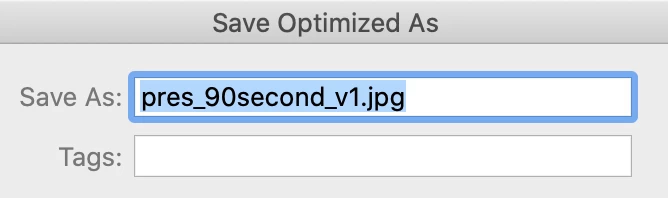


It might seem like a small thing, but when saving multiple files from one PSD (ie. saving out JPEGs for an animation or storyboatd) it used to be really quick and now is not.


Can this be changed/fixed/addresed??


This topic has been closed for replies.

8 replies

PECourtejoie
Community Expert
Community Expert
December 14, 2021

Hello, one of the fixes of the newly released 23.1 https://helpx.adobe.com/photoshop/kb/fixed-issues.html is targeted to filename issues on saving on a mac, I'd give it a try...

Eugene Reisch
Inspiring
December 9, 2021

Just to be clear, as I seem to have been misunderstood by someone (perhaps they have not read the OP prolery) and this thread has become muddied.


I'm not asking about adding file name extensions, nor am I looking for a 'workaround' - I'm trying to fix an issue that is causing me an inconvenience.


I'm concerned with the highlighting of the full filename AND extension when saving to web.


When saving a file, the filename ONLY used to be highlighted. That meant that with one tap of the <right-arrow>, the cursor was now at the end of your existing filename and before any file extension, '.jpg' for example.


The means that if saving out numerous images or versions from one file (for example, a web banner 'banner.psd' with mutiple copy versions) you could 'save for web' (banner.jpg), then tap the <right arrow> key and type 'a' (or, b, c, d... for example) and hit <return> quickly enabling you to quickly save out 'bannera.jpg, bannerb.jpg, bannerc.jpg' etc.


Now you have to either type in the full name again, or tap <right arrow> once to put the cursor at the end of the filename AND extension, then <left arrow> 4 times to bring the cursor back to the end of your existing filename.


It might not sound like a big issue for someone, but it's a time waster for me (if it were not an issue I would not be trying to find a fix)


If anyone is able to provide a possible solution (not just a 'workaround', thanks), then I'm all ears and will be grateful to hear it.


I hope that's clear, I hope I'm not the only one with this issue and I hope someone knows the answer 🙂


Eugene Reisch
Inspiring
December 9, 2021

(Please excuse typos - I don't seem to be able to edit my posts)

PECourtejoie
Community Expert
Community Expert
December 7, 2021

Hi, did it change when you upgraded the version of Photoshop, or when you installed Catalina?

Catalina made and mandated many Save-related changes that broke the previous behaviors.

Eugene Reisch
Inspiring
December 7, 2021

The issue persists.


I'm running Big Sur (11.6) and the latest CC suite (Photoshop 23.0.2)


PECourtejoie
Community Expert
Community Expert
December 7, 2021

Hello, AFAIK, the changes mandated by Catalina, continued in Monterey and Big Sur...

According to this thread, the solution is to write a new name, omit the extension, it should be automatically added: 


https://community.adobe.com/t5/photoshop-ecosystem-discussions/saving-file-extension-issue-in-photoshop-21-1-0/m-p/10978068

Participant
December 7, 2021

Same here, pls fix Adobe

Stephen Marsh
Community Expert
Community Expert
January 18, 2021

Until this is fixed by Adobe, a script is the workaround.

Participant
January 18, 2021

Adobe, are you out there? When will this be fixed??

JJMack
Community Expert
Community Expert
January 18, 2021

Use Adobe chat to contact Adobe or use their feedback site this is a user site

JJMack
JJMack
Community Expert
Community Expert
August 26, 2020

Just type the file name you want. Save as will add the extension if you do not, For you have chosen the file type in the save as field or Photoshop use the existing file type to pre populate that field for you.

JJMack
Eugene Reisch
Inspiring
August 26, 2020

Except it doesn't.


I tried/assumed that only to find I could not open the images I'd exported (into After Effects, for exasmple), the reason being they'd saved wtihout file extensions.


JJMack
Community Expert
Community Expert
August 26, 2020

I just tried doing it in Windows 21.2.2 with a new document that has never been saved the document name does not even have an extension.  When  I use  Save as in Windows PS 21.2.2 and create an new directory so there will nor files in the folder, When I set the File name to xyz no extension the file saved into the new folder has an extension Photoshop defaulted to. Are you a Mac user????

JJMack
August 26, 2020
Eugene Reisch
Inspiring
August 26, 2020

Yep... but no solution there either.

August 26, 2020

Somebody mentioned this on the last page

"I actually found my solution to this by accident in Photoshop's own preferences. It's in file handling > append file extension. You should select never. Hope this works out for all of you going through this annoyance."

Although it didn't resolve the issue for others, might be worth a try if you haven't tried it already