
Participant
December 13, 2019
Respondido

Save for Web - Default Zoom Level/Option?

  • December 13, 2019
  • 3 respostas
  • 1307 Visualizações

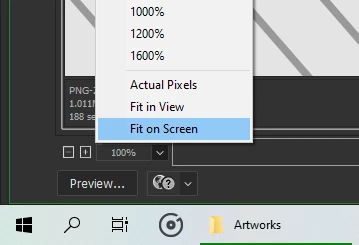
Is there any way to set the zoom level when saving for web? It is 100% by default, but the artworks that I'm working on measures about 60 x 80 inches. For artworks that big, I use Fit on Screen. Is there any way to set that option by default? It took me a while to find that in Preferences but no to avail. For me, it's an additional step and should be automated. Imagine how many clicks or time I would save if it's automated. 
Melhor resposta por mark@headTrix

Hi there,


I have a few ideas on how you can make this a bit quicker/easier.


1.  You can use Command +/- (Control +/-) to zoom in and out (this works in document window AND in Save for Web)


2. You an also press Command 0 to fit in Window. 

3. You can create an action that opens Save for Web, and then fits in Window. You can then assign your own quickkey to this action and Voila! One button click to where you want to be.


Hope this helps!
cheers,
Mark

3 Respostas

Participant
December 20, 2019

Thank you good sir. Cheers to you.

Community Expert
December 20, 2019

You are welcome Finn!


Happy Holidays to you and yours!


cheers!
mark

headTrix, Inc. | Adobe Certified Training & Consulting
Community Expert
December 13, 2019

Hi there,


I have a few ideas on how you can make this a bit quicker/easier.


1.  You can use Command +/- (Control +/-) to zoom in and out (this works in document window AND in Save for Web)


2. You an also press Command 0 to fit in Window. 

3. You can create an action that opens Save for Web, and then fits in Window. You can then assign your own quickkey to this action and Voila! One button click to where you want to be.


Hope this helps!
cheers,
Mark

headTrix, Inc. | Adobe Certified Training & Consulting
D Fosse
Community Expert
Community Expert
December 13, 2019

When saving for web and screen/mobile devices, you'd normally want 100%, because that's how it will display. Perhaps 200% for retina/4K screens. It's hard to imagine much demand for "fit to screen" as default.


You do realize that inside Save For Web, "size" doesn't really have any meaning? It's all about pixels, so many high by so many wide. The ppi number gets stripped out of the file, and any concept of size with it.


How big is your file, in pixels? Are you sure Save For Web is the right tool for this?

Participant
December 20, 2019

Give me an answer, not a question about my work. Just tell me if Photoshop have this option. Oops. It doesn't. lol