
Participant
March 3, 2022
Question

Save for Web- GIF Error

  • March 3, 2022
  • 1 reply
  • 686 views

Hello,

Each time I'm trying to save a gif it shows me this error:
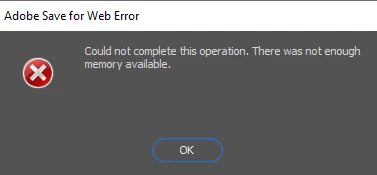
I got the recent update of photoshop and I got a really good computer for adobe's programs, I usually don't have errors but for some reason this error keeps coming while I'm trying to save a gif... and till today I just gave up on gifs but I'm done with it, I wanna fix this and can't seem to find a solution that works on the internet...


this is my computer's memory which says I got a lot of free space...


Please help me... 

 Thank you 


This topic has been closed for replies.

1 reply

Community Expert
March 4, 2022

have you tried saving a GIF using File>Export>Save for Web(legacy)? That is what I always use and it gives you options to reduce the file by color, or file size and much more.


Hope that helps!
mark

headTrix, Inc. | Adobe Certified Training & Consulting
RotemShAuthor
Participant
March 4, 2022

Yeah I always try saving it this way and I reduced the file by color and all but it still gives me this error for some reason... 😞


Community Expert
March 5, 2022

hmm. How large is the file? Have you tested it with a DIFFERENT file to see if it works?

Or just try creating a new file and add a shape or something and try it? Could the image just be too big for your computer to handle? Or do you have too many other applications opened?


Cheers.

mark

headTrix, Inc. | Adobe Certified Training & Consulting