
Exit
  • Global community
    • Language:
      • Deutsch
      • English
      • Español
      • Français
      • Português
  • 日本語コミュニティ
  • 한국 커뮤니티
0

Save for Web increasing GIF file size (Photoshop 21.0)

New Here ,
Nov 05, 2019 Nov 05, 2019

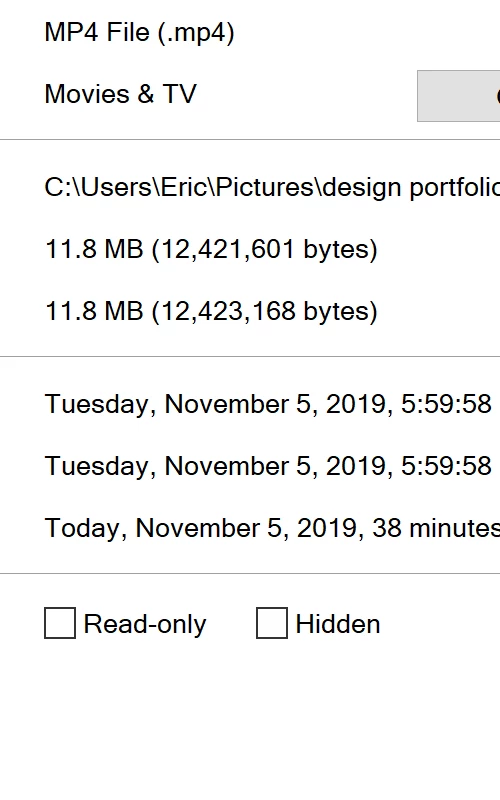
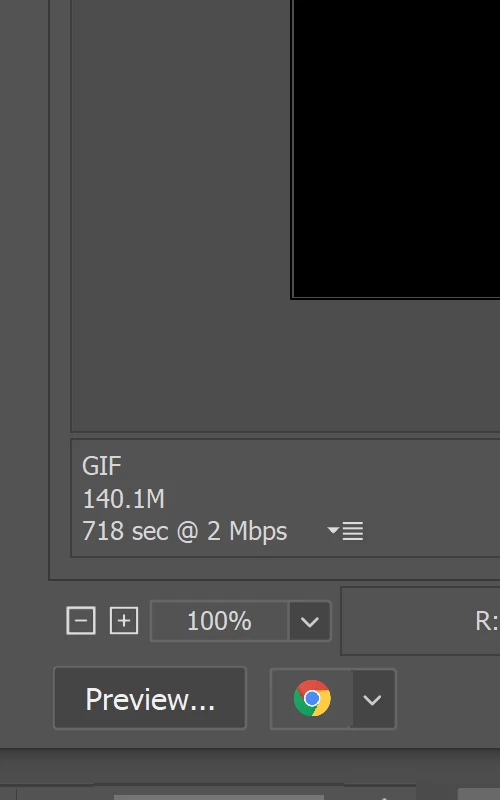
I have an mp4 im trying to save as a gif in Photoshop. The original file size is 11.8 MB but when I open it in Save for Web it increases the file size to 140 MB.
 

Untitled-1.jpgUntitled-2.jpg


Ive adjusted all the settings in the Save for Web menu but nothing really makes a difference other than fewer colors and 0% dither, but its still outrageously high.(dropped it to 64 colors and its at 119 MB)

never had an issue before this last update.

Tried another mp4 file to see if maybe something was just wrong with my file, but i had similar results. went from 568 KB mp4 to a 741 KB GIF.

Installed photoshop 20.0.7 but it does the same thing.

Not sure what else to try.

Am I missing something? 

{Thread renamed by moderator}

265
Translate
Report
Community guidelines
Be kind and respectful, give credit to the original source of content, and search for duplicates before posting. Learn more
community guidelines
Adobe
Adobe Employee ,
Nov 05, 2019 Nov 05, 2019

Hi There,

That shouldn't be happening, could you please let us know if it happened before the update too?

Also, please have a look at this article to know how you can reduce the file size of the GIF: https://www.lifewire.com/how-to-make-smaller-gifs-1699970

Regards,
Sahil

Translate
Report
Community guidelines
Be kind and respectful, give credit to the original source of content, and search for duplicates before posting. Learn more
community guidelines
New Here ,
Nov 06, 2019 Nov 06, 2019
LATEST

Thank you for the response.

Ive adjusted all the settings in the Save for Web menu but nothing really makes a difference other than fewer colors and 0% dither, but its still outrageously high.(dropped it to 64 colors and its at 119 MB)

never had an issue before this last update.

Tried another mp4 file to see if maybe something was just wrong with my file, but i had similar results. went from 568 KB mp4 to a 741 KB GIF.

Installed photoshop 20.0.7 but it does the same thing.

Not sure what else to try.

Translate
Report
Community guidelines
Be kind and respectful, give credit to the original source of content, and search for duplicates before posting. Learn more
community guidelines