
Participating Frequently
April 18, 2020
Question

Save for Web (Legacy) Gif Creation Error

  • April 18, 2020
  • 1 reply
  • 4023 views

Dear Community,


I receive the following error when attempting to create a gif though Export > Save for Web (Legacy):
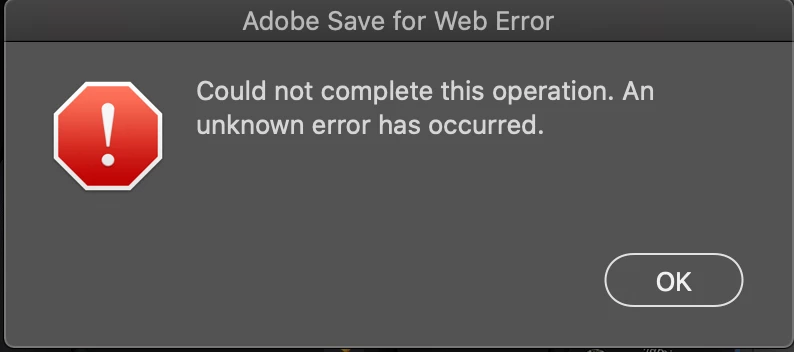


This was using the following settings. I cannot reduce the image size due to required spec:
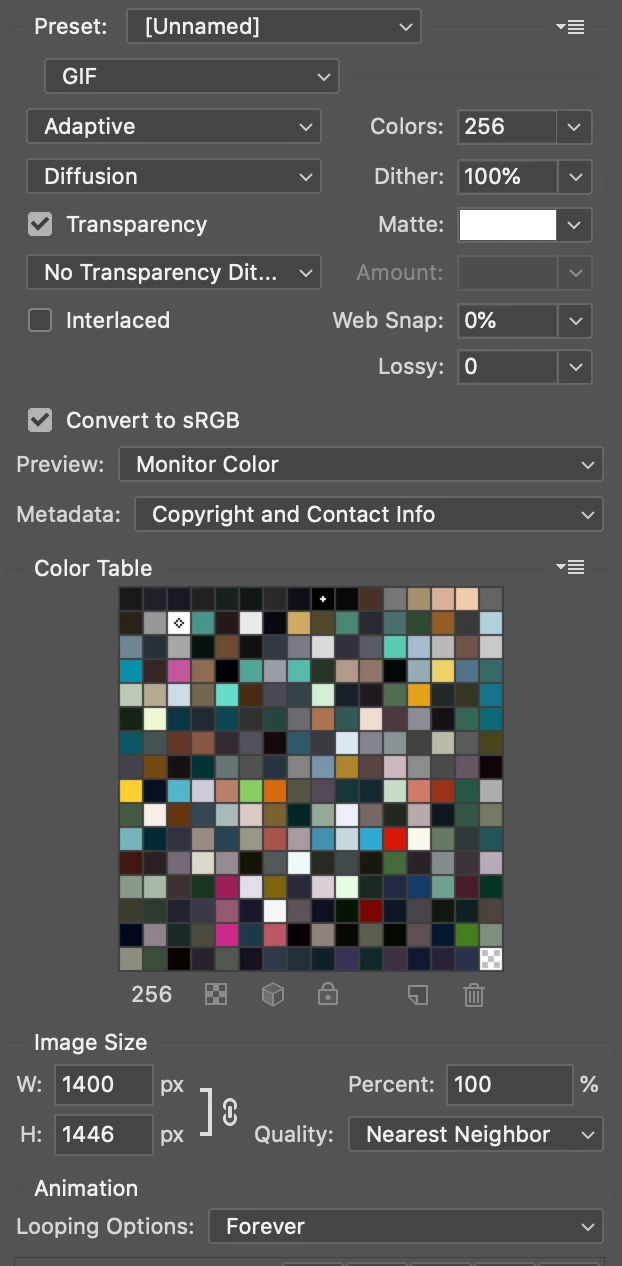
Adobe Photoshop is latest version on MacOS Catalina:


Adobe Photoshop Version: 21.1.2 20200410.r.136 2020/04/10: efaf3fa4e40 x64 Number of Launches: 0 Operating System: Mac OS 10.15.4 System architecture: Intel CPU Family:6, Model:14, Stepping:10 with MMX, SSE Integer, SSE FP, SSE2, SSE3, SSE4.1, SSE4.2, AVX, AVX2, HyperThreading Physical processor count: 4 Logical processor count: 8 Processor speed: 2400 MHz Built-in memory: 8192 MB Free memory: 2950 MB Memory available to Photoshop: 6061 MB Memory used by Photoshop: 70 % 


I have tried many different strategies to get this image exported including, but not limited to:

  • Deleting Adobe Save for Web 13.0 Prefs file under Library
  • Deleting Save for Web Prefs.psp file under Library
  • Reinstalling Photoshop
  • Changing individual parameters (reducing image size by 50% results in success but image size must be 100%)
  • Doing the same on my MS Surface Book, with the same results
  • Allowing Full Disk Access through Security & Privacy
  • Allowing Accessibility through Security & Privacy
  • Trying to use the Preview button instead of Save... in Save for Web dialog
  • Using file names and paths with only alphanumeric characters


Please help, would be much appreciated!


Best regards.


This topic has been closed for replies.

1 reply

c.pfaffenbichler
Community Expert
Community Expert
April 18, 2020

Just to make sure: Are you saving to the internal disk? 


You seem to have covered this 

https://helpx.adobe.com/photoshop/kb/photoshop-and-macos-catalina.html#AdobeSaveforWebError

but did you also restore the general Preferences after making sure all customized presets like Actions, Patterns, Brushes etc. have been saved?

https://helpx.adobe.com/photoshop/kb/basic-trouble-shooting-steps.html

Participating Frequently
April 18, 2020

Thanks so much for the fast response, much appreciated. I'll cover off your helpful suggestions in the order in which they were made:


  1. I am saving to the internal disk -- specifically to my User folder, which does contain a dot in the name. Still, this does not work when saving to Desktop folder either.
  2. https://helpx.adobe.com/photoshop/kb/photoshop-and-macos-catalina.html#AdobeSaveforWebError : I hadn't seen this exact link and to be sure I was following the guidance therein, made sure to rename the source .psd file (which contained underscores), the smart object reference to a video (also had underscores), and the destination .gif file. Still no joy.
  3. https://helpx.adobe.com/photoshop/kb/basic-trouble-shooting-steps.html
  4. I followed this link and found one on that page that led me to the restoration of the general preferences, which I performed:
     

    Likes


Perhaps worth noting: in spite of all of these preferences file deletion and resets, my default options when entering the Save for Web (Legacy) dialog remained as an unsaved preset which I had put in days ago (I knew because dither was at 100% and colors were at 256): in fact, these options can be reviewed on my first post where I screen captured them. It seems these options are saved in the .psd file itself, for upon changing them to preset 'GIF 128 Dithered', and saving the .psd, the preset now appears when re-entering the Save for Web (Legacy) dialog.


To give as much information as I can, here too is a screen cap of the very simple layer structure of the .psd:

A final point: between each attempt I am quitting Photoshop.


Best regards.


c.pfaffenbichler
Community Expert
Community Expert
April 18, 2020