Exit
  • Global community
    • Language:
      • Deutsch
      • English
      • Español
      • Français
      • Português
  • 日本語コミュニティ
  • 한국 커뮤니티
0

Save for Web optimization

Guest
Feb 18, 2017 Feb 18, 2017

I've been saving GIFs with Save for Web without touching anything that says "optimize/optimization" for quite some time. Last month after I set the "Optimize to file size..." for one time, the GIFs start to look a lot grainier (idk how to describe it). And it wouldn't let me save the original, or without the optimization. How do I remove the optimizing in Save for Web?

396
Translate
Report
Community guidelines
Be kind and respectful, give credit to the original source of content, and search for duplicates before posting. Learn more
community guidelines
Adobe
Community Expert ,
Feb 18, 2017 Feb 18, 2017

Export - Save for web should not have changed your original file - it only changes settings for the exported version.

To reset the Save for Web dialogue to the last saved setting press Alt(Option on Mac)  and the cancel button will change to "Reset"

To remove all settings and go back to the original - go to "Preset" and in the drop down choose original

Dave

Translate
Report
Community guidelines
Be kind and respectful, give credit to the original source of content, and search for duplicates before posting. Learn more
community guidelines
Guest
Feb 18, 2017 Feb 18, 2017

Thanks for answering me.

I tried your first method but it doesn't seem to respond to my clicking of "Reset".

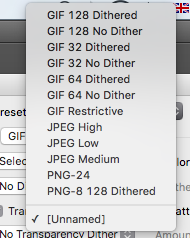
And there isn't original in my preset menu.Screen Shot 2017-02-18 at 8.25.45 PM.png

Translate
Report
Community guidelines
Be kind and respectful, give credit to the original source of content, and search for duplicates before posting. Learn more
community guidelines
Community Expert ,
Feb 18, 2017 Feb 18, 2017

Hi

If things are not working as they should - I would try resetting preferences.

Preferences in Photoshop

Dave

Translate
Report
Community guidelines
Be kind and respectful, give credit to the original source of content, and search for duplicates before posting. Learn more
community guidelines
Guest
Feb 18, 2017 Feb 18, 2017
LATEST

Thanks anyways!

Translate
Report
Community guidelines
Be kind and respectful, give credit to the original source of content, and search for duplicates before posting. Learn more
community guidelines