
Known Participant
January 18, 2018
Answered

Save PNG, what options to check?

  • January 18, 2018
  • 1 reply
  • 16817 views

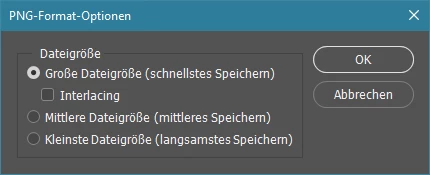
I am a bit confused what options to check when I save my edited clipart files as pngs. There are three options large, medium or small. If create my clipart to be as crisp and clear as possible. What to chose? I do not find any answers when I google it. 🙂 What is the difference between the alternatives?
Correct answer

Do you mean the little window that appears when you click the save button?

I've got  the german version only:

It is just the compression. Small > smallest file size / large > largest file size.

It has nothing to do with the quality. PNG = lossless compression format.

Is the PNG Format Lossless Since it Has a Compression Parameter?

Fenja

1 reply

Correct answer
January 18, 2018

Do you mean the little window that appears when you click the save button?

I've got  the german version only:

It is just the compression. Small > smallest file size / large > largest file size.

It has nothing to do with the quality. PNG = lossless compression format.

Is the PNG Format Lossless Since it Has a Compression Parameter?

Fenja

Steve Dave
Inspiring
January 18, 2018

Agreed with fenjas29325284​.

Known Participant
January 18, 2018

Then it would be smartest for me to do the large compression (smallest file), as I sell the files as instant downloads? I want the quality to be high but the size of the file as small as possible.