mlphoto.raw
Known Participant
December 2, 2023
Question

Saving as TIF, how to set "Layer Compression" default as ZIP?

  • December 2, 2023
  • 3 replies
  • 5250 views

Hi! My workflow in Photoshop has always been non-destructive. Just incase I want to come back, to revisit edits. So I save all the layers, and never flatten. 

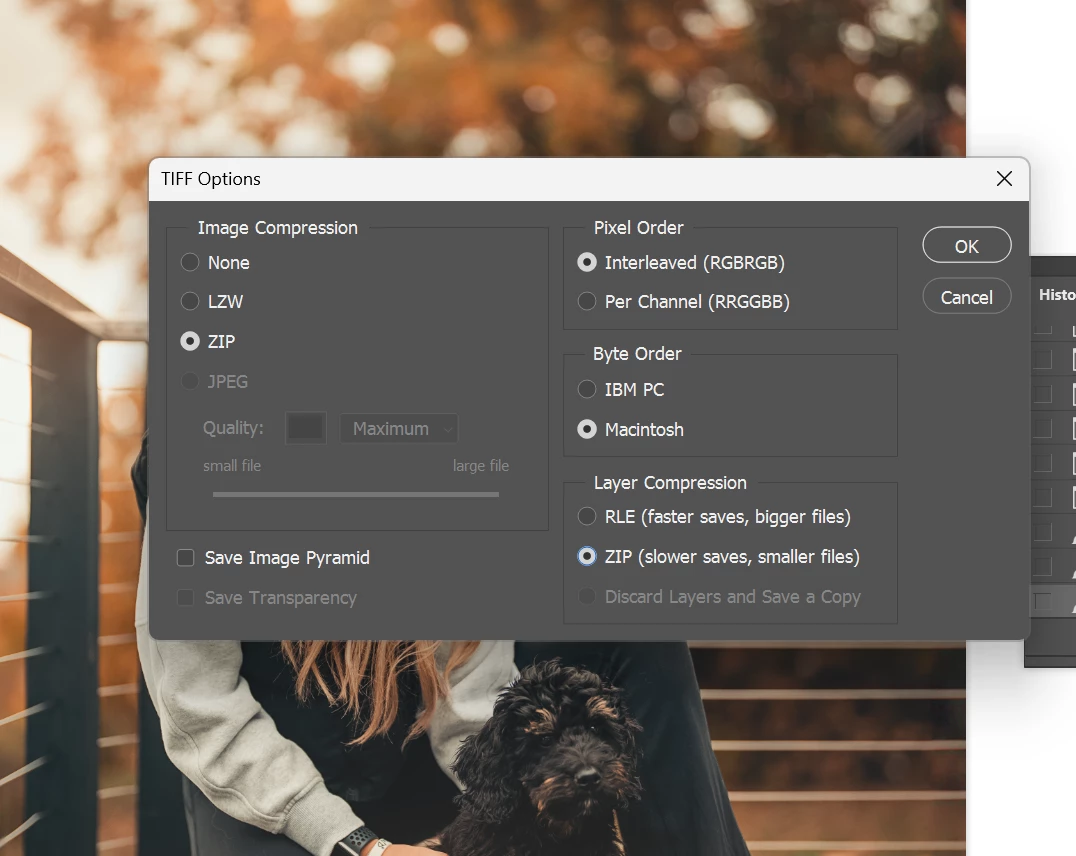
With the ever growing size of raw on these newer cameras, I've been hitting the 4GB limitation for layered TIF, even if compression is ZIP. I've found that enabling Layer Compression to ZIP always gets me under the 4GB limit to get it to play nice in my workflow.

Is there a way to set default behavior of Layer Compression to ZIP? I'm tiring of having to Save As, and hitting the ZIP option. 

Thank you!

P.S. is there a better way to use an alternative format like PSB, and have the Lightroom Classic catalog/stack it by default?  I rely on LrC a lot, so that would be a requirement. 
  

This topic has been closed for replies.

3 replies

mlphoto.raw
Known Participant
December 4, 2023

ok, so I decided to dive into this further tonight. 

I'm running Adobe LrC 13.0.2. and Adobe Photoshop Beta 25.4.0
Based on the few comments here about PSB, I went into LrC preferences and changed the external editing file preference like this: 

I initially thought PSD is same as PSB. I found this out little later that i was wrong. 

My work flow typically, I do the ACR/LR adjustments in the Lightroom Classic, and right click and edit-in... Photoshop:


For this test, I took this image, and expanded the image using the AI crop tool, to give it some file size, and did my usual layer work flow on it. 
 

original is 5760x8640, and resulting image is 8086x12129. 

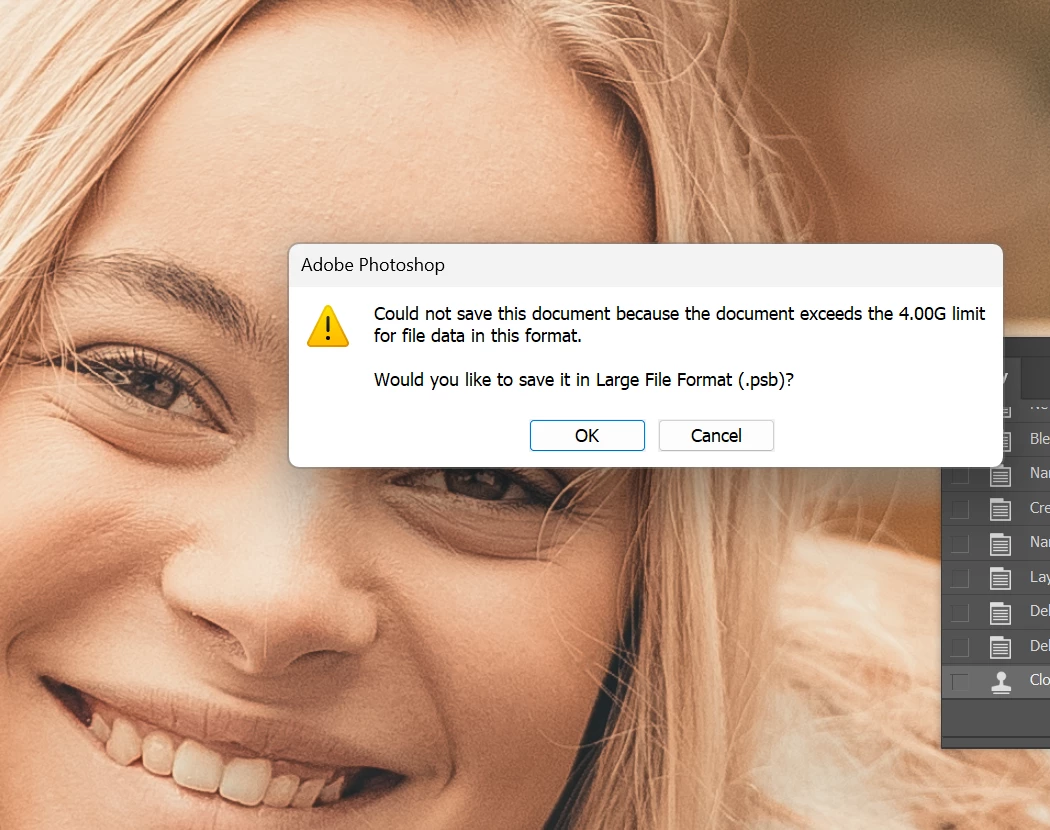
And then, I saved it, and it gave me an error that the image exceeded the 2GB limit for PSD. So I saved it as PSB as it suggested, and lo-and-behold, LrC recognized the PSB, and stacked the images automatically. 


And then, I tried to replicate the TIF saving issue where it exceeds 4GB, and when I attempted to save it as uncompressed TIF with uncompressed layers it did the same error, suggesting to save as PSB. 


The problem here, is why, within the Lightroom preference panel for external editing, there is only PSD or TIFF. Obviously PSB is the ideal choice here, but is there anyway to have the Lightroom default to PSB for external editing? 

Also is there any way to make the Photoshop default to compress ZIP and Layer ZIP in TIF? So when I have ~50-100 images open in photoshop, going through my workflow, and constantly get interrupted by these error messages, and I have to manually hit OK, and save as PSB or hit Cancel and Save As, and hit the layer compression ZIP radio button. 

Perhaps @Mark.Dahm can point me in the right direction? 

mlphoto.raw
Known Participant
December 4, 2023

@Stephen Marsh 

I just hopped on my m2 mbp, and it exhibits the same behavior as my PC. All screen shots below are from the mac. 


right here I have to manually click on the ZIP layer compression every time. and it won't remmeber/be permanent. 


This is even in Lightroom Classic, external editing tab, has the TIFF ZIP compression turned on. 


@Conrad_C Thank you so much for your input. A lot of times, I have 50-100s of images open in photoshop, to work as a big batch, and I just keep going to the next tab for next photo to work on while the previous photos "slow save" in TIF. 

I'd just love the option of it saving as layer-zip, or save as PSB, without any interaction from me, so i can keep continuing to focus on working on the next image, like you stated.

Stephen Marsh
Community Expert
Community Expert
December 3, 2023

In a quick test (Intel Mac, Ps2021), the TIFF save settings were sticky, even after quitting and restarting Photoshop.

mlphoto.raw
Known Participant
December 4, 2023

I should try this test on my m2 mbp, I thought I saw the same behavior few months ago. 

D Fosse
Community Expert
Community Expert
December 2, 2023

I never compress anything, so I wanted to see what zip compression actually does.


I took a random file, a few layers, that saves uncompressed at slightly over 2 GB.

With full zip compression it saves at 1.24 GB.

With zip layer compression it saves at 1.25 GB.


So far so good. But now to what mainly interests me: how long does it take?


Uncompressed it saves in under 2 seconds. Basically instant.

With full zip compression it saves in 44 seconds (!)

With zip layer compression it saves in 35 seconds.


I really, really have a hard time seeing how such an insignificant size reduction is worth the long save times. It certainly isn't for me.


Now - I use PSB, and I do agree with one thing. There should be a preference to set that as the default format, so that you don't have to choose it every time.

mlphoto.raw
Known Participant
December 3, 2023

Thank you for your test, however on my end, the size difference is significant with many layers.


D Fosse
Community Expert
Community Expert
December 3, 2023

OK, but how long does the save take?