Participating Frequently
September 15, 2020
Question

Saving PDF from photoshop, part text is white

  • September 15, 2020
  • 5 replies
  • 8689 views

I use Photoshop 2020 v.21.2.3

When I save as PDF (High Quality Print)

It should look like this...
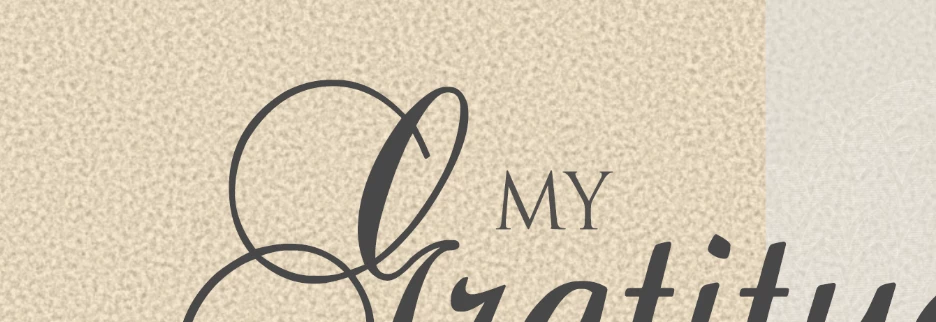
But it saves like this...
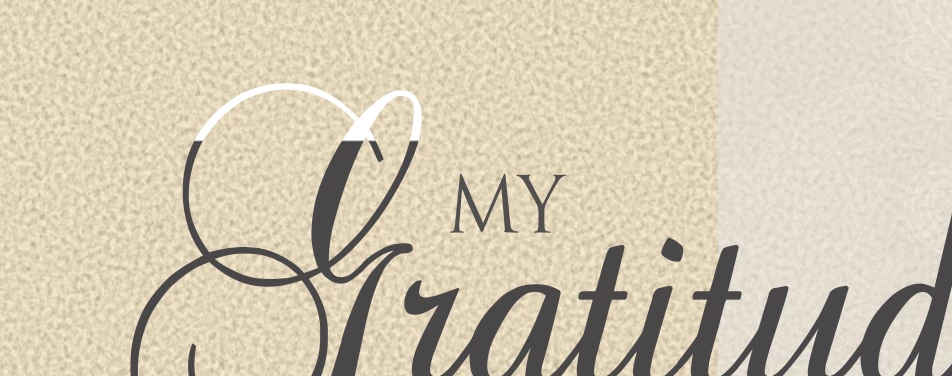
 

Any advice?


Thank you

5 replies

Participant
September 8, 2024

Возможно кому-то это поможет!!!
Столкнулся с подобной проблемой, перепробовал абсолютно всё.

Попробуйте это:

Редактирование текста - изменить размер шрифта - применить - редактирование текста - установить изначальный размер шрифта. 

Мне помогло только это, надеюсь и вам поможет.

Причём качество не теряется, видать в фотошопе какой-то баг

Participant
April 22, 2023

Try to to save as pft after makeing the text layer rasterzis


c.pfaffenbichler
Community Expert
Community Expert
April 22, 2023

I would prefer Type > Convert to Shape in order to maintain vector output in a pdf. 

Participant
January 11, 2024

I converted to test to a smart object and it worked. 

soerenj64494347
Participant
January 18, 2022

Exact same issue here. Running latest Photoshop (v23.1), trying to export my images to PDF, and encountering that a few latters are partly white.


I tried playing around with many pdf export settings, without luck.


I need the font layers to be persisted, of course when flattening the image the problem is gone, but that cannot be the solution.

Participant
January 20, 2022

Did you convert to shape?

soerenj64494347
Participant
January 20, 2022

No, but that's the point: I don't want to convert to shape, as I need/want to embed the fonts in my resulting pdf so they are displayed as (vectorized) fonts, not as pixels.


Of course, that would be a workaround, but it cannot be the solution.

Participant
November 4, 2021

Any update to this?  Currently encountering this

Participant
November 4, 2021

Update: I converted the problem text to shape and it worked.

Bob_Hallam
Legend
September 15, 2020

What version of PDF are you saving as?

ICC programmer and developer, Photographer, artist and color management expert, Print standards and process expert.
Participating Frequently
September 15, 2020

Acrobat 5 (PDF 1.4)


Bob_Hallam
Legend
September 15, 2020

Try saving at a higher level PDF such as 1.7 or 1.7+ also remove the fast web preview if this is for print work and that should solve the problem.  

ICC programmer and developer, Photographer, artist and color management expert, Print standards and process expert.