
Participating Frequently
June 24, 2019
Answered

Saving Tiff files developed in photoshop cc

  • June 24, 2019
  • 4 replies
  • 2920 views

When I try to save a file to Tiff format from Photoshop cc 2019 the resulting file does not save complete. It happens when I have been working with selections and layer adjustments. It seems to save one of the selections only. ( I flatten the image before saving). If I save to Jpeg everything seems to be OK. Any one with ideas.   Thanks in advance.    Dave
    This topic has been closed for replies.
    Correct answer D Fosse

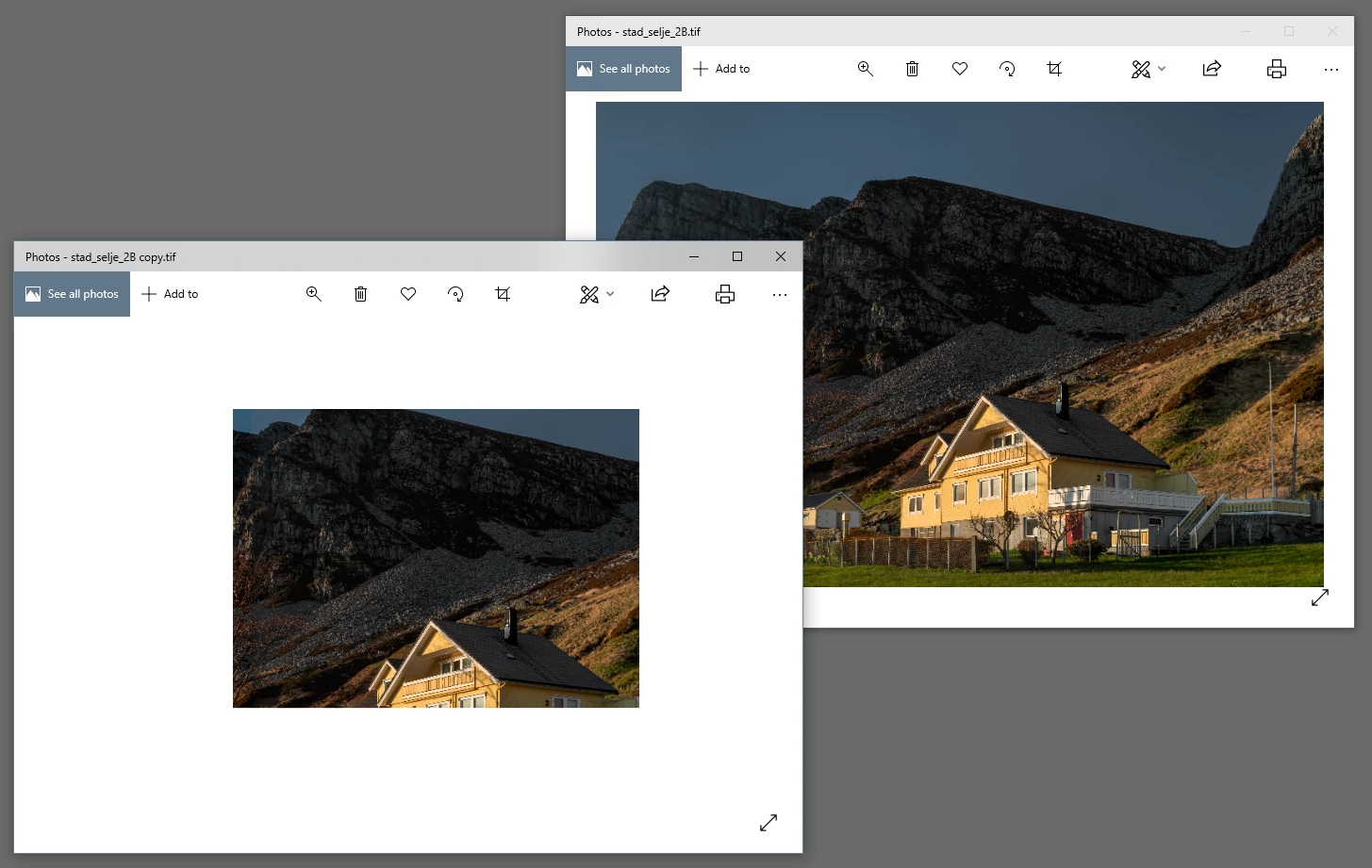
    I think the OP refers to how Windows Photos and Explorer display TIFFs with alpha channels. Left is a copy with an alpha channel:

    I don't know if this is a bug or intended behavior. In a lot of applications, alpha channels are automatically treated as transparency (but not in Photoshop, where it's just an extra channel).

    In any case, the file is completely unharmed. It opens back up normally. If you need to display it in Photos/Explorer, don't save it with an alpha channel.

    4 replies

    D Fosse
    Community Expert
    D FosseCommunity ExpertCorrect answer
    Community Expert
    June 24, 2019

    I think the OP refers to how Windows Photos and Explorer display TIFFs with alpha channels. Left is a copy with an alpha channel:

    I don't know if this is a bug or intended behavior. In a lot of applications, alpha channels are automatically treated as transparency (but not in Photoshop, where it's just an extra channel).

    In any case, the file is completely unharmed. It opens back up normally. If you need to display it in Photos/Explorer, don't save it with an alpha channel.

    c.pfaffenbichler
    Community Expert
    Community Expert
    June 24, 2019

    Just to make sure: You do save the layered images, too?

    Theresa J
    Community Expert
    Community Expert
    June 24, 2019

    First, is there a reason you are flattening the image? TIFF files can have layers and if you keep the layers you can come back later and continue to adjust your edits. Second, selections are not saved with any file format. You can save a selection to a channel and channels can be saved with a tiff.

    c.pfaffenbichler
    Community Expert
    Community Expert
    June 24, 2019

    Please post meaningful screenshots.

    Do the images open damaged in Photoshop?

    If not the problem would seem to be the other application you use to view the images.

    When you save the tiff copy you can uncheck »Alpha Channels« by the way.

    Participating Frequently
    June 24, 2019

    Thanks for your reply. It seems that after I have flattened the layers, the alpha channels for the selections are still active. If I delete the alpha channels after I flatten and before I save the image saves ok. Is this normal ??? I am quite new to this so bear with me...Dave

    Sent from Mail for Windows 10

    c.pfaffenbichler
    Community Expert
    Community Expert
    June 24, 2019

    Does the tiff open as expected in Photoshop?