
Known Participant
April 24, 2025
Answered

Schriftarten-Fehler in Photoshop 26.5.0

  • April 24, 2025
  • 1 reply
  • 354 views

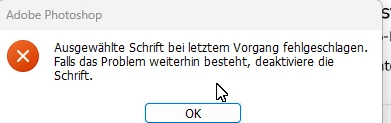
Nacvh Auswahl verschiedener Schriftarten erhalte ich die unten dargestellte Fehlermeldung "Ausgewählte Schrift bei ... ersetzen..."

Ich kann diesen Fehler nicht beheben und daher zurzeit in PS keine Texte mehr einfügen.
Wie kann ich diesen Fehler beheben?
Correct answer Aleke

Hi @Colorful_play0D45! No worries at all! So it was just one font causing the issue? If you downloaded it from Adobe Fonts, you can search for it in the Creative Cloud app and redownload it. If it was from a third-party, you might need to contact the provider.

Thanks so much for your patience!

Alek

1 reply

Community Manager
April 24, 2025

Hi @Colorful_play0D45! Sorry to hear you're having issues with fonts! 

Is this affecting every single font or just certain ones? Version 26.6 has recently been released, so could you update and see if that helps?

Also, some users have found that deleting the font cache folder can resolve similar issues. Could you give it a try?

1. Exit Photoshop and the Creative Cloud desktop app (if installed).
2. Navigate to C:\Users\[username]\AppData\Roaming\Adobe\Adobe Photoshop 2025.
3. Delete the CT Font Cache folder and empty the trash.

Let me know how it goes! 😊

Best, Alek

*(If you mention me with an @, like @Aleke, I’ll get a notification and can respond faster.)*
Known Participant
April 24, 2025

Hi Alek,

In the meantime, I helped to overcome my problem by deleting the font from Windoes\Fonts.
Of course, I thereby cannot use this font any more.

Now, I deleted the CT Font Cache folder additionally.
Is there any possibility to reload the font which I deleted?

I will now update PS to 26.6 following your recommendation. Until now Adobe has nor reminded me to update my version which should happen automatically. I will try to the reason.

You helped me a lot. Great thanks to you.

Best regards
Horst

Best regards<br />Horst
AlekeCommunity ManagerCorrect answer
Community Manager
April 24, 2025

Hi @Colorful_play0D45! No worries at all! So it was just one font causing the issue? If you downloaded it from Adobe Fonts, you can search for it in the Creative Cloud app and redownload it. If it was from a third-party, you might need to contact the provider.

Thanks so much for your patience!

Alek

*(If you mention me with an @, like @Aleke, I’ll get a notification and can respond faster.)*