
Participant
December 7, 2020
Question

Scratch Disk Full

  • December 7, 2020
  • 2 replies
  • 379 views

Hey everyone,


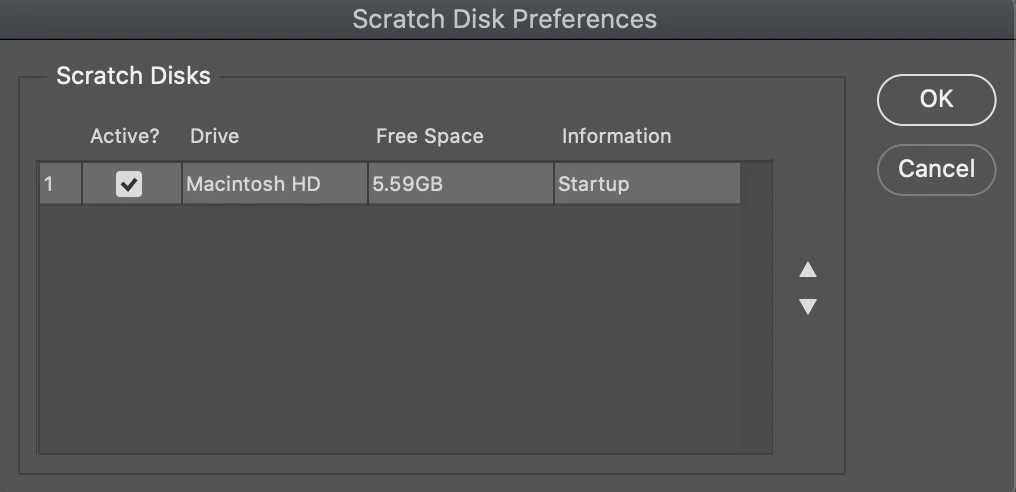
Needed some assistance with an issue I have trying to open photoshop on a mac. I tried to open it today and got the error message about the scratch disk being full and therefore I couldn't open photoshop. I searched far and wide to figure out how to alleviate this issue but it appears I can't do anything unless I actually have photoshop open which is obviously not something I'm able to do. I tried the whole CMD + Option click thing and it brought up a box that let's me do absolutely nothing. It looks like the picture below. I can't double click or right-click on anything, I can't uncheck the box under "Active?". My only two options are to hit OK or Cancel which doesn't solve my problem and is making me furious. Can anyone help me with this issue?
This topic has been closed for replies.

2 replies

D Fosse
Community Expert
Community Expert
December 7, 2020

Scratch disk is not a Photoshop setting. It's real physical disk space, and you have nothing left. Your system drive is filled to capacity. You need to free up space ASAP, or you will soon have bigger problems than Photoshop not opening.


I have single files bigger than the total free space you have left. 6 GB can be filled in seconds, and then the whole machine freezes up for good.


Image editing needs a lot of memory, much more than any RAM you may have installed. That's just the nature of raster image editing, irrespective of application. So temporary working data are written to disk. This is the scratch disk. The Photoshop dialog just gives you a way to allocate the available disk space you have.


For Photoshop to operate normally, you need as a bare minimum 100GB or so free disk space. But realistically, for any serious work, you should have 500GB or more.

Participant
December 7, 2020

Hi mate,


I got this problem before so this is what I did, hope it can help you as well.


1. Compress photoshop projects into RAR and put on any available cloud you have, then delete those in the disk.

2. Check to see the error is still there.


I believe all Adobe users have their own Creative Cloud, so try to save important projects up there. If not, using other clouds can be helpful too. Only store stocks and recourse on computer hard disk.


If you want them always available even when you don't connect to the wifi, buy an alternation hard disk and use it as a USB. 


Well, those are clumsy ways I did. Hope to see more professional responses below. 😕😕 

JJMack
Community Expert
Community Expert
December 7, 2020

Just starting Photoshop uses 7GB of scratch space on my PC. IMO you need 80GB of free space for good performance and be able to batch process images with Photoshop

JJMack