



Question
Script: Automatically create ellipse shape that matches user-drawn outline points
I figured I'd share a Photoshop script I just finished that I'm simply calling "Path Points To Ellipse".
It's one that I've imagined for a long time, but was finally possible with the help of AI (I never would have figured this out otherwise lol. And it still took a bunch of fighting with it)
What It Does: Lets you draw at least 6 arbitrary path points with the pen tool, and it will automatically create an ellipse such that the points fall along its outline. Or at least as close as possible.
Features:
- Works with any size or rotation angle
- Will still create the closest match even if the points don't form a "valid" ellipse
- Does NOT require any underlying image. It goes purely based off the points.
- The script offers to automatically fetch required 'numeric.js' library file which is used for calculations
Use Case Ideas:
- Creating a ellipse that matches a raster image without having to fuss around with the ellipse tool or free transform tool
- Testing to see if something is truly an ellipse in the first place, based on the match of the resulting ellipse
- Just roughly freehanding the points to get an ellipse close to a desired size
Demo:
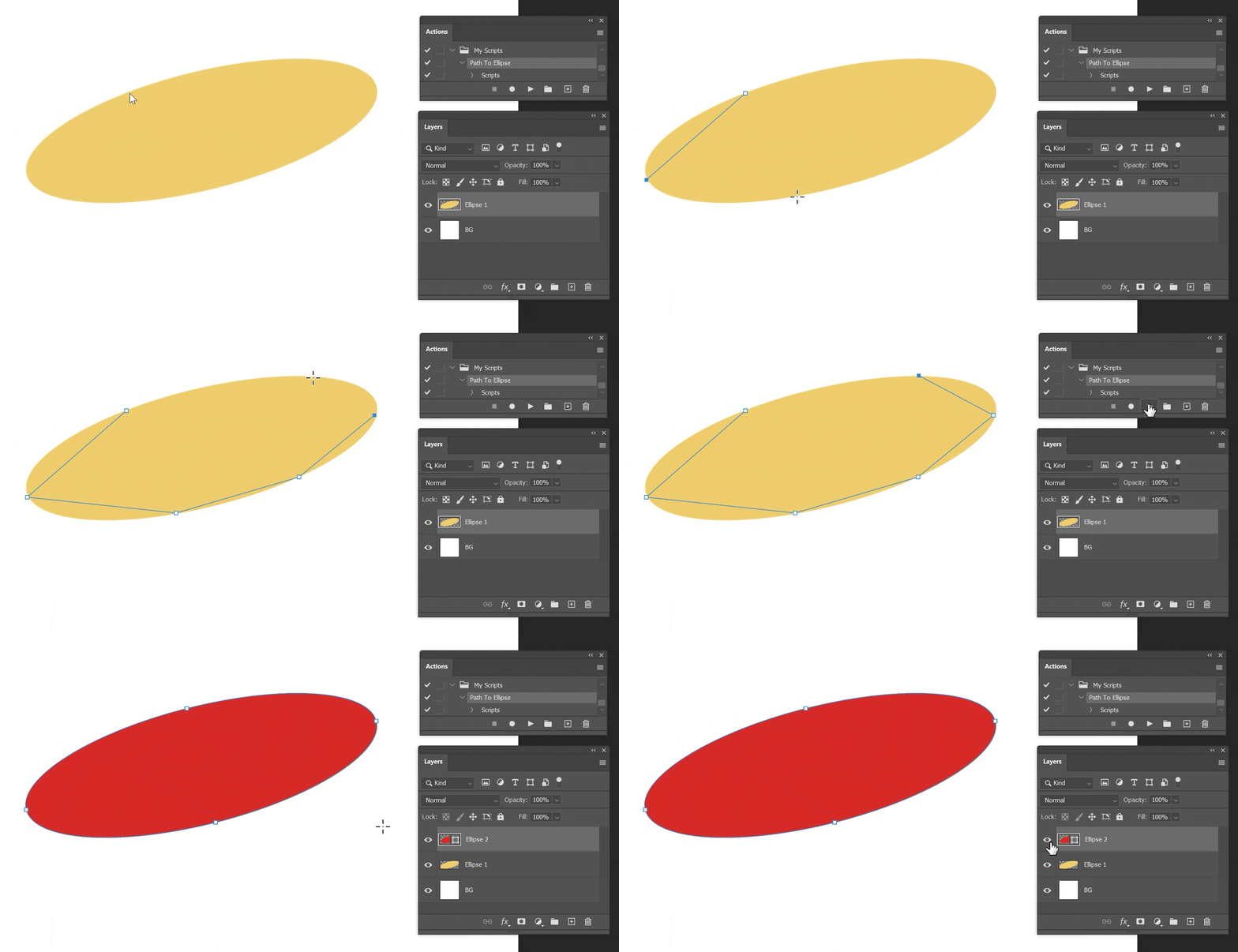
Tips:
- Based on my testing, it should even work if an ellipse/circular object has been warped by perspective
- You can try using the content-aware tracing pen tool to quickly create the points automatically, then just use those for the script
- The points can be drawn in any order. The algorithm doesn't look at the path, just the point coordinates
- Obviously the more accurately place the points, the more accurate the result
- While you could theoretically draw all the points close together on one part of the ellipse, it will be more accurate if the points are more spread out along the outline.
- Though not necessary, it's probably most accurate if you at least place four of the points near the four most extreme "sides" of the original ellipse. Basically it makes the bounds more obvious to the algorithm.
- You can use more than 6 points, that's the minimum required by the algorithm used.
Download:
- Option 1: Attached To Post: See files attached to thread below
- You can remove the ".txt" extensions (The forum restricts filetypes)
- Option 2: GitHub Repo Link: https://github.com/ThioJoe/Adobe-Apps-Scripts-And-Tools/blob/main/Scripts/Photoshop/Path-Points-To-Ellipse.jsx
- If I update it and forget to update the thread attachments, the GitHub repo will always have the latest version.
How It Works (I had the help of the AI to summarize these points 😂😞
- Uses the Direct Least Squares Fitting of Ellipses method
- Minimizes algebraic distance between points and ellipse, subject to an ellipticity constraint
- Transforms the problem into a generalized eigenvalue problem, solved using linear algebra


 AdChoices