
Andreas Resch
Inspiring
June 16, 2015
Question

Script Dialog messed up in Photoshop CC 2015

  • June 16, 2015
  • 2 replies
  • 1345 views

Hello.

My script worked fine in all the previous versions of Photoshop and suddenly the dialog is messep up. Some image buttons won't show, font have different colors, radio buttons are missing, checkoxes look horrible ...

What was done to the scripting language to make all this happen? This is very annoying.

Here a comparison of how the script looked before (left) and how it looks now (right).
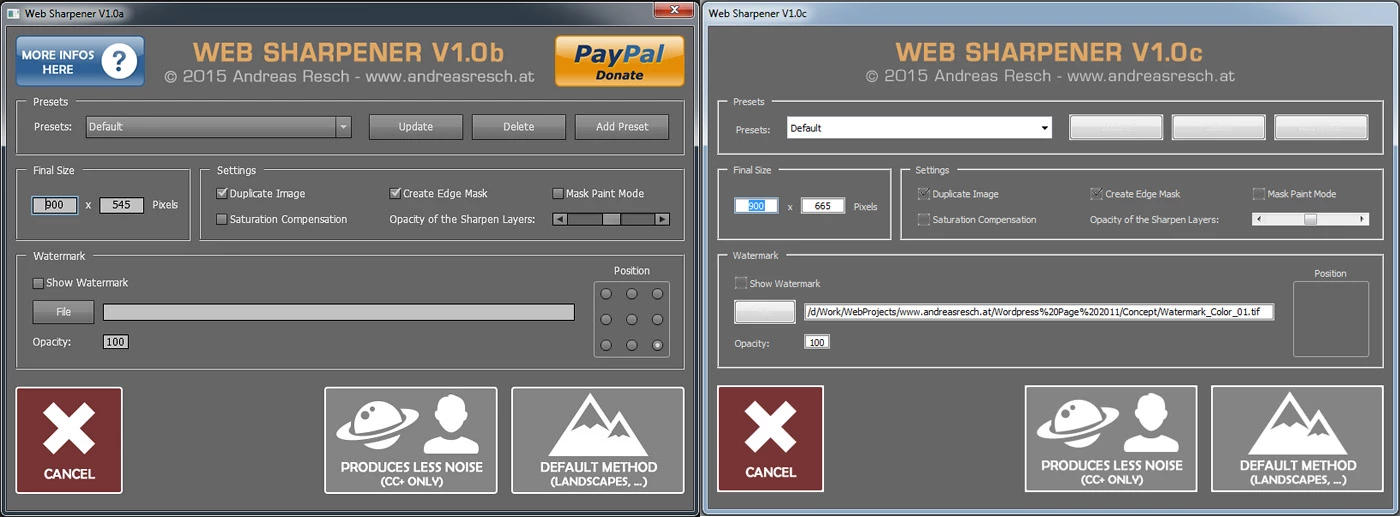
Maybe someone can explain the problem.

Cheers,

Andreas Resch

This topic has been closed for replies.

2 replies

JJMack
Community Expert
Community Expert
June 16, 2015

Photoshop Help | Photoshop UI toolkit for plug-ins and scripts

UI Layout

There are no changes in the scripting APIs for creating user interfaces. However, there is a difference in the way the grouping widget works.

In Flex, the “group” widget used to act as layout mechanism for grouping widgets and used to be completely invisible itself. Now, “group” is itself a widget with its own background and can’t overlap with other widgets.

For instance, if we have two groups arranged one over the other with widgets in each group such that widgets from one group do not overlap with widgets in the other group, all widgets are visible in Flex.

Group widget - Flex


However, in the new framework, in the same scenario, the group at the top hides the group at the bottom.

Group widget - New framework


JJMack
Andreas Resch
Inspiring
June 17, 2015

Hello,

thanks for your feedback so far, but aside from other people having issues to, there's no explanation why this was done or how to fix it.

It was mentioned, that JPGs can't be used any more, but all my image buttons are PNGs and still some of them don't show up.

Here's the code that creates my dialog in case somebody can share some light on how to modify the structure.

dlg = new Window("dialog{text:'Script Interface',bounds:[100,100,900,664],\

  titlepanel:Panel{bounds:[10,10,790,70] , text:'' ,properties:{borderStyle:'none',su1PanelCoordinates:true}, alignchildren:'center',\

  title1:Image{bounds:[0,0,780,60] , icon:'"+strScriptPath+"/header.png'},\

             infobutton:IconButton{bounds:[0,0,151,60] , icon:'"+strScriptPath+"/info" + strLanguage + ".png', properties:{style:'toolbutton'}},\

             donatebutton:IconButton{bounds:[629,0,780,60] , icon:'"+strScriptPath+"/paypal" + strLanguage + ".png', properties:{style:'toolbutton'}}\

  },\

  presetpanel:Panel{bounds:[10,80,790,150] , text:' "+strPresets+" ' ,properties:{borderStyle:'etched',su1PanelCoordinates:true},\

  presetlabel:StaticText{bounds:[20,22,80,42] , text:'"+strPresets+":' ,properties:{scrolling:false,multiline:false}},\

  presetdropdown:DropDownList{bounds:[80,17,390,43]},\

  addpreset:Button{bounds:[650,15,760,45] , text:'"+strAdd+"', name:'addpreset' },\

  deletepreset:Button{bounds:[530,15,640,45] , text:'"+strDelete+"', name:'deletepreset' },\

  updatepreset:Button{bounds:[410,15,520,45] , text:'"+strUpdate+"', name:'updatepreset' }\

  },\

  sizepanel:Panel{bounds:[10,160,214,250] , text:' "+strFinalSize+" ' ,properties:{borderStyle:'etched',su1PanelCoordinates:true},\

  widthinput:EditText{bounds:[18,32,70,51] , text:'' , justify: 'center', properties:{multiline:false,noecho:false,readonly:false}},\

  xlabel:StaticText{bounds:[80,33,86,52] , text:'x' ,properties:{scrolling:false,multiline:false}},\

  heightinput:EditText{bounds:[96,32,148,51] , text:'' , justify: 'center', properties:{multiline:false,noecho:false,readonly:false}},\

  sizeunit:StaticText{bounds:[158,33,208,52] , text:'"+strSizeUnit+"' ,properties:{scrolling:false,multiline:false}}\

  },\

  settingspanel:Panel{bounds:[224,160,790,250] , text:' "+strSettingsPanel+" ' ,properties:{borderStyle:'etched',su1PanelCoordinates:true},\

             duplicateimage:Checkbox{bounds:[18,20,218,35] , text:'"+strDuplicateImage+"' },\

             edgemask:Checkbox{bounds:[220,20,436,35] , text:'"+strEdgeMask+"' },\

             maskmode:Checkbox{bounds:[410,20,560,35] , text:'"+strMaskMode+"' },\

             saturationcompensation:Checkbox{bounds:[18,50,218,65] , text:'"+strSaturationCompensation+"' },\

             layeropacitylabel:StaticText{bounds:[220,50,408,65] , text:'"+strLayerOpacity+"' ,properties:{scrolling:false,multiline:false}},\

             layeropacitystrength:Scrollbar{bounds:[410,50,547,65] , minvalue:1, maxvalue:5, value:3, stepdelta:1, jumpdelta:1}\

  },\

  watermarkpanel:Panel{bounds:[10,260,790,400] , text:' "+strWatermark+" ' ,properties:{borderStyle:'etched',su1PanelCoordinates:true},\

  usewatermark:Checkbox{bounds:[18,20,250,44] , text:'"+strUseWatermark+"' },\

              pickwatermarkfile:Button{bounds:[18,52,90,80] , text:'"+strFile+"', name:'pickwatermarkfile' },\

  watermarkpath:EditText{bounds:[100,56,650,76] , text:'' ,properties:{multiline:false,noecho:false,readonly:false}},\

              watermarkposition:StaticText{bounds:[680,10,754,30] , text:'"+strWMPosition+"' ,justify: 'center', properties:{scrolling:false,multiline:false}},\

              posframe:Image{bounds:[672,30,761,119] , icon:'"+strScriptPath+"/posframe.png'},\

  wmpos1:RadioButton{bounds:[680,36,700,52] , text:'' }, wmpos2:RadioButton{bounds:[710,36,730,52] , text:'' }, wmpos3:RadioButton{bounds:[740,36,760,52] , text:'' },\

              wmpos4:RadioButton{bounds:[680,66,700,82] , text:'' }, wmpos5:RadioButton{bounds:[710,66,730,82] , text:'' }, wmpos6:RadioButton{bounds:[740,66,760,82] , text:'' },\

              wmpos7:RadioButton{bounds:[680,96,700,112] , text:'' }, wmpos8:RadioButton{bounds:[710,96,730,112] , text:'' }, wmpos9:RadioButton{bounds:[740,96,760,112] , text:'' },\

              watermarkopacitylabel:StaticText{bounds:[18,93,90,112] , text:'"+strWatermarkOpacity+"' ,properties:{scrolling:false,multiline:false}},\

              watermarkopacity:EditText{bounds:[100,92,130,109] , text:'0' , justify: 'center' , properties:{multiline:false,noecho:false,readonly:false}}\

  },\

  buttonpanel:Group{bounds:[0,420,800,545],\

  button1:IconButton{bounds:[588,0,790,125] , icon:'"+strScriptPath+"/button1" + strLanguage + ".png', properties:{style:'toolbutton'}},\

             button2:IconButton{bounds:[370,0,572,125] , icon:'"+strScriptPath+"/button2" + strLanguage + ".png', properties:{style:'toolbutton'}},\

  cancelbutton:IconButton{bounds:[10,0,135,125] , icon:'"+strScriptPath+"/cancelbutton" + strLanguage + ".png', properties:{style:'toolbutton'}}\

  }\

         };", strTitle);


Thanks,

Andreas

JJMack
Community Expert
Community Expert
June 17, 2015

What I saw was overlap needed to be removed from groups not longer works, and the png info seemed to be in reference for Adobe 2x UI that work on large 4K displays but not on small high resolution 2k displays.   When you have a 2K display you need to change Adobe default Auto UI scaling to 100% else Photoshop UI will not fit on the 2k Display for some reason Adobe scale its UI to 200% on 2K Displays and its UI does not fit in at 1080x720 on my Surface Pro 3...768 is Photosho height requirement.   Here is what I read in the like I posted.

Note:

Some users may find that their existing scripts have incorrect UI layout in the new framework because of this same reason. All such scripts should be modified by removing overlaps in the “group” widgets. Scripts created afresh in the new framework or modified to run in it work fine in Flex as well.

HiDPI support

With this change, script UI now supports HiDPI displays as well. However, no change is required in the scripts to make it work on HiDPI displays. You just need to place the 2x image assets alongside the 1x image assets having same filename as 1x image asset followed by @2X as suffix.

For instance, if the filename for 1x image asset is imageFile.png, then 2x image asset should be named as imageFile@2X.png and present at the same location.

Note:

If the 2x image asset is not found, 1x image asset will be used.

JJMack
Inspiring
June 16, 2015

I understand your pain.

See this thread: Photoshop CC 2015 changes to scripting

Please report any new bugs that I haven't already.