
Participating Frequently
April 11, 2019
Question

Script help: Crop based on select subject

  • April 11, 2019
  • 4 replies
  • 14459 views

I have been trying to create an action, but think it's going to take a little more than that to accomplish what I am trying to do.  Please let me know if for some reason it would not be possible.

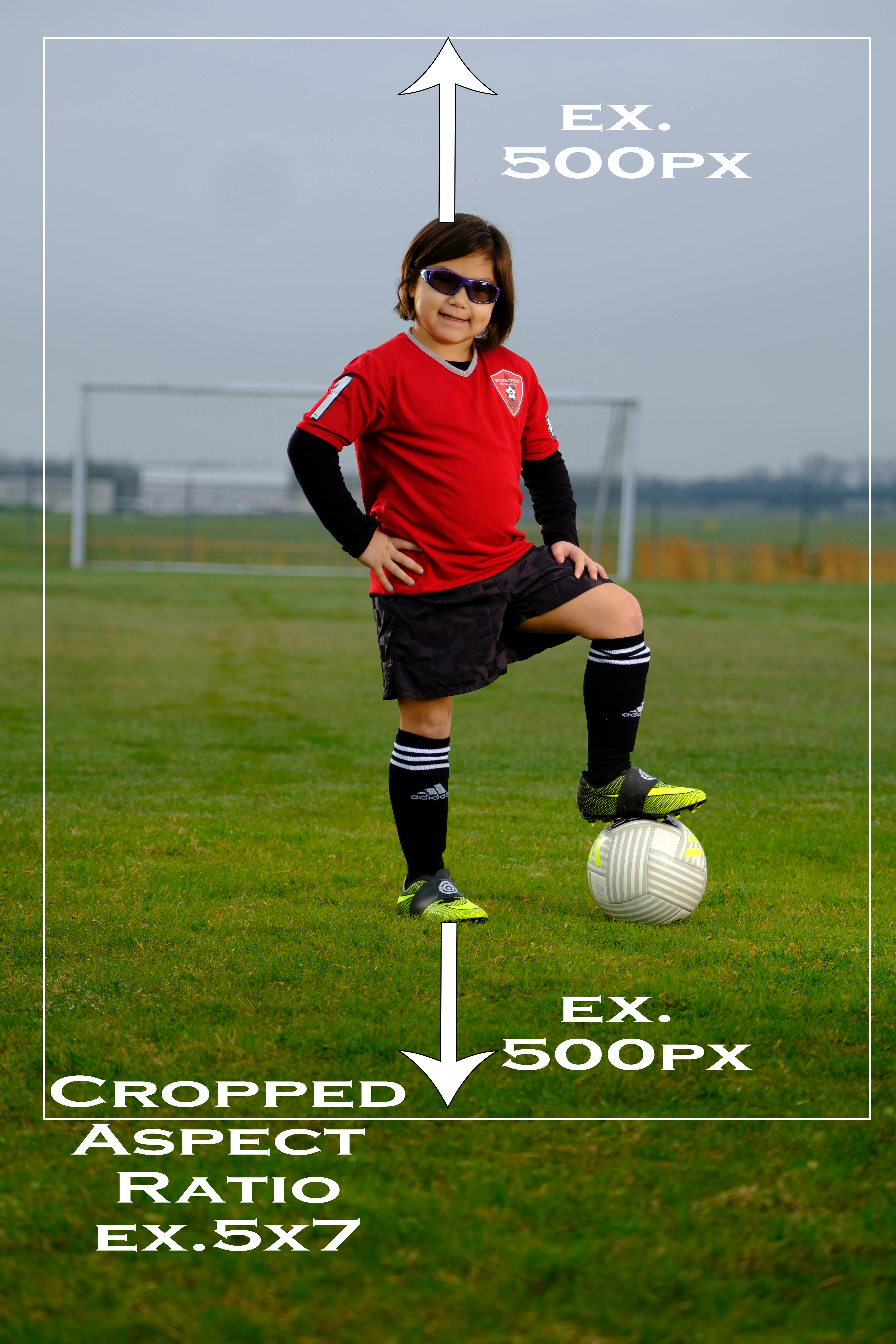
I photograph full length portraits(natural background-Not Green screen).  I am looking to be able to auto crop based on a set amount of pixels above the head and feet(based on the select subject) and then be able to crop in a certain aspect ratio(5x7,8x10,7x10, ect....) keeping the padding above the head and feet keeping the subject in the middle of the photo.
This topic has been closed for replies.

4 replies

willcampbell7
Legend
August 26, 2020

In the time since I posted a reply to this message, with some code, I've taken that code and rolled it into a full script with interface. Anyone interested have a look and see if it suits your needs for auto cropping. Download free here Auto Crop

William Campbell
willcampbell7
Legend
December 28, 2020

I've updated the script to use content-aware cropping.

Auto Crop

Also I now have a YouTube of using the script. Photoshop Script Auto Crop

William Campbell
Stephen Marsh
Community Expert
Community Expert
May 7, 2019

A related topic thread here:

Batch cropping to aspect ratio

Participant
March 4, 2020

Anyone tried this plug in

World's Best Volume Photo Cropping!


Seems to be exactly the intended purpose.


I ask because I'm looking for a solution to auto-crop out heads

JJMack
Community Expert
Community Expert
April 12, 2019

While the select subject in the case selection bounds would most likely have a portrait aspect ratio where the height is lager than the width. That will not always be the case.  So you can not simply add 1000 Pixels to the height and set a standard portrait Aspect Ratio that height.  If the select subject selection has a landscape aspect ratio the a standard portrait selection crop would crop off  parts of the subject.

However you could select subject expand the selection 500px and crop to a none standard aspect ratio which may be a portrait or square or landscape aspect ratio,  It would be a very easy action to record. It will work well as long as there are 500PX on all sides of the select subject selection bounds.

JJMack
Participating Frequently
April 12, 2019

Yes you are correct, I have gotten that far, the problem is the crop is then based on the height of the person(+500px) and not an set aspect ratio.  So the the tall athletes, you get a long and skinny crop. 

JJMack
Community Expert
Community Expert
April 12, 2019

If you know how to script Photoshop you could calculate a standard Landscape or Portrait aspect ratio crop once  you get the select subject bounds.  However Select subject does not always get it right IMO. And there would need to be sufficient room for the crop. If the subject is not well centered with room for the crop you will run out of canvas to make the crop

JJMack
Stephen Marsh
Community Expert
Community Expert
April 12, 2019

The following script from JJMack may be of help in an action:


AspectRatioSelection.jsx

JJMacksCraftingActions.zip


I am kicking this around and will post back once I have a workable solution incorporating the script with an action… Otherwise a full custom script would be required.


You may also find this recent discussion helpful:


Guide Lines for Print Sizes Action?

Participating Frequently
April 12, 2019

Awesome, Thank you!  I will take a look at JJmack's action too, 

Stephen Marsh
Community Expert
Community Expert
April 15, 2019

Hi Howard, the various sample images did help… I had to revise my original action as it did not work consistently with your original goal of having the 500px padding at the head and foot of the image. It did work well to scale the images to the desired aspect ratio, however the crops would have been too variable. In the end I did have to reference two “helper” scripts to get the job done.


The action to auto crop takes about 10 seconds per picture on my old laptop. The action can be batched through the standard Image Processor script or the third party Image Processor Pro script. The action presumes that the start point is a flattened image. Any existing guides will be removed. It may be possible to optimise the run of the action, I went down the path of flexibility over speed.


You can then double check the batch output in Bridge using the filter panel for aspect ratio and isolate any shots that have failed due to the image content and canvas size breaking the aspect ratio crop.


If you process to PSD format, you can then open up the PSD and you will have access to the un-cropped image, which allows fine tuning of position and size etc. The action set offers a “revert” action that will reset the processed PSD back to the original 4160 x 6240 canvas size so that you can potentially use the crop tool set to the desired aspect ratio to manually crop if required.


You will need to install Downloading and Installing Adobe Scripts the two helper scripts before running the action. I have zip compressed the action set and helper scripts for download Auto Crop Sports Portraits.zip.


I have only offered a 5:7 crop action in the set, it should be easy enough to duplicate and rename the action for other aspect ratio crops. You should only need to edit/replace 2 steps in a duplicated action to repurpose it for a new crop aspect ratio such as 8:10 etc. I’m of course happy to discuss this when needed.


P.S. You may also find the following script of use for quickly checking the aspect ratio of an open image in Photoshop:


Prepression: Photoshop – Document Info: Aspect Ratio Value Script


Two helper scripts were instrumental in my action. I’ll post the code here as the DropBox link will no doubt be broken at a future point in time:


// Add Guides to Selection Bounds.jsx

// Photoshop: Add guides to a selection (a javascript solution)


#target Photoshop


main();

function main(){

if(!documents.length) return;

var startRulerUnits = preferences.rulerUnits;

try{

preferences.rulerUnits = Units.PIXELS

var SB = activeDocument.selection.bounds;

}catch(e){return;}

guideLine(SB[1].value,"Hrzn");

guideLine(SB[3].value,"Hrzn");

guideLine(SB[0].value,"Vrtc");

guideLine(SB[2].value,"Vrtc");

preferences.rulerUnits = startRulerUnits;

}

function guideLine(position, type){

var desc = new ActionDescriptor();

var desc2 = new ActionDescriptor();

desc2.putUnitDouble( app.charIDToTypeID ('Pstn'), app.charIDToTypeID('#Pxl'), position );

desc2.putEnumerated( app.charIDToTypeID('Ornt'), app.charIDToTypeID('Ornt'), app.charIDToTypeID(type) );

desc.putObject( app.charIDToTypeID('Nw  '), app.charIDToTypeID('Gd  '), desc2 );

executeAction( app.charIDToTypeID('Mk  '), desc, DialogModes.NO );

};


// https://forums.adobe.com/message/8732179#8732179

// https://forums.adobe.com/message/8728770#8728770


// 2019 - Uncomment line 116 to enable the layer mask, which has been disabled to retain the proportions of the resized layer


// FitImageToGuides.jsx


/* ==========================================================

// 2014  John J. McAssey (JJMack) 

// ======================================================= */ 


// This script is supplied as is. It is provided as freeware.  

// The author accepts no liability for any problems arising from its use. 


/* Help Category note tag menu can be used to place script in automate menu

<javascriptresource>

<about>$$$/JavaScripts/FitImageToGuides/About=JJMack's FitImageToGuides .^r^rCopyright 2014 Mouseprints.^r^rFour and only four guides are required</about>

<category>JJMack's Script</category>

</javascriptresource>

*/ 


// enable double-clicking from Mac Finder or Windows Explorer 

#target photoshop 


// bring application forward for double-click events 

app.bringToFront(); 


// ensure at least one document open 

if (!documents.length) alert('There are no documents open.', 'No Document'); 

else { 

  // declare Global variables 


  //main(); // at least one document exists proceed 

  app.activeDocument.suspendHistory('Fix Image to Guides','main()');  //problem if there is a selection a layer resize Photoshop back up a history step ? 

/////////////////////////////////////////////////////////////////////////////// 

//                            main function                              

/////////////////////////////////////////////////////////////////////////////// 

function main() { 

  // declare local variables 

  var orig_ruler_units = app.preferences.rulerUnits; 

  var orig_type_units = app.preferences.typeUnits; 

  var orig_display_dialogs = app.displayDialogs; 

  app.preferences.rulerUnits = Units.PIXELS; // Set the ruler units to PIXELS 

  app.preferences.typeUnits = TypeUnits.POINTS;   // Set Type units to POINTS 

  app.displayDialogs = DialogModes.NO; // Set Dialogs off 

  try { code(); } 

  // display error message if something goes wrong 

  catch(e) { alert(e + ': on line ' + e.line, 'Script Error', true); } 

  app.displayDialogs = orig_display_dialogs; // Reset display dialogs  

  app.preferences.typeUnits  = orig_type_units; // Reset ruler units to original settings  

  app.preferences.rulerUnits = orig_ruler_units; // Reset units to original settings 

/////////////////////////////////////////////////////////////////////////////// 

//                           main function end                             

/////////////////////////////////////////////////////////////////////////////// 


/////////////////////////////////////////////////////////////////////////////////////////////// 

// The real code is embedded into this function so that at any point it can return  

// to the main line function to let it restore users edit environment and end       

////////////////////////////////////////////////////////////////////////////////////////////// 

function code() { 

  if (app.activeDocument.guides.length != 4) { alert("Four and only four Guides are required"); return; } // quit 

  // get guides; 

  var theVert = new Array; 

  var theHor = new Array; 

  for (var m = 0; m < app.activeDocument.guides.length; m++) { 

  if (app.activeDocument.guides.direction == Direction.HORIZONTAL) {theVert.push(app.activeDocument.guides.coordinate)} 

  else {theHor.push(app.activeDocument.guides.coordinate)} 

    }; 

  if (theHor.length != 2 || theVert.length != 2) { alert("Four Guides two vertical and two horizontal are required"); return; } // quit 

  getTarget=getSelectedLayersIdx(); 

  if (getTarget.length!=1){ alert("The number of layers targeted is " + getTarget.length ); return; } // quit 

  if (app.activeDocument.activeLayer.isBackgroundLayer ) { alert("Can not resize the background layer"); return; } // quit 

  if (!app.activeDocument.activeLayer.visible ) { alert("Active layer is  not visible"); return; } // quit 

  //if (hasLayerMask()) { alert("Active layer is  Masked"); return; } // quit 

  if (app.activeDocument.activeLayer.kind == LayerKind.NORMAL  || app.activeDocument.activeLayer.kind == LayerKind.SMARTOBJECT && hasLayerMask()) { deleteLayerMask ();} 

  if (app.activeDocument.activeLayer.kind != LayerKind.NORMAL  && app.activeDocument.activeLayer.kind != LayerKind.SMARTOBJECT )  {  

  alert("Active layer is " + app.activeDocument.activeLayer.kind); return; } // quit 

  // set selection to the area defined but the guide lines the selection may get undone by the bug in .resize() backing up a step in histoty ??? 

  app.activeDocument.selection.select([[theHor[0], theVert[0]], [theHor[1], theVert[0]], [theHor[1], theVert[1]], [theHor[0], theVert[1]]]); 

  // resize current normal layer or smart object layer to just cover selection canvas area aspect ratio and size and mask off any overflow 

  var SB = app.activeDocument.selection.bounds; // Get selection bounds 

  var SWidth = (SB[2].value) - (SB[0].value); // Area width 

  var SHeight = (SB[3].value) - (SB[1].value); // Area height 

  var LB = app.activeDocument.activeLayer.bounds; // Get Active layers bounds 

  var LWidth = (LB[2].value) - (LB[0].value); // Area width 

  var LHeight = (LB[3].value) - (LB[1].value); // Area height 

  var userResampleMethod = app.preferences.interpolation; // Save interpolation settings 

  app.preferences.interpolation = ResampleMethod.BICUBIC; // resample interpolation bicubic 

  app.activeDocument.selection.deselect(); // This deselect work around Adobe Bug in CS5, CS6, CC and CC 2014 

  // Since Adobe does not fix old releases of Photoshop this is a necessary work around for many releases of Photoshop 

  //alert("Before re-size history");  // Added to debug Adobe Resize Bug 

  try { 

  if (LWidth/LHeight<SWidth/SHeight) { // layer's Aspect Ratio less the Canvas area Aspect Ratio  

  var percentageChange = ((SWidth/LWidth)*100); // Resize to canvas area width 

  app.activeDocument.activeLayer.resize(percentageChange,percentageChange,AnchorPosition.MIDDLECENTER); 

  } 

  else {  

  var percentageChange = ((SHeight/LHeight)*100); // resize to canvas area height 

  app.activeDocument.activeLayer.resize(percentageChange,percentageChange,AnchorPosition.MIDDLECENTER); 

  } 

  } 

  catch(e) {  

  app.preferences.interpolation = userResampleMethod; // Reset interpolation setting 

  selectFront(); // Photoshop make top layer current when none are targeted 

  code(); // Retry  with top visible layer selected targeted  

  return; // rest would have been done during the retry 

  } 

  //alert("After re-size history");    // Added to debug Adobe Resize Bug 

  app.preferences.interpolation = userResampleMethod; // Reset interpolation setting 

  // Seems to be a bug in  resize() the document seems to first be backed up a step in history 

  app.activeDocument.selection.select([[theHor[0], theVert[0]], [theHor[1], theVert[0]], [theHor[1], theVert[1]], [theHor[0], theVert[1]]]); // redo the selection 

  align('AdCH'); // align to horizontal centers 

  align('AdCV'); // align to vertical centers 

  // addLayermask(); // add layer mask to mask off excess

///////////////////////////////////////////////////////////////////////////////////////////////////////////////////////////////////////////////////////////////////// 

// Helper Functions 

///////////////////////////////////////////////////////////////////////////////////////////////////////////////////////////////////////////////////////////////////// 

function align(method) { 

  var desc = new ActionDescriptor(); 

  var ref = new ActionReference(); 

  ref.putEnumerated( charIDToTypeID( "Lyr " ), charIDToTypeID( "Ordn" ), charIDToTypeID( "Trgt" ) ); 

  desc.putReference( charIDToTypeID( "null" ), ref ); 

  desc.putEnumerated( charIDToTypeID( "Usng" ), charIDToTypeID( "ADSt" ), charIDToTypeID( method ) ); 

  try{executeAction( charIDToTypeID( "Algn" ), desc, DialogModes.NO );} 

  catch(e){} 

///////////////////////////////////////////////////////////////////////////////    

// Function: hasLayerMask    

// Usage: see if there is a raster layer mask    

// Input: <none> Must have an open document    

// Return: true if there is a vector mask    

///////////////////////////////////////////////////////////////////////////////    

function hasLayerMask() {    

  var hasLayerMask = false;    

  try {    

  var ref = new ActionReference();    

  var keyUserMaskEnabled = app.charIDToTypeID( 'UsrM' );    

  ref.putProperty( app.charIDToTypeID( 'Prpr' ), keyUserMaskEnabled );    

  ref.putEnumerated( app.charIDToTypeID( 'Lyr ' ), app.charIDToTypeID( 'Ordn' ), app.charIDToTypeID( 'Trgt' ) );    

  var desc = executeActionGet( ref );    

  if ( desc.hasKey( keyUserMaskEnabled ) ) { hasLayerMask = true; }    

  } 

  catch(e) { hasLayerMask = false; }    

  return hasLayerMask;    

}    

function getSelectedLayersIdx(){ 

      var selectedLayers = new Array; 

      var ref = new ActionReference(); 

      ref.putEnumerated( charIDToTypeID("Dcmn"), charIDToTypeID("Ordn"), charIDToTypeID("Trgt") ); 

      var desc = executeActionGet(ref); 

      if( desc.hasKey( stringIDToTypeID( 'targetLayers' ) ) ){ 

         desc = desc.getList( stringIDToTypeID( 'targetLayers' )); 

          var c = desc.count 

          var selectedLayers = new Array(); 

          for(var i=0;i<c;i++){ 

            try{ 

               activeDocument.backgroundLayer; 

               selectedLayers.push(  desc.getReference( i ).getIndex() ); 

            }catch(e){ 

               selectedLayers.push(  desc.getReference( i ).getIndex()+1 ); 

            } 

          } 

       }else{ 

         var ref = new ActionReference(); 

         ref.putProperty( charIDToTypeID("Prpr") , charIDToTypeID( "ItmI" )); 

         ref.putEnumerated( charIDToTypeID("Lyr "), charIDToTypeID("Ordn"), charIDToTypeID("Trgt") ); 

         try{ 

            activeDocument.backgroundLayer; 

            selectedLayers.push( executeActionGet(ref).getInteger(charIDToTypeID( "ItmI" ))-1); 

         }catch(e){ 

            selectedLayers.push( executeActionGet(ref).getInteger(charIDToTypeID( "ItmI" ))); 

         } 

      } 

      return selectedLayers; 

}; 

function selectFront() { 

// Alt+. shortcut select ftont visible layer 

var idslct = charIDToTypeID( "slct" ); 

    var desc250 = new ActionDescriptor(); 

    var idnull = charIDToTypeID( "null" ); 

        var ref207 = new ActionReference(); 

        var idLyr = charIDToTypeID( "Lyr " ); 

        var idOrdn = charIDToTypeID( "Ordn" ); 

        var idFrnt = charIDToTypeID( "Frnt" ); 

        ref207.putEnumerated( idLyr, idOrdn, idFrnt ); 

    desc250.putReference( idnull, ref207 ); 

    var idMkVs = charIDToTypeID( "MkVs" ); 

    desc250.putBoolean( idMkVs, false ); 

executeAction( idslct, desc250, DialogModes.NO ); 

function deleteLayerMask (apply) { 

// Delet Layer mask default to not apply first 

if (apply == undefined) {var apply = false}; 

try { 

var idDlt = charIDToTypeID( "Dlt " ); 

    var desc9 = new ActionDescriptor(); 

    var idnull = charIDToTypeID( "null" ); 

        var ref5 = new ActionReference(); 

        var idChnl = charIDToTypeID( "Chnl" ); 

        var idChnl = charIDToTypeID( "Chnl" ); 

        var idMsk = charIDToTypeID( "Msk " ); 

        ref5.putEnumerated( idChnl, idChnl, idMsk ); 

    desc9.putReference( idnull, ref5 ); 

    var idAply = charIDToTypeID( "Aply" ); 

    desc9.putBoolean( idAply, apply ); 

executeAction( idDlt, desc9, DialogModes.NO ); 

catch (e) {} 

}; 

function addLayermask(){ 

// Add layer Mask 

var idMk = charIDToTypeID( "Mk  " ); 

    var desc52 = new ActionDescriptor(); 

    var idNw = charIDToTypeID( "Nw  " ); 

    var idChnl = charIDToTypeID( "Chnl" ); 

    desc52.putClass( idNw, idChnl ); 

    var idAt = charIDToTypeID( "At  " ); 

        var ref19 = new ActionReference(); 

        var idChnl = charIDToTypeID( "Chnl" ); 

        var idChnl = charIDToTypeID( "Chnl" ); 

        var idMsk = charIDToTypeID( "Msk " ); 

        ref19.putEnumerated( idChnl, idChnl, idMsk ); 

    desc52.putReference( idAt, ref19 ); 

    var idUsng = charIDToTypeID( "Usng" ); 

    var idUsrM = charIDToTypeID( "UsrM" ); 

    var idRvlS = charIDToTypeID( "RvlS" ); 

    desc52.putEnumerated( idUsng, idUsrM, idRvlS ); 

executeAction( idMk, desc52, DialogModes.NO ); 

// Un link layer mask just added fron the layers content 

var idsetd = charIDToTypeID( "setd" ); 

    var desc2 = new ActionDescriptor(); 

    var idnull = charIDToTypeID( "null" ); 

        var ref1 = new ActionReference(); 

        var idLyr = charIDToTypeID( "Lyr " ); 

        var idOrdn = charIDToTypeID( "Ordn" ); 

        var idTrgt = charIDToTypeID( "Trgt" ); 

        ref1.putEnumerated( idLyr, idOrdn, idTrgt ); 

    desc2.putReference( idnull, ref1 ); 

    var idT = charIDToTypeID( "T   " ); 

        var desc3 = new ActionDescriptor(); 

        var idUsrs = charIDToTypeID( "Usrs" ); 

        desc3.putBoolean( idUsrs, false ); 

    var idLyr = charIDToTypeID( "Lyr " ); 

    desc2.putObject( idT, idLyr, desc3 ); 

executeAction( idsetd, desc2, DialogModes.NO ); 

}