
Participant
November 26, 2019
Question

Script to get a name from a list of grouped layers

  • November 26, 2019
  • 3 replies
  • 1972 views

Hi.


I am trying to make a script that can grab a name from a list of grouped layers. I only need the name from one group at a time. (All of the other groups would not be visible, only the one I need will be visible).


So I am trying to make a script that can look for the only visible group from the list of grouped layer. Get the name of the visible layer and use that name to save out as jpeg.


Can someone please point me in the right direction?

Please see below for the layer structure.
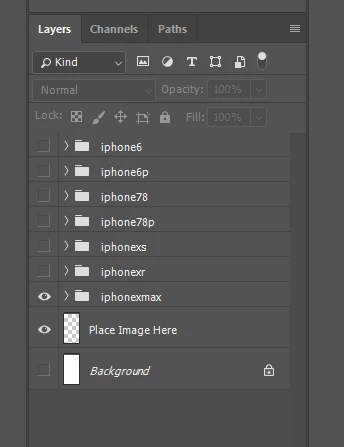


Thanks.

This topic has been closed for replies.

3 replies

JJMack
Community Expert
Community Expert
November 27, 2019

You would need to process artlayers within the layerset you are interested in. If you do not know that the document being processed has unique layer and layerset names you can not count on names being unigue.  You need to use a recursive process for layerset nesting is possible.  So a layerset may haves nested layesets within it and so on. This may help.

/* ==========================================================
// 2017  John J. McAssey (JJMack) 
// ======================================================= */
// This script is supplied as is. It is provided as freeware. 
// The author accepts no liability for any problems arising from its use.
// enable double-clicking from Mac Finder or Windows Explorer
#target photoshop // this command only works in Photoshop CS2 and higher
// bring application forward for double-click events
app.bringToFront();
// ensure at least one document open
if (!documents.length) alert('There are no documents open.', 'No Document');
else {
	// declare Global variables
	//main(); // at least one document exists proceed
    app.activeDocument.suspendHistory('Some Process Name','main()');
}
///////////////////////////////////////////////////////////////////////////////
//                            main function                                  //
///////////////////////////////////////////////////////////////////////////////
function main() {
	// declare local variables
	var orig_ruler_units = app.preferences.rulerUnits;
	var orig_type_units = app.preferences.typeUnits;
	var orig_display_dialogs = app.displayDialogs;
	app.preferences.rulerUnits = Units.PIXELS;  	// Set the ruler units to PIXELS
	app.preferences.typeUnits = TypeUnits.POINTS;   // Set Type units to POINTS
	app.displayDialogs = DialogModes.NO;	    	// Set Dialogs off
	try { code(); }
	// display error message if something goes wrong
	catch(e) { alert(e + ': on line ' + e.line, 'Script Error', true); }
	app.displayDialogs = orig_display_dialogs;  	// Reset display dialogs 
	app.preferences.typeUnits  = orig_type_units;	// Reset ruler units to original settings 
	app.preferences.rulerUnits = orig_ruler_units;	// Reset units to original settings
}
///////////////////////////////////////////////////////////////////////////////
//                           main function end                               //
///////////////////////////////////////////////////////////////////////////////

/////////////////////////////////////////////////////////////////////////////////////
// The real code is embedded into this function so that at any point it can return //
// to the main line function to let it restore users edit environment and end      //
/////////////////////////////////////////////////////////////////////////////////////
function code() {
	processArtLayers(activeDocument)  
}
function processArtLayers(obj) {  
    for( var i = obj.artLayers.length-1; 0 <= i; i--) {/* alert(obj.artLayers[i]); */processLayers(obj.artLayers[i])}  
    for( var i = obj.layerSets.length-1; 0 <= i; i--) {/* alert(obj.layerSets[i]); */processArtLayers(obj.layerSets[i])} // Process Layer Set Layers  
} 
function processLayers(layer) { 
//	alert('Layer Name = "' + layer.name + '"');
	switch (layer.kind){
	case LayerKind.SMARTOBJECT : processSmartObj(layer); break;
	default : break; // none process layer types catch all
	}
} 
//////////////////////////////////////////////////////////////////////////////////
//			Layer Type Functions					//
//////////////////////////////////////////////////////////////////////////////////
function processSmartObj(obj) { 
//	alert('Smart Object = "' + obj.name + '"');
	var localFilePath = "";
	var ref = new ActionReference();    
    ref.putIdentifier(charIDToTypeID('Lyr '), obj.id );    
    var desc = executeActionGet(ref);    
    var smObj = desc.getObjectValue(stringIDToTypeID('smartObject'));   
	try {
		alert(obj_to_str(smObj), "Object Properties"); 
		var localFilePath = smObj.getPath(stringIDToTypeID('link'));   
		alert("Layer " + obj.name + ' linked file is"' +  localFilePath + '"');
	}
	catch(e) {}
	return localFilePath;
}
function obj_to_str(obj){var str = ""; for (var p in obj) if(obj.hasOwnProperty(p))try{str+=p+"::"+obj[p]+"\n";}catch(e){};return str;}  


JJMack
Legend
November 26, 2019

for(var a = 0; a < app.activeDocument.layerSets.length; a++){
alert(app.activeDocument.layerSets[a].visible.toString());
}


Legend
November 26, 2019

I should add... you can test for visibility (Boolean) and then get the name.


for(var a = 0; a < app.activeDocument.layerSets.length; a++){
alert(app.activeDocument.layerSets[a].visible.toString() + ' ' + app.activeDocument.layerSets[a].name);
}

c.pfaffenbichler
Community Expert
Community Expert
November 26, 2019

Please post a meaningful screenshot of the Layers Panel because I for one am not sure I understand the Layer/Group-structure in question. 

Participant
November 27, 2019

Sorry. I've included a screenshot of the layer structure.

It is basically a template for different sizes of phone cases. I will only need one group visible at one time.