
Participant
February 28, 2022
Question

Script to group layers with similar postScriptName

  • February 28, 2022
  • 1 reply
  • 434 views

Hello. I have several documents with many text layers and I wish to sort the text layers into 2 groups at least. I want all similar fonts to be in their respective new groups, as shown in the example below. 
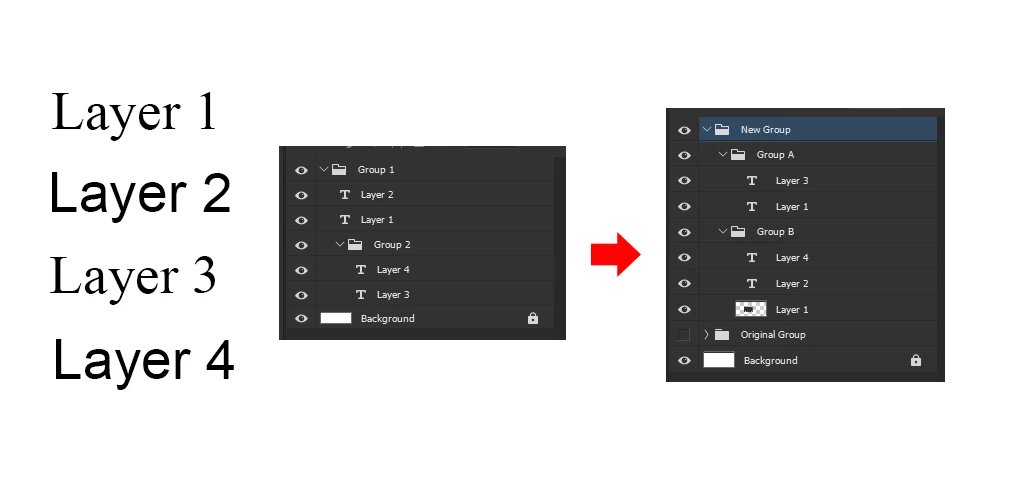
Note that the actual documents can also contain image layers but I only want the text layers to be sorted, regardless of the layer order.


This topic has been closed for replies.

1 reply

Kukurykus
Legend
February 28, 2022
JhooonAuthor
Participant
March 1, 2022

Hello! Thank you for the suggestion. I've look into the two codes and found both of them very useful! Over the past days, I've been trying to change some variables on the original scripts though I'm struggling as I only have basic understanding about JS, and programming in general. I can only do as much as basic text formatting on ungrouped layers in a document.

In the meantime, I might have found an alternative involving at least 2 scripts from these threads:

Select text layers: https://community.adobe.com/t5/photoshop/select-only-the-text-layers/m-p/11017397


Group layers: https://community.adobe.com/t5/photoshop/create-group-from-existing-layers/m-p/11211578

I've thought about combining these two in an Action. For selecting layers, I'll attempt to add a filter of 2 conditions: the name of each font (since the documents contain common fonts) and that if it is a visible text layer. Before the text are grouped though, it has to be formatted using either my Action or script (Although it won't work on groups/layerSets so I might resort to using mainly the Action I've prepared.). So it's select -> format -> group using both scripts and Photoshop shortcuts (like the grouping part maybe) in one Action.

Do you have some recommended readings or tutorial on JS? I'm also following the official Photoshop scripting reference.