
Scrubby zoom suddenly stoped working
I have a problem with photoshop CC2018 (in CS6 version problem doesn't exist).
I'm working with product photography (about 100 photos per one catalog) and in random moment after some time scrubby zoom just stops working.
I see that it always stops working when I'm using pen tool and zooming by CTRL+space+drag, I don't know if it's a rule.
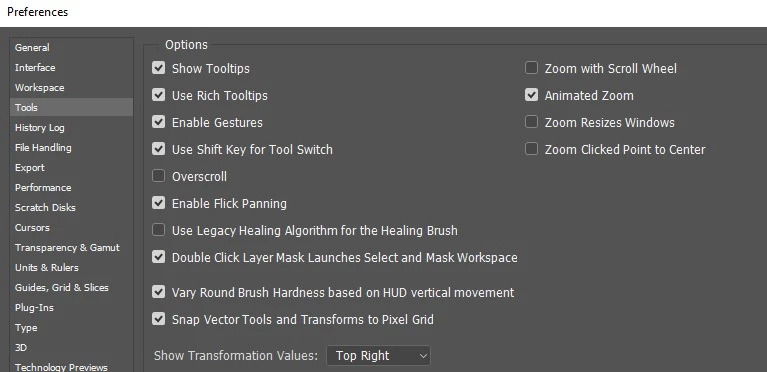
Maybe there is a mysterious key shortcut that disables animated zoom, I don't know. After restart program problem is solved. After create new/open recent document problem is solved too (but only on this new opened tab)
System info and screens:
Adobe Photoshop Version: 19.0 20171103.r.190 2017/11/03: 1143799 x64
Number of Launches: 37
Operating System: Windows 10 64-bit
Version: 10 or greater 10.0.16299.15
System architecture: Intel CPU Family:6, Model:12, Stepping:3 with MMX, SSE Integer, SSE FP, SSE2, SSE3, SSE4.1, SSE4.2, AVX, AVX2, HyperThreading
Physical processor count: 2
Logical processor count: 4
Processor speed: 2898 MHz
Built-in memory: 16326 MB
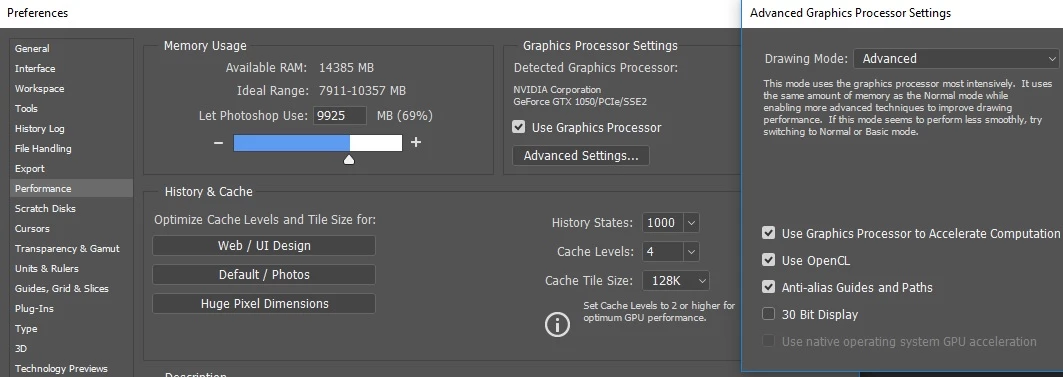
Memory available to Photoshop: 14385 MB
Memory used by Photoshop: 69 %
Surface Dial: Enabled.
Alias Layers: Disabled.
Modifier Palette: Enabled.
Highbeam: Enabled.
Image tile size: 128K
Image cache levels: 4
Display: 1
OpenGL Drawing: Enabled.
OpenGL Allow Old GPUs: Not Detected.
OpenGL Drawing Mode: Advanced
OpenGL Allow Normal Mode: True.
OpenGL Allow Advanced Mode: True.
glgpu[0].GLVersion="4.1"
glgpu[0].IsIntegratedGLGPU=0
glgpu[0].GLMemoryMB=2048
glgpu[0].GLName="NVIDIA GeForce GTX 1050"
glgpu[0].GLVendor="NVIDIA Corporation"
glgpu[0].GLDriverVersion="23.21.13.8813"
glgpu[0].GLRectTextureSize=32768
glgpu[0].GLRenderer="GeForce GTX 1050/PCIe/SSE2"

 AdChoices