
Participating Frequently
May 8, 2017
Answered

Select and Mask mode not working

  • May 8, 2017
  • 3 replies
  • 22526 views

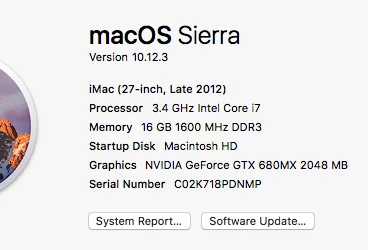
I've been struggling with this all weekend. Not sure if it's a performance issue. However when i go into select and mask mode. Everything seems fine. I lassoed the background out and ready to go in there and get the fine details out of the model off the background. The one thing is the brushes doent respond at all. I can move them over and nothing happens. I just end up clicking ok and nothing happens. Not sure what is. Please help. Here is what I have.
This topic has been closed for replies.
Correct answer davescm

That doesnt even work I can select stuff but it goes to SM area and I cant use any of the tools they dont do anything and then I hit ok and it wont even cut out the rough selection that I used. So not sure what to do. I can't even call support to find out what the issues are.


Hi

If you can't use any tools in Select and Mask and cannot use refine edge either, using the method I described, I would reset your preferences.

Go to Preferences > General and click Reset Preferences on Quit. Click OK then close and restart Photoshop

Dave

3 replies

Participant
November 22, 2021

Actually, the solution might seems very fake but that's the go you've been looking for. When you find yourself struggling in a situation like this,


Just press the letter Q, This simply enables/dissables Quick mask mode, Once you have dissabled the same you're good to go... As simple as that.... I hope this works for you....

Participant
December 1, 2020

I think I am having the same issue as stated above. I have been resetting my photoshop but are there any solutions besides resetting it? Because it is getting too often. And what are the reason(s) behind it? 

Participant
May 22, 2021

I have update my Photoshop 2021 to 22.4.1 and I have the above mentioned problem. I have resetted preferences and restarted, it did not work. Still the tools in Select & Mask are not working. But I followed the advice above to go to menu, hold shift and choose Select and mask to get the old Refine edge tool. That one works and finally I can edit my selection, although I would be glad to use the new tool (tutorials I follow uses the new one). Anyone have any idea how to fix it?

Participant
May 23, 2021

I'm also having this issue, it seems that something is happening because if I click okay the edits appear on the layer.  But while in "select and mask" nothing is updating.  I'm not on onion layer, just white.

davescm
Community Expert
Community Expert
May 8, 2017

Hi

Can I check whether you are using select and mask in onion skin mode on a duplicate layer?

If so then S&M can appear to do nothing as it masks areas and the layer below (which is the same) , shows through.

Just to test, try using it on a single layer image with onion skin enabled and transparency at 50%

Dave

Participating Frequently
May 8, 2017

Hello,

No I did check. I usually use overlay in select and mask mode. It shows all red and then I try to brush over the fine hairs and it does nothing. Then just click ok to get out of select and mask mode and it just does nothing after you hit ok.

davescm
Community Expert
davescmCommunity ExpertCorrect answer
Community Expert
May 8, 2017

That doesnt even work I can select stuff but it goes to SM area and I cant use any of the tools they dont do anything and then I hit ok and it wont even cut out the rough selection that I used. So not sure what to do. I can't even call support to find out what the issues are.


Hi

If you can't use any tools in Select and Mask and cannot use refine edge either, using the method I described, I would reset your preferences.

Go to Preferences > General and click Reset Preferences on Quit. Click OK then close and restart Photoshop

Dave