
Participant
March 7, 2017
Answered

Select color lookup tables only work in prophoto rgb

  • March 7, 2017
  • 1 reply
  • 428 views

I just picked up a project I had put on a back burner a while so I don't know what the trigger was, I only know that over half my color lookup tables won't work. I used to work in prophoto rgb but haven't found many printers that will print that way and uploading images online is wildly unpredictable... so I've been working in Adobe rgb 1998 for the last year or so.

These color lookup tables won't work unless I change back into Prophoto and convert the file over. Otherwise all I get is a black layer.

It seems to only happen on the .look file extensions, and not all of them all the time. It's just glitchy with a 95% fail rate.

Photoshop has had to turn off my hardware acceleration because it's an old unsupported card with crap drivers. Could this be the culprit? If so, why would it work just fine when working in Prophoto color space?

I really need these to work in a more commonly printed color space. Any help would be great. Even if it's just my need of further education here. ^_^
    This topic has been closed for replies.
    Correct answer davescm

    It is a bug in CC2017  that has been reported.

    If you have  CC2015 installed, you can do the following workaround.

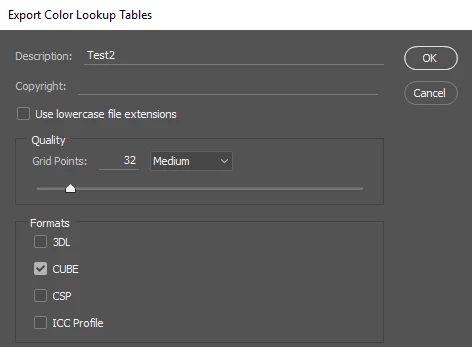
    In CC2015 apply the required LUT, which does work, then go to Export - Color Look Up Tables - give it a name and save it as Cube format

    Now in CC2017 you can choose  "Load LUT" from the 3DLUT menu. Choose the *.Cube LUT that you just saved and apply it within CC2017.

    You may also wish to add your comments to  the report linked below:

    CC2017 Color look up table issue | Photoshop Family Customer Community

    Dave

    1 reply

    davescm
    Community Expert
    davescmCommunity ExpertCorrect answer
    Community Expert
    March 7, 2017

    It is a bug in CC2017  that has been reported.

    If you have  CC2015 installed, you can do the following workaround.

    In CC2015 apply the required LUT, which does work, then go to Export - Color Look Up Tables - give it a name and save it as Cube format

    Now in CC2017 you can choose  "Load LUT" from the 3DLUT menu. Choose the *.Cube LUT that you just saved and apply it within CC2017.

    You may also wish to add your comments to  the report linked below:

    CC2017 Color look up table issue | Photoshop Family Customer Community

    Dave