
damiano.f
Known Participant
May 11, 2023
Answered

Select Object doesn't select around canvas edges

  • May 11, 2023
  • 4 replies
  • 1183 views

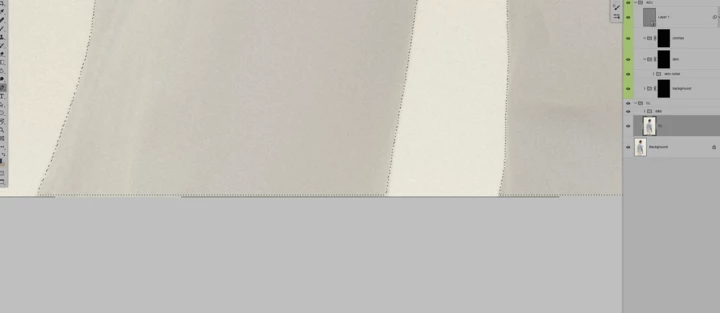
Select objects leaves a line of unselected pixels around the edge of the document. This happens on every image and I suppose it's a bug more than a feature as it doesn't really make sense to keep it consistently I have tried on different machines and with different settings, and the unselected line happens to all of them.


Please see below for a visual explanation.


If anybody can explain, it'd be great.


Many thanks,
This topic has been closed for replies.
Correct answer CShubert

Hi @damiano.f testing here and we are not seeing this issue.


Let's make sure we're in a default state and there are no stale settings somewhere: 

Restore your preferences using this manual method:  

https://helpx.adobe.com/photoshop/using/preferences.html#Manually 

Does it work correctly? 

If that doesn't solve it, you can quit Photoshop and put the Settings folder back. 


4 replies

CShubert
Community Manager
Community Manager
May 11, 2023

Great to hear that it fixed your issue. What is means is that there is a corrupt preferene somewhere in your folder... it is a slow process but you can replace your current working folder with seperate prefs one by one, restart Ps and make sure it is working to find the corrupt one.


damiano.f
damiano.fAuthor
Known Participant
May 11, 2023

Hi @CShubert,


Before I start importing all the settings one by one and flag which one is causing the bug. Can you please run a test with the Cloud setting activated? I noticed that every time I use the cloud option I get the edge gap and without it, I get the selection all the way to the edge of the canvas.

Thanks,


D

CShubert
Community Manager
Community Manager
May 11, 2023

@damiano.f our test was with the Cloud setting on.


damiano.f
damiano.fAuthor
Known Participant
May 11, 2023

Hi @CShubert 


Thanks for your answer.

That actually fixes it, but I don't really want to lose all my settings and preferences as it will take a long time to re-set it up the way it is.

Is this the only way to fix it?

Thank you.

CShubert
Community Manager
CShubertCommunity ManagerCorrect answer
Community Manager
May 11, 2023

Hi @damiano.f testing here and we are not seeing this issue.


Let's make sure we're in a default state and there are no stale settings somewhere: 

Restore your preferences using this manual method:  

https://helpx.adobe.com/photoshop/using/preferences.html#Manually 

Does it work correctly? 

If that doesn't solve it, you can quit Photoshop and put the Settings folder back. 


damiano.f
damiano.fAuthor
Known Participant
May 11, 2023

Edited:

It's only the bottom edge of the canvas that gets unselected. The sides and top get selected to the edges, as expected.