
Karim Eldardiry
Participating Frequently
April 22, 2022
Answered

Select subject not working in Photoshop 23.3 on M1 Mac

  • April 22, 2022
  • 2 replies
  • 1027 views

Hi, I use both photoshop and Beta on apple silicon, latest versions as of today. in Photoshop i cannot select the subject, also the option to choose between processing on the machine or the cloud is not there, while in the Beta version it is there and i can select the subject. I have made a video (attached) where you can see the difference in both. this is a very weired issue.

Thanks


{Thread title edited by moderator}
This topic has been closed for replies.
Correct answer Jeff Arola

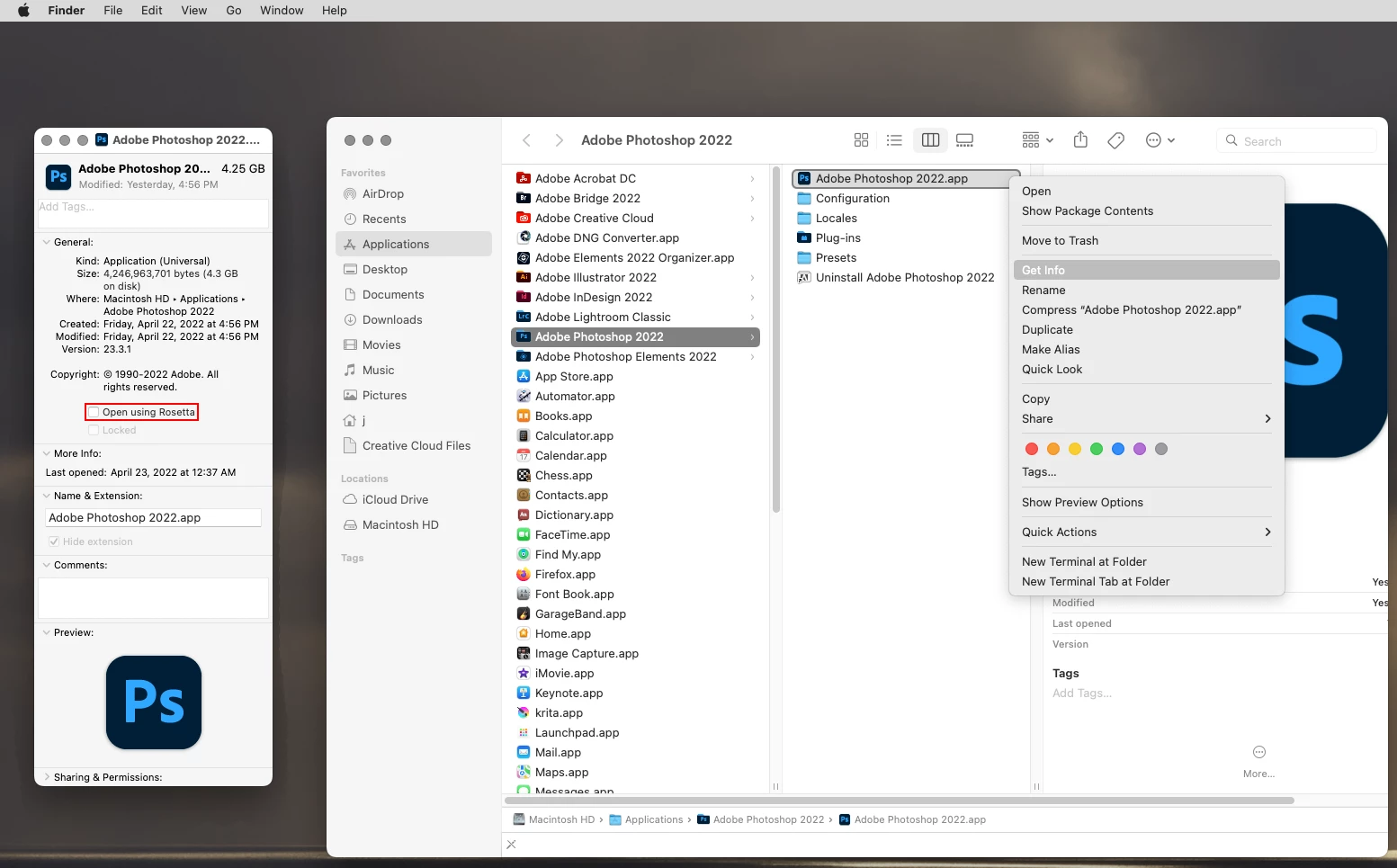
Looks to me like your running photoshop 23.3 under Rosetta. See if running photoshop 23.3 under M1 makes any difference.


Make sure photoshop is not running and then go to /Applications/Adobe Photoshop 2022, right click on the

Adobe Photoshop 2022.app, click Get Info and uncheck Open using Rosetta.


While Select Subject does seem to work here using Rosetta, it also seems to be quite a bit slower than running

photoshop with the M1 Processor.


Also, only the beta version of photoshop has the Cloud and Device choices under Select Subject.

2 replies

Jeff Arola
Community Expert
Jeff ArolaCommunity ExpertCorrect answer
Community Expert
April 23, 2022

Looks to me like your running photoshop 23.3 under Rosetta. See if running photoshop 23.3 under M1 makes any difference.


Make sure photoshop is not running and then go to /Applications/Adobe Photoshop 2022, right click on the

Adobe Photoshop 2022.app, click Get Info and uncheck Open using Rosetta.


While Select Subject does seem to work here using Rosetta, it also seems to be quite a bit slower than running

photoshop with the M1 Processor.


Also, only the beta version of photoshop has the Cloud and Device choices under Select Subject.

Karim Eldardiry
Participating Frequently
May 4, 2022

Thanks a lot. This worked perfectly. Many thanks

nikunj.m
Legend
April 22, 2022

Hi,


We're sorry about the trouble with Photoshop while trying to use Select subject. Please try updating Photoshop to version 23.3.1 using the Creative Cloud desktop app & let us know if continue to get the error while using Select subject.


If the issue persists, you can try to reset the preferences of Photoshop using the steps mentioned here: https://helpx.adobe.com/photoshop/using/preferences.html#reset_preferences

Please backup your settings prior to resetting the preferences. You can check: https://helpx.adobe.com/photoshop/using/preferences.html#BackupPhotoshoppreferences


Regards,

Nikunj