
Known Participant
December 19, 2024
Answered

Select tool issues launch adobe help website

  • December 19, 2024
  • 3 replies
  • 804 views

Lately with the update to photoshop 26.0.0 I have problems. If I right click on an empty layer (command + left click). I also have the same problem if I make a selection on the canvas, not on the document. Can I block it somehow? It's annoying that photoshop takes me to Firefox, in my case, when I don't ask it for. Someone else have this issue?. Thank you.
Correct answer Jeff Arola

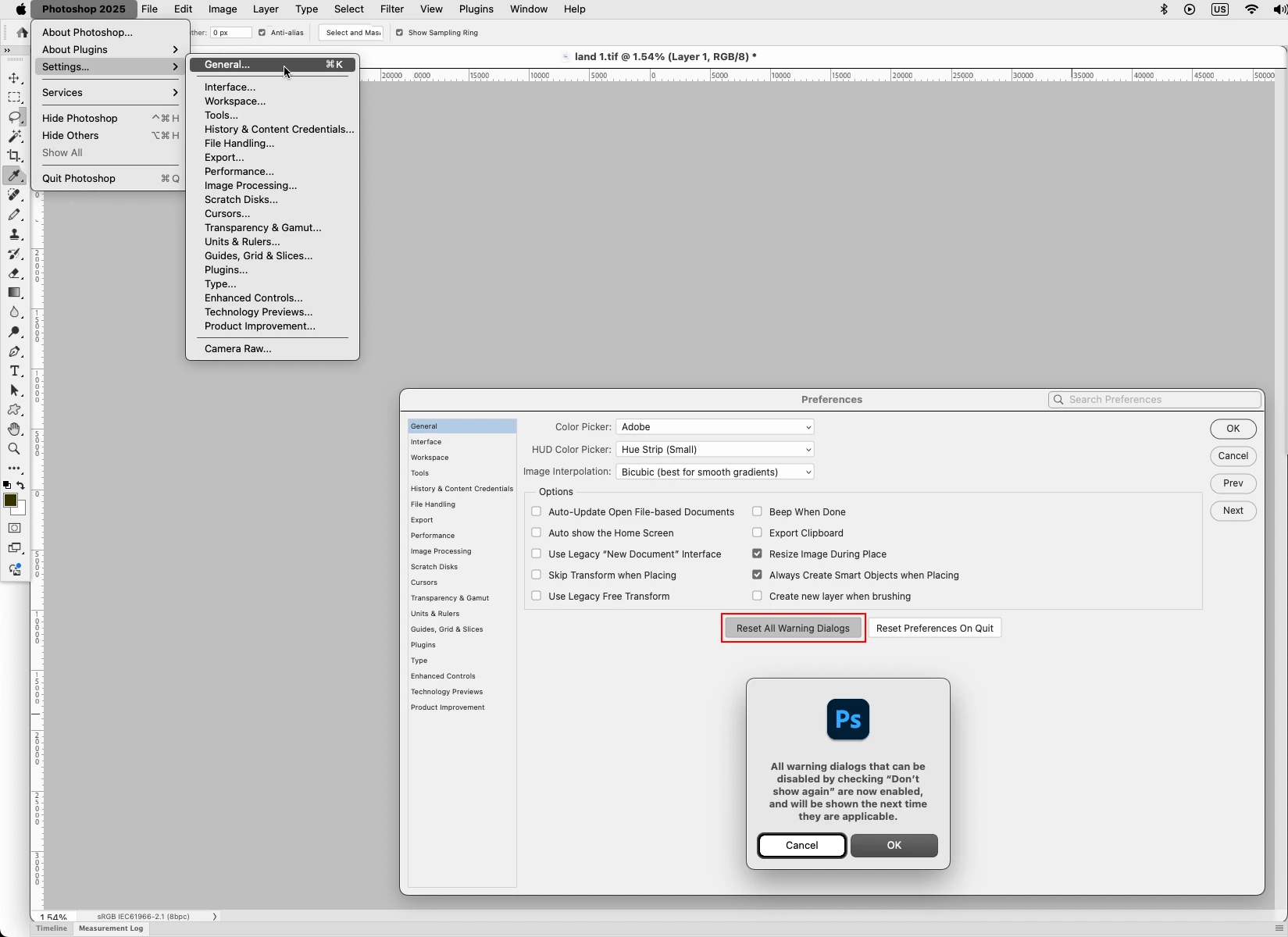
Go to Photoshop 2025 (version)>Settings>General, click on Reset All Warning Dialogs, then restart Photoshop and see if the issue is fixed.


3 replies

Jeff Arola
Community Expert
Jeff ArolaCommunity ExpertCorrect answer
Community Expert
December 26, 2024

Go to Photoshop 2025 (version)>Settings>General, click on Reset All Warning Dialogs, then restart Photoshop and see if the issue is fixed.


Arte5FE6Author
Known Participant
December 31, 2024

Hello Jeff!!!!

Thank you thank you thank you!

I read your reply thinking "I dont think this will solve the problems", but It was the solution )))) both of them

I really appreciate your help.

Greetings.

Miguel Angel

Legend
December 19, 2024

Your advice to upgrade is a good one. Be not afraid, we've had v26.1 released between v26.0 and v26.2.

When I command-click on an empty layer, I get "Warning: No pixels were selected  OK/Learn more."

Larry
Arte5FE6Author
Known Participant
December 24, 2024

Hi LAMY2017. I did today (26.1.0 now) and my problems continue... Not a big issue of course, probably local problem. Maybe with other version disappear. Thank you anyway. Also to you, c.pfaffenbichler.

Legend
December 24, 2024

I have to admit I read your original post too quickly. Going back to see what I missed --

  • Subj: which "select" tool? Subject, Sky, Marquee, Magic Wand?
  • Have you recorded/created an Action recently?
    I can't think of a reason for FF or any browser to open after right-clicking on. layer.
  • "same problem if I make a selection on the canvas, not on the document"

Are you saying the layer you're trying to work on is smaller than the canvas (whick is the bottom-most layer, not really a canvas)? In my understanding, the document is the entire file, one or more layers, including the "canvas."


When I right-click (command-left click on my trackpad) on a blank layer, I get the warnning "no pixels were selected." Are you clicking on the thumbnail in the layers panel or the actual document.

Larry
c.pfaffenbichler
Community Expert
Community Expert
December 19, 2024

I cannot reproduce the issue. 

Have you tried the current version (26.2.0)? 

Arte5FE6Author
Known Participant
December 19, 2024

Hi c.pfaffenbichler, thank you for your quick reply.
No I din try the new version. Usually I wait a bit )) But yes, I will try in a few days and cross fingers.