
Participating Frequently
December 14, 2023
Answered

Selected tool changes on its own

  • December 14, 2023
  • 6 replies
  • 960 views

Photoshop version 25.2, Windows 10.

When I select a tool and then move the mouse away from the tool palette, the tool changes to a tool I did not select.

Examples:

- Select the Magic Wand Tool, move the mouse away, the tools changes to the Object Selection Tool.

- Select the Line Tool, move the mouse away, the tool changes to the Rectangle Tool.

I have to go back to the palette and re-select the tool I wanted. 

This does not happen 100% of the time, but it happens more often than not. It did not occur in previous versions.

Aggravating.
Correct answer Ged_Traynor

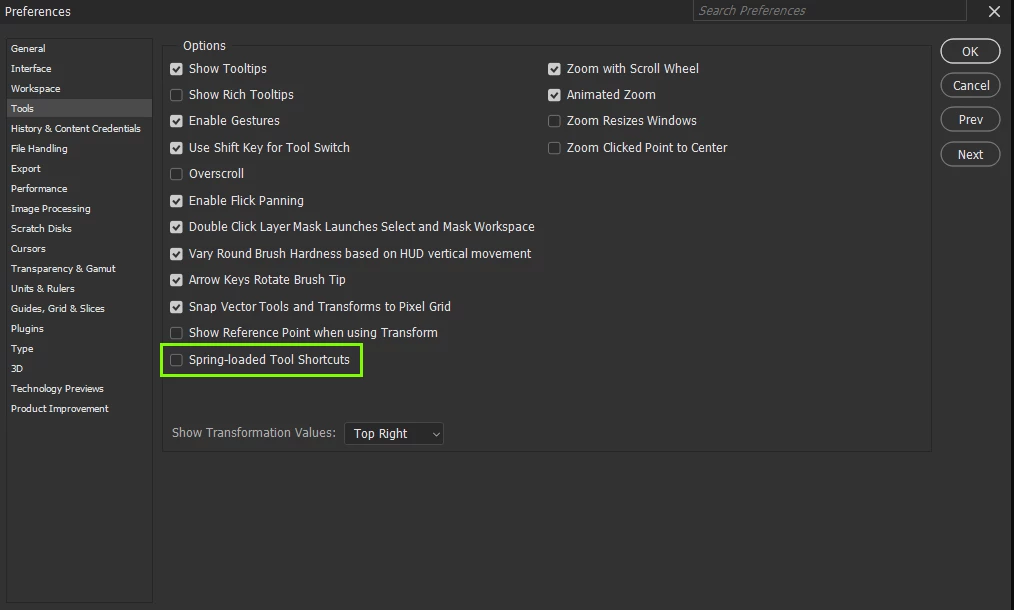
@Deborah342639444s96 try disabling this option in preferences to see if it helps


6 replies

Participating Frequently
January 20, 2025

This problem is back again, with a vengence. Now, instead of this occurring occasionally, it's 100% of the time. It doesn't matter how I set the Spring-loaded Tools Shortcuts option, on or off. I can't get through a single image edit without having to reselect every tool I click on. I put up with it for a while, hoping the next update would fix whatever one of the previous updates broke. No such luck. Nothing on my system has changed (except for automatic software updates, now on Photoshop version 26.2.0). If anyone out there has seen this or, even better, has a way to to fix it, I'd appreciate hearing from you. Thanks.

Community Manager
January 20, 2025

Hi @Deborah342639444s96! 😊

Could you share a short video showing the issue? When the tool changes, does it switch back to the previous tool you were using, or is it a random one? Also, does this happen when you use hotkeys, when you click on the tool, or both?

Thanks! Alek

*(If you mention me with an @, like @Aleke, I’ll get a notification and can respond faster.)*
Participating Frequently
January 31, 2025

Hi Aleke. I can't capture video on this computer. I don't use hotkeys, mouse only. The issue occurs exactly as I've stated:

- Select the Magic Wand Tool, move the mouse away, the tools changes to the Object Selection Tool.

- Select the Line Tool, move the mouse away, the tool changes to the Rectangle Tool.

I have to go back to the palette and re-select the tool I wanted.

Ged_Traynor
Community Expert
Community Expert
December 14, 2023

@Deborah342639444s96 you're welcome

Participating Frequently
December 14, 2023

Turning off Spring-loaded Tools Shortcuts seems to have done the trick. Thanks very much, Ged_Traynor.

Participating Frequently
December 14, 2023

I haven't tried closing all other applications. There's always something running in the backgraound. But again, this did not happen with previous versions of Photoshop.

I did not use keys.

My company has very robust antivirus protection that runs automatically.

Ged_Traynor
Community Expert
Ged_TraynorCommunity ExpertCorrect answer
Community Expert
December 14, 2023

@Deborah342639444s96 try disabling this option in preferences to see if it helps


PECourtejoie
Community Expert
Community Expert
December 14, 2023

Hi, do you experience it when no other software is running?

are you inputting some keystrokes?

Did you run a full virus scan on your machine?