Exit
  • Global community
    • Language:
      • Deutsch
      • English
      • EspaƱol
      • FranƧais
      • PortuguĆŖs
  • ę—„ęœ¬čŖžć‚³ćƒŸćƒ„ćƒ‹ćƒ†ć‚£
  • ķ•œźµ­ ģ»¤ė®¤ė‹ˆķ‹°
0

selecting color not working

Community Beginner ,
Jul 15, 2021 Jul 15, 2021

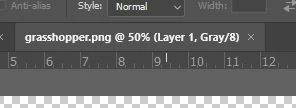
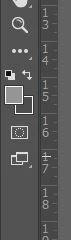
Grabbed these screen images. For some reason I cannot switch colors using eyedropper etc.

I typically just click on one of the boxes and up pops the color options. I noticed that the top of the layer states  "@50% Layer 1, Gray/8"

I must have hit something that turned off the ability to use paint bucket etc.

When I use the eye dropper to select a color, the color box stays gray?!

Any help will be greatly appreciated.

Thanks!
Capture not switching.JPGCapture hopper.JPG

393
Translate
Report
Community guidelines
Be kind and respectful, give credit to the original source of content, and search for duplicates before posting. Learn more
community guidelines

correct answers 1 Correct answer

Community Expert , Jul 15, 2021 Jul 15, 2021

Your document must be in a color mode, like rgb, and not grayscale.


Translate
Adobe
Community Expert ,
Jul 15, 2021 Jul 15, 2021

Grayscale images do not have Ā»colorsĀ« and you appear to be working on one. 


Edit: Image > Mode > …

Translate
Report
Community guidelines
Be kind and respectful, give credit to the original source of content, and search for duplicates before posting. Learn more
community guidelines
Community Expert ,
Jul 15, 2021 Jul 15, 2021

Your document must be in a color mode, like rgb, and not grayscale.


My System: Intel i7-8700K - 64GB RAM - NVidia Geforce RTX 3060 - Windows 11 Pro 25H2 -- LR-Classic 15 - Photoshop 27 - Nik Collection 8 - PureRAW 5 - Topaz Photo
Translate
Report
Community guidelines
Be kind and respectful, give credit to the original source of content, and search for duplicates before posting. Learn more
community guidelines
Community Beginner ,
Jul 15, 2021 Jul 15, 2021

Thank you for lightning reply! How do I reset it to color mode? I must have hit a button without realizing it! Obviously I'm new to this. Thanks for patience!

Translate
Report
Community guidelines
Be kind and respectful, give credit to the original source of content, and search for duplicates before posting. Learn more
community guidelines
Community Expert ,
Jul 15, 2021 Jul 15, 2021

Image > Mode > RGB Color

or example. 

Translate
Report
Community guidelines
Be kind and respectful, give credit to the original source of content, and search for duplicates before posting. Learn more
community guidelines
Community Beginner ,
Jul 15, 2021 Jul 15, 2021
LATEST

Got it! thanks much!!!

Translate
Report
Community guidelines
Be kind and respectful, give credit to the original source of content, and search for duplicates before posting. Learn more
community guidelines