
Participant
September 27, 2023
Answered

Serious problem with Photoshop menus [RightFont]

  • September 27, 2023
  • 23 replies
  • 4813 views

Hello, I have a serious problem with Photoshop. Cannot access any menu. After clicking menu item, i.e. "Image" submenu appears but I cannot go any further. It flickers, disappears randomly when I move mouse pointer over it, all submenu items are greyed out. It started with Photoshop 2023 few weeks ago, after PS 2024 update it was OK for a couple of days but now it's back. PS is now basically useless. Resetting preferences, clean reinstall, trying different mouse didn't help. My setup: Mac Mini M1, Photoshop 25.0.0, Mac OS 14.0. Any help, please?


["RightFont" added to subject line by moderator to assist others who search]
This topic has been closed for replies.
Correct answer

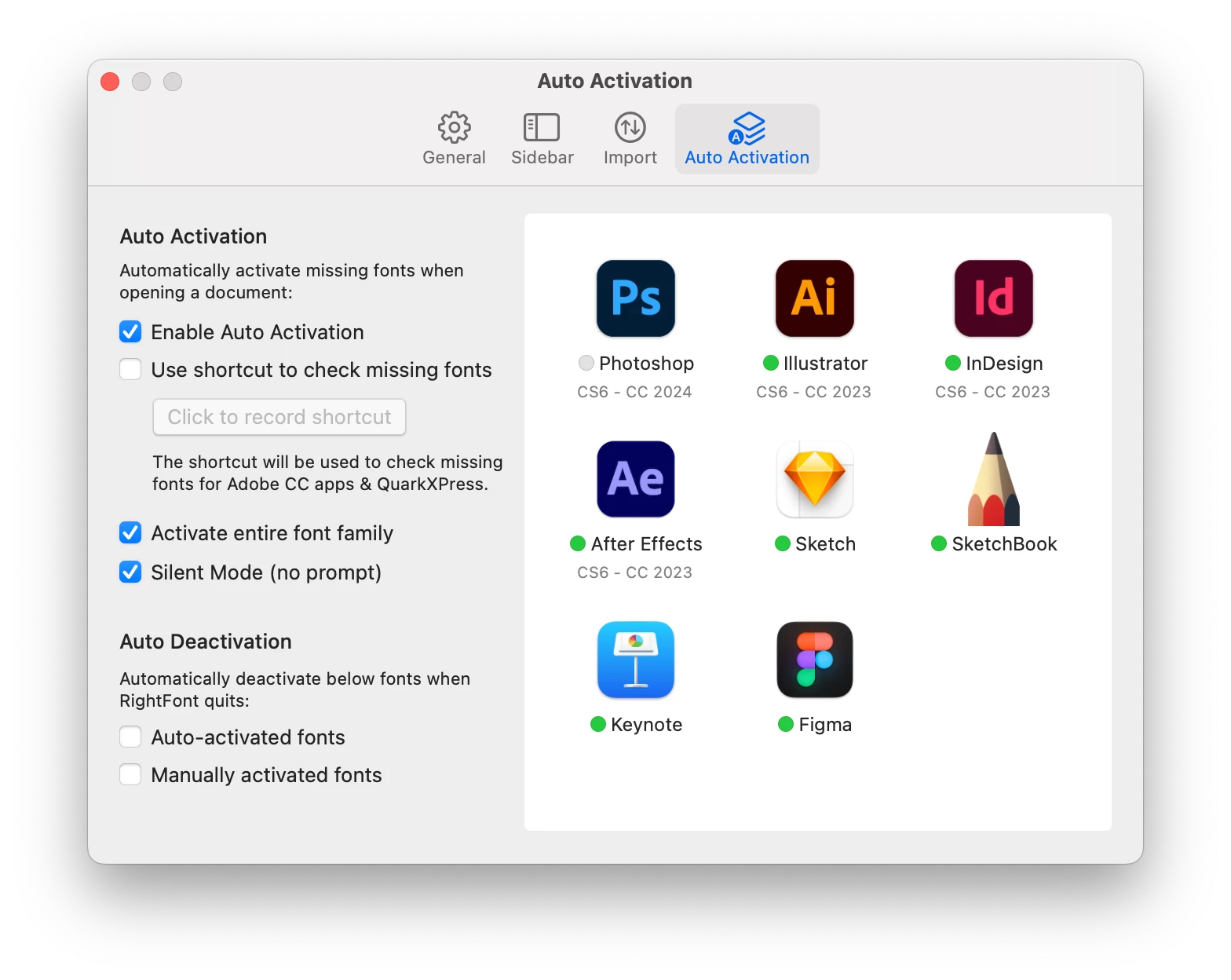
Just to add to this solution, it seems that you can keep RightFont running and just disable the auto-activation feature for Photoshop. In RightFont settings, click the green circle next to Photoshop to deactivate the feature. They are now working alongside eachother just fine. 

23 replies

Participating Frequently
October 12, 2023

I love you!! Thank you!! Saved me!!

dpcom
Participating Frequently
October 6, 2023

Here is Rightfont's response

jaycthomas
Participant
October 5, 2023

If anyone is using RightFont.  Turn off the autoactivate for Photoshop and this will fix your issues inside Photoshop with menus.

October 5, 2023

After upgrading to Sonoma, the icons in the menu are blurry. This happens only in photoshop in all display resolutions, regardless if internal or external displays. In Ventura the symbols are sharp

Kevin Stohlmeyer
Community Expert
Community Expert
October 5, 2023

@21625471 see the above posted answer.

Participant
October 5, 2023

thanks a lot, same problem and correct solution for me

best regards

fern'

Participant
October 4, 2023

Tested and working, RightFont disabled auto activation for PS solved the issue.


THX a Lot 

dpcom
Participating Frequently
October 3, 2023

yeahhhh Thanks a lot !!  

Andrew LaMorte
Known Participant
October 3, 2023

OOOOOooohh.. Okay.. this makes sense for me.. I JUST bought RightFont at the same time I updated to Sonoma.. Everyone should make RightFont aware of the issue?

Correct answer
October 2, 2023

Just to add to this solution, it seems that you can keep RightFont running and just disable the auto-activation feature for Photoshop. In RightFont settings, click the green circle next to Photoshop to deactivate the feature. They are now working alongside eachother just fine. 

jane-e
Community Expert
Community Expert
October 2, 2023


@dpcom  wrote: Thanks a lot for your help Jane-e


All thanks go to @kunotzka who figured out that deactivating RightFont solves the menu issue!

Jane