Inspiring
August 18, 2018
Answered

Set thumbnails size inside Layer Panel

  • August 18, 2018
  • 7 replies
  • 4272 views

I wish we could directly set the Thumbnail inside Layer Panel with the help of a script.

Sadly the listener doesn't record the setting of the Thumbnail Size, it only records the call of the Layer panel options .

I already found the helpful code below inside this post : get/set "Add Mask By Default" via AM?

but when i run the code, ESTK responds with the error "this functionnality may not be available in this versin of PS"

var ref = new ActionReference();

ref.putProperty (stringIDToTypeID ("property"), stringIDToTypeID ("layerThumbnailSize"));

ref.putEnumerated( charIDToTypeID("capp"), charIDToTypeID("Ordn"), charIDToTypeID("Trgt") );

var desc = executeActionGet(ref);

var layerThumbnailSize = typeIDToStringID(desc.getEnumerationValue(stringIDToTypeID("layerThumbnailSize")));

alert(layerThumbnailSize);

So, any help is welcome...
This topic has been closed for replies.
Correct answer JJMack

The scriptlistners does record what  I call junk code for some things you do in Photoshop that just does not work in scripts.   There is a script in the forum that can clean scriptlistener code (Clean SL)script  to make it  easer to read and use.  I ask the author to add a remove junk code button to remove statement  I consider junk.  He did and made is easy foe me to add additional statments type to be removed.

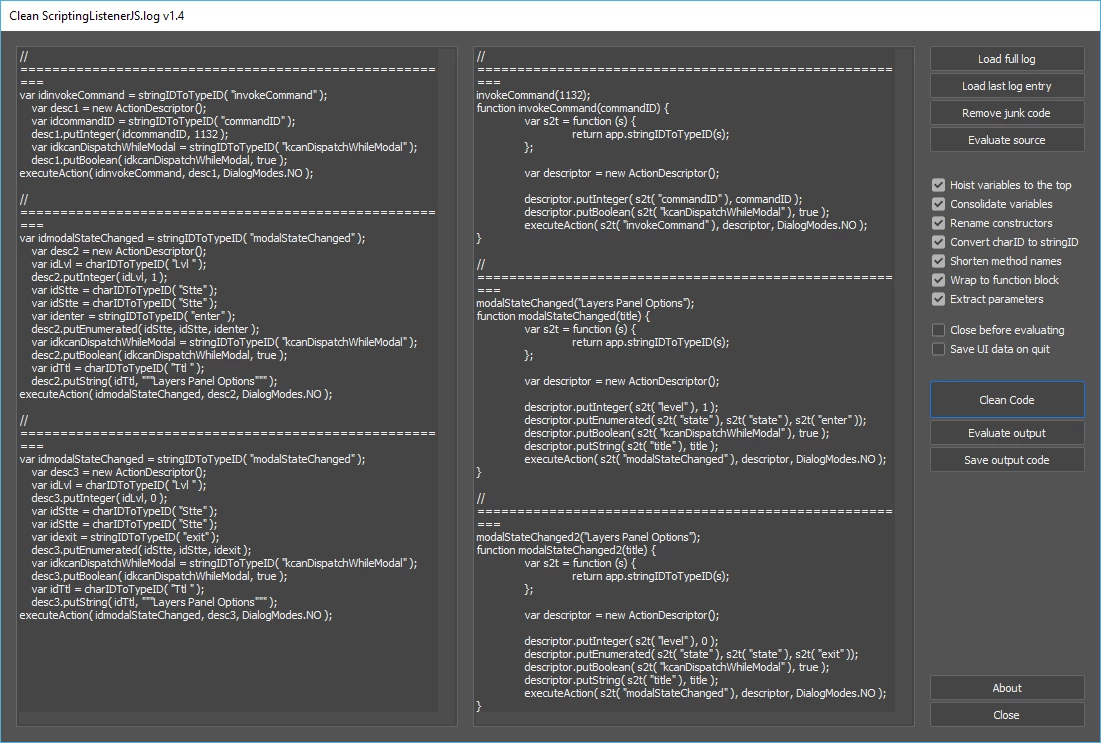
Here I set the layers panel  thumbnails size. Scriptlistner recorded 3 Action manager steps. From that none are useable.

Clean that code it easy to see its for the layers panel

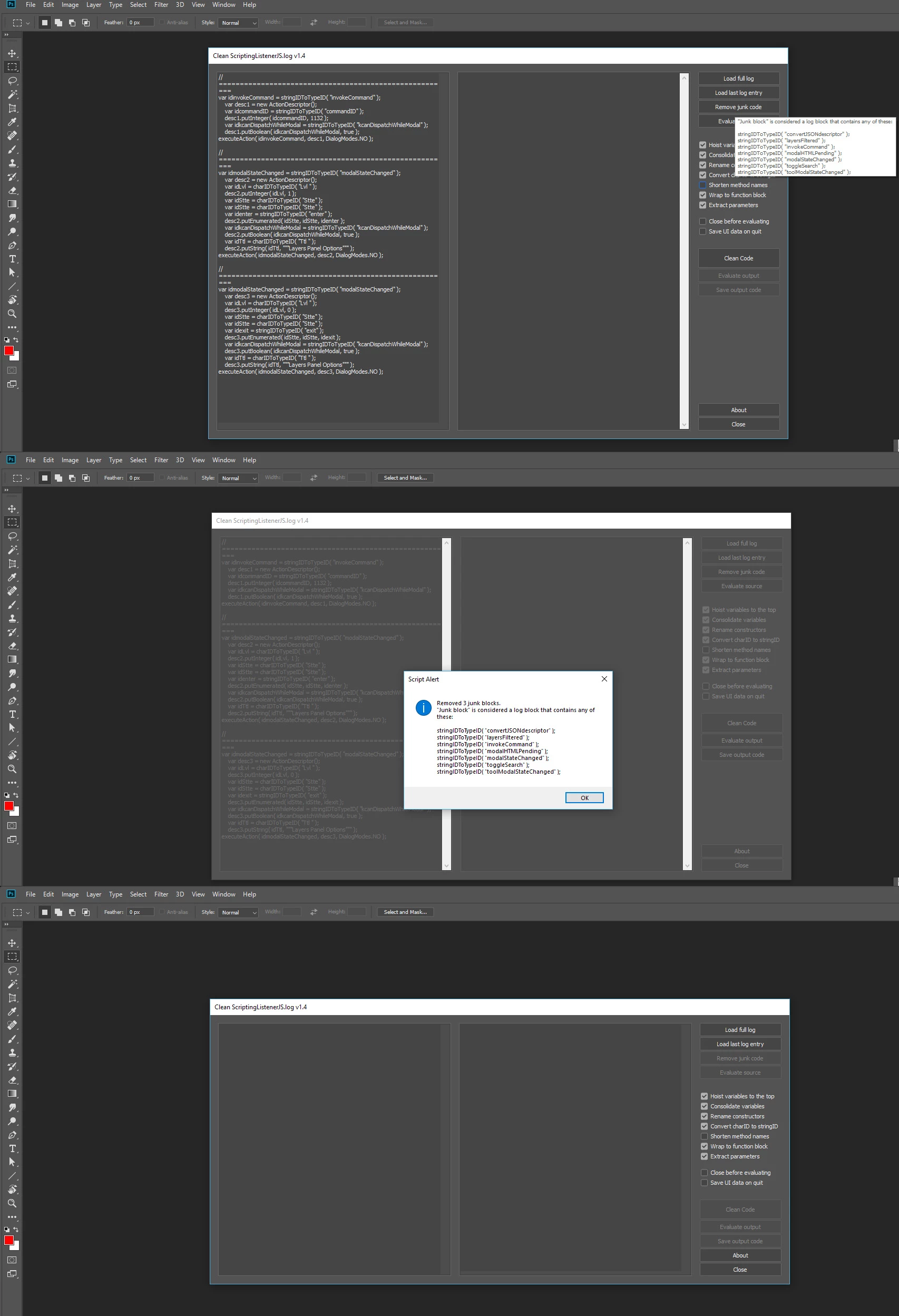
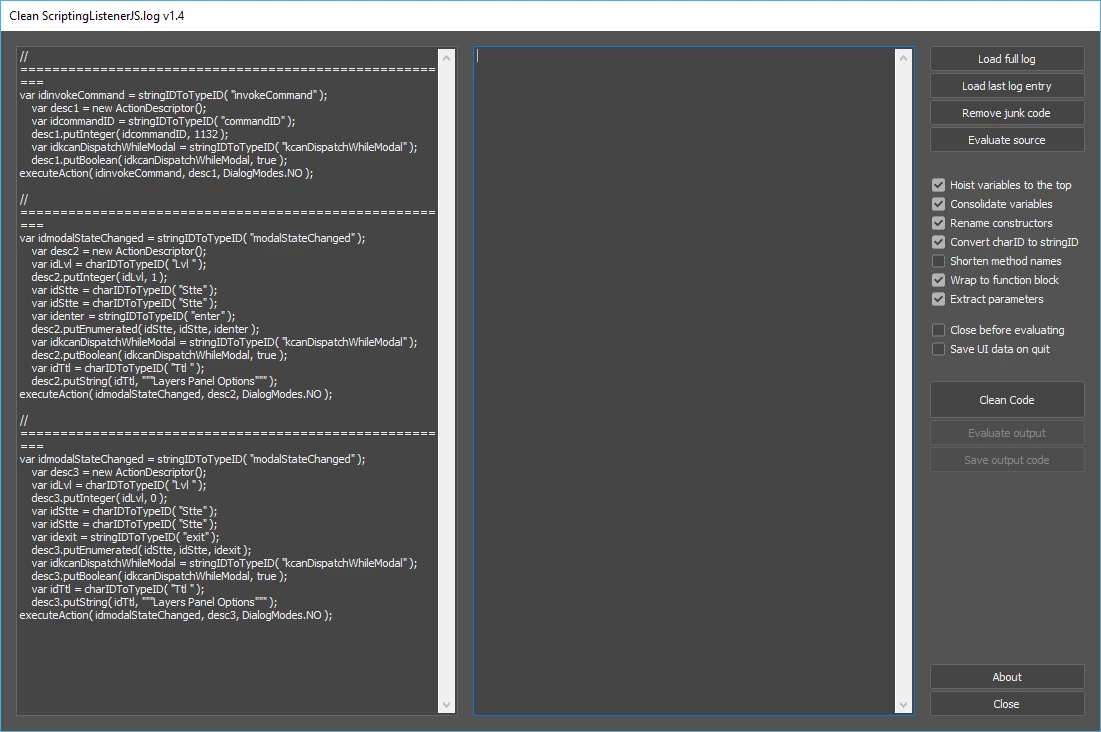
However if you first remove what I consider junk code you come up empty.

7 replies

Jarda Bereza
Inspiring
August 19, 2018

This is how looks photoshop preferences file when it is converted from binary to JSON.

Anyway only addCopyToLayerNames works for me if I ask for property in application class.

And layer thumbnail size could be "PctS" which is not working under this key.

Kukurykus
Brainiac
August 19, 2018

Which exact file (if some) binaries you change to JSON, perhaps one of those in AppData (Windows) folder where files are beeing overwritten while quitting Photoshop? If you didn't notice there's other post of me before yours you can anser for

Jarda Bereza
Inspiring
August 19, 2018

This file:

"C:\Users\Jarda\AppData\Roaming\Adobe\Adobe Photoshop CC 2018\Adobe Photoshop CC 2018 Settings\Adobe Photoshop CC 2018 Prefs.psp"

The answer for message above:

- we can set "copy names" with "set descriptor" action

- this means that you can read descriptor, change it, put it back (set it) and that's all

- but employees in Adobe must explicitly code support for set descriptor

- so this value is Enum and if you want to use "set descriptor" action you should put Enum back

- Enum has these keys: 1) property name (what it is in parent object) 2) what type of enum it is (e.g. predefined colors, predefined sizes,...) 3) one from these predefined values

- you can set thumbnails sizes manually and then read their values and they are: "none", "small", "medium", "large"

Jarda Bereza
Inspiring
August 19, 2018

This code sets "add copy to layer names"

function setAddCopyToLayerNames (add){

var desc = new ActionDescriptor();

var ref = new ActionReference();

ref.putProperty( charIDToTypeID( "Prpr" ), stringIDToTypeID( "addCopyToLayerNames" ) );

ref.putEnumerated( charIDToTypeID( "capp" ), charIDToTypeID( "Ordn" ), charIDToTypeID( "Trgt" ) );

desc.putReference( charIDToTypeID( "null" ), ref );

desc.putBoolean(stringIDToTypeID( "addCopyToLayerNames" ), add)

executeAction( charIDToTypeID( "setd" ), desc, DialogModes.NO );

}

setAddCopyToLayerNames (true);

So code for layerThumbnails according code which can read value should look like this:

var desc = new ActionDescriptor();

var ref = new ActionReference();

ref.putProperty( charIDToTypeID( "Prpr" ), stringIDToTypeID( "layerThumbnailSize" ) );

ref.putEnumerated( charIDToTypeID( "capp" ), charIDToTypeID( "Ordn" ), charIDToTypeID( "Trgt" ) );

desc.putReference( charIDToTypeID( "null" ), ref );

desc.putEnumerated(stringIDToTypeID( "layerThumbnailSize" ), stringIDToTypeID( "size" ),stringIDToTypeID( "none" ));

executeAction( charIDToTypeID( "setd" ), desc, DialogModes.NO );

Anyway it doesn't work and it doesn't throw error either. Any Idea why?

Kukurykus
Brainiac
August 19, 2018

I did the same few hours ago basing on a code 'addCopyToLayerNames' you shared with me few months ago. I was sure if that can be read it can be also set, but like in your case to my surprise or because of no abilities it failed, so I even did not post my result. Maybe that was wrong as it's possible and someone will show how to do it correctly...

btw we can check the type, that is enumeration in case of 'layerThumbnailSize', so it uses 3 inputs like you did, but we can't read by Action Manager what exact 3 of them beside first one should be used. Is that your guess they should be 'size' and for ex. 'none' hower they seem to be logical. Maybe there is problem with these names. And once again is there way to check which one should be used or we can only compare some with other SL similar functions they are used in them?

Kukurykus
Brainiac
August 18, 2018

How it answers to Evergreen question if he already found it himself, SL doesn't record that operation that could be used?

Kukurykus
Brainiac
August 18, 2018

Have you ever tried code I wrote for you, you never replied anything for that: Re: How to get an annotation's position ?

Inspiring
August 18, 2018

In answer to

Kukurykus  a écrit

Have you ever tried code I wrote for you, you never replied anything for that: Re: How to get an annotation's position ? 

Sorry for the late reply...Now it's done. I just have to learn how to use properly the forum.

Thanks again to all for sharing your knowledges.

Inspiring
August 18, 2018

In fact the SListener doesn't records nothing when I change the thumbnail size, so I guess I have had the code to open the Layer Panel options from elsewhere, probably from the configurator.

Brainiac
August 18, 2018

Which version of Photoshop?

You need CC2018 (everything works there) or at least 2015.5 (not sure).

Inspiring
August 18, 2018

CS6 version ... so it seems like my wish will not become reality !

Brainiac
August 18, 2018

CS6 you can only

runMenuItem(stringIDToTypeID("layersPaletteOptions"))

JJMack
JJMackCorrect answer
Community Expert
August 18, 2018

The scriptlistners does record what  I call junk code for some things you do in Photoshop that just does not work in scripts.   There is a script in the forum that can clean scriptlistener code (Clean SL)script  to make it  easer to read and use.  I ask the author to add a remove junk code button to remove statement  I consider junk.  He did and made is easy foe me to add additional statments type to be removed.

Here I set the layers panel  thumbnails size. Scriptlistner recorded 3 Action manager steps. From that none are useable.

Clean that code it easy to see its for the layers panel

However if you first remove what I consider junk code you come up empty.

JJMack
Inspiring
August 18, 2018

If I understand you well, there is nothing more to add ...

Thanks JJMack for your useful answer.

Kukurykus
Brainiac
August 18, 2018

r-binanswers correctly to your qeuestion. However I don't know is setting size of Thumbnail also possible beside reading it in later releases, like some settings I found ScriptListener doesn't write they were set but can be set by using ActionManager.