

davidc88034496
Known Participant
October 7, 2021
Answered

Setting Artboard Background to Transparent

  • October 7, 2021
  • 1 reply
  • 1402 views

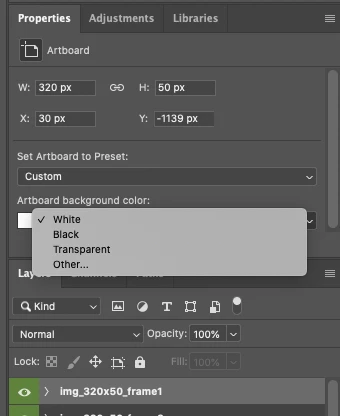
Hi, im trying to use Photoshop Javascript to programmatically make the Artboards Background Transparent.  I know how to do it via the GUI. Please take a look at the screenshot below.  In this same manner i wish to set the background to Transparent instead of "White" or "Black".  I tried using ScriptListener Plugin, but im fairly new to it and it seemed that i would have to provide the coordinates of the Artboard Layer rather than the name of the Artboard Layer in order to try to change it to transparent.   Please take a look at the generated CLEAN-SL code below.  If someone could provide a clue.. i wish to simply select Artboard by its name (Since its easier) or another technique and then change it to transparent.


thanks
 

editArtboardEvent(6720, 64, 7220, 564, "", 255, 255, 255, 3, 8, 1);

function editArtboardEvent(top, left, bottom, right, artboardPresetName, red, Grn, blue, artboardBackgroundType, changeSizes, changeBackground) {
	var c2t = function (s) {
	return app.charIDToTypeID(s);
	};


	var s2t = function (s) {
	return app.stringIDToTypeID(s);
	};


	var descriptor = new ActionDescriptor();
	var descriptor2 = new ActionDescriptor();
	var descriptor3 = new ActionDescriptor();
	var descriptor4 = new ActionDescriptor();
	var list = new ActionList();
	var reference = new ActionReference();


	reference.putEnumerated( s2t( "layer" ), s2t( "ordinal" ), s2t( "targetEnum" ));
	descriptor.putReference( c2t( "null" ), reference );
	descriptor3.putDouble( s2t( "top" ), top );
	descriptor3.putDouble( s2t( "left" ), left );
	descriptor3.putDouble( s2t( "bottom" ), bottom );
	descriptor3.putDouble( s2t( "right" ), right );
	descriptor2.putObject( s2t( "artboardRect" ), s2t( "classFloatRect" ), descriptor3 );
	descriptor2.putList( s2t( "guideIDs" ), list );
	descriptor2.putString( s2t( "artboardPresetName" ), artboardPresetName );
	descriptor4.putDouble( s2t( "red" ), red );
	descriptor4.putDouble( c2t( "Grn " ), Grn );
	descriptor4.putDouble( s2t( "blue" ), blue );
	descriptor2.putObject( s2t( "color" ), s2t( "RGBColor" ), descriptor4 );
	descriptor2.putInteger( s2t( "artboardBackgroundType" ), artboardBackgroundType );
	descriptor.putObject( s2t( "artboard" ), s2t( "artboard" ), descriptor2 );
	descriptor.putInteger( s2t( "changeSizes" ), changeSizes );
	descriptor.putInteger( s2t( "changeBackground" ), changeBackground );
	executeAction( s2t( "editArtboardEvent" ), descriptor, DialogModes.NO );
}


This topic has been closed for replies.
Correct answer Stephen Marsh

Looking at the SL code when changing an existing arboard background property (snippet, not full working code):


var idartboardBackgroundType = stringIDToTypeID( "artboardBackgroundType" );
        desc472.putInteger( idartboardBackgroundType, 1 );


The integer 1 = White, 2 = Black, 3 = Transparent, 4 = Other

To select the layer by name (presuming that only 1 layer has this exact name):


app.activeDocument.activeLayer = app.activeDocument.layers['Artboard 1'];


Here is the raw SL code in a function with some fluff removed, while still offering the possibility to use an "other" colour:


abTrans();

function abTrans() {
    var ideditArtboardEvent = stringIDToTypeID("editArtboardEvent");
    var desc520 = new ActionDescriptor();
    var idnull = stringIDToTypeID("null");
    var ref129 = new ActionReference();
    var idlayer = stringIDToTypeID("layer");
    var idordinal = stringIDToTypeID("ordinal");
    var idtargetEnum = stringIDToTypeID("targetEnum");
    var desc521 = new ActionDescriptor();
    var idartboard = stringIDToTypeID("artboard");
    var idchangeBackground = stringIDToTypeID("changeBackground");
    ref129.putEnumerated(idlayer, idordinal, idtargetEnum);
    desc520.putReference(idnull, ref129);

    // Options for "other" idartboardBackgroundType, 4
    var idcolor = stringIDToTypeID("color");
    var desc523 = new ActionDescriptor();
    var idred = stringIDToTypeID("red");
    desc523.putDouble(idred, 128.000000);
    var idgrain = stringIDToTypeID("grain");
    desc523.putDouble(idgrain, 128.000000);
    var idblue = stringIDToTypeID("blue");
    desc523.putDouble(idblue, 128.000000);
    var idRGBColor = stringIDToTypeID("RGBColor");
    desc521.putObject(idcolor, idRGBColor, desc523);

    var idartboardBackgroundType = stringIDToTypeID("artboardBackgroundType");
    // putInteger 1 = White, 2 = Black, 3 = Transparent, 4 = Other
    desc521.putInteger(idartboardBackgroundType, 3);

    desc520.putObject(idartboard, idartboard, desc521);
    desc520.putInteger(idchangeBackground, 1);
    executeAction(ideditArtboardEvent, desc520, DialogModes.NO);
}


This slightly shorter version does not allow for an "other" colour:


abTrans();

function abTrans() {
    var ideditArtboardEvent = stringIDToTypeID("editArtboardEvent");
    var desc520 = new ActionDescriptor();
    var idnull = stringIDToTypeID("null");
    var ref129 = new ActionReference();
    var idlayer = stringIDToTypeID("layer");
    var idordinal = stringIDToTypeID("ordinal");
    var idtargetEnum = stringIDToTypeID("targetEnum");
    var desc521 = new ActionDescriptor();
    var idartboard = stringIDToTypeID("artboard");
    var idchangeBackground = stringIDToTypeID("changeBackground");
    ref129.putEnumerated(idlayer, idordinal, idtargetEnum);
    desc520.putReference(idnull, ref129);

    var idartboardBackgroundType = stringIDToTypeID("artboardBackgroundType");
    // putInteger 1 = White, 2 = Black, 3 = Transparent
    desc521.putInteger(idartboardBackgroundType, 3);

    desc520.putObject(idartboard, idartboard, desc521);
    desc520.putInteger(idchangeBackground, 1);
    executeAction(ideditArtboardEvent, desc520, DialogModes.NO);
}


1 reply

Stephen Marsh
Community Expert
Stephen MarshCommunity ExpertCorrect answer
Community Expert
October 8, 2021

Looking at the SL code when changing an existing arboard background property (snippet, not full working code):


var idartboardBackgroundType = stringIDToTypeID( "artboardBackgroundType" );
        desc472.putInteger( idartboardBackgroundType, 1 );


The integer 1 = White, 2 = Black, 3 = Transparent, 4 = Other

To select the layer by name (presuming that only 1 layer has this exact name):


app.activeDocument.activeLayer = app.activeDocument.layers['Artboard 1'];


Here is the raw SL code in a function with some fluff removed, while still offering the possibility to use an "other" colour:


abTrans();

function abTrans() {
    var ideditArtboardEvent = stringIDToTypeID("editArtboardEvent");
    var desc520 = new ActionDescriptor();
    var idnull = stringIDToTypeID("null");
    var ref129 = new ActionReference();
    var idlayer = stringIDToTypeID("layer");
    var idordinal = stringIDToTypeID("ordinal");
    var idtargetEnum = stringIDToTypeID("targetEnum");
    var desc521 = new ActionDescriptor();
    var idartboard = stringIDToTypeID("artboard");
    var idchangeBackground = stringIDToTypeID("changeBackground");
    ref129.putEnumerated(idlayer, idordinal, idtargetEnum);
    desc520.putReference(idnull, ref129);

    // Options for "other" idartboardBackgroundType, 4
    var idcolor = stringIDToTypeID("color");
    var desc523 = new ActionDescriptor();
    var idred = stringIDToTypeID("red");
    desc523.putDouble(idred, 128.000000);
    var idgrain = stringIDToTypeID("grain");
    desc523.putDouble(idgrain, 128.000000);
    var idblue = stringIDToTypeID("blue");
    desc523.putDouble(idblue, 128.000000);
    var idRGBColor = stringIDToTypeID("RGBColor");
    desc521.putObject(idcolor, idRGBColor, desc523);

    var idartboardBackgroundType = stringIDToTypeID("artboardBackgroundType");
    // putInteger 1 = White, 2 = Black, 3 = Transparent, 4 = Other
    desc521.putInteger(idartboardBackgroundType, 3);

    desc520.putObject(idartboard, idartboard, desc521);
    desc520.putInteger(idchangeBackground, 1);
    executeAction(ideditArtboardEvent, desc520, DialogModes.NO);
}


This slightly shorter version does not allow for an "other" colour:


abTrans();

function abTrans() {
    var ideditArtboardEvent = stringIDToTypeID("editArtboardEvent");
    var desc520 = new ActionDescriptor();
    var idnull = stringIDToTypeID("null");
    var ref129 = new ActionReference();
    var idlayer = stringIDToTypeID("layer");
    var idordinal = stringIDToTypeID("ordinal");
    var idtargetEnum = stringIDToTypeID("targetEnum");
    var desc521 = new ActionDescriptor();
    var idartboard = stringIDToTypeID("artboard");
    var idchangeBackground = stringIDToTypeID("changeBackground");
    ref129.putEnumerated(idlayer, idordinal, idtargetEnum);
    desc520.putReference(idnull, ref129);

    var idartboardBackgroundType = stringIDToTypeID("artboardBackgroundType");
    // putInteger 1 = White, 2 = Black, 3 = Transparent
    desc521.putInteger(idartboardBackgroundType, 3);

    desc520.putObject(idartboard, idartboard, desc521);
    desc520.putInteger(idchangeBackground, 1);
    executeAction(ideditArtboardEvent, desc520, DialogModes.NO);
}


davidc88034496
Known Participant
October 8, 2021

Thanks so much im going to start experimenting with the code you gave me. 


I just hand a question. Im still fairly new...


So if i ran this code below:

app.activeDocument.activeLayer = app.activeDocument.layers['Artboard 1'];

It would set make that layer active and selected right?

and once thats selected...

and i would run the shorter version function....

abTrans();

 It would then run that whole editartbaordcommand and set artboardBackgroundType to 3. 


That would be the flow..

make the layer active by using the .activeLayer method and passing in the unique name of the layer. and then that function..


i know it sounds simple but i just wanted to make sure if thats how the flow should be.


thanks again so much. that code looks promising..


Stephen Marsh
Community Expert
Community Expert
October 8, 2021

@davidc88034496 


That is correct:

  1. Target the required layer by name
  2. Run the function to set the artboard background to transparent


P.S. Although I trimmed the code, there really was no need to reduce the code length, the entire SL recording for changing an existing artboard to transparency could have been used.