
Fedevan10
Participant
April 17, 2024
Question

Setting Exposure

  • April 17, 2024
  • 1 reply
  • 1792 views

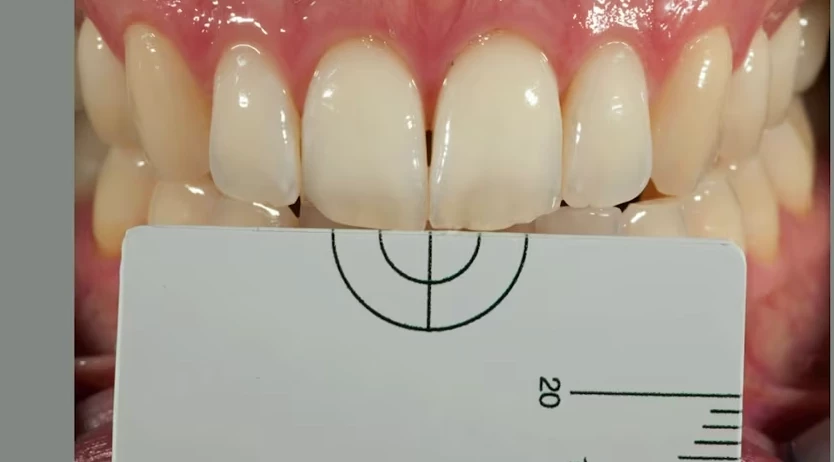
Hi, I'm a dentistry student and I'm doing a project where I need to use photoshop. I have made a pic of a mouth with near a grey/white balance card which I know exactly be 79.0.0. (CIE LAB Values). I need to set the pic's exposure based on this value. How can I make it without trying many times until I've reached the correct value? Like a command or specific function

P.S. I'm attaching also the pic so you understand what I'm talking about 
This topic has been closed for replies.

1 reply

Bojan Živković11378569
Community Expert
Community Expert
April 17, 2024

If I understand correctly, you're asking to go to Image > Mode > Lab Color, place a Color Sampler point on the card, then create a Curves adjustment layer and correct the Lab values to the exact numbers, right?

Legend
April 17, 2024

Add a color fill layer set to L*A*B values of 79, 0, 0. Set it to Difference mode.

Then add a curves adjustment layer. Use the black point eyedropper and click on an area of the card. This will set the card to black, which is what Difference give you if two layers are identical. Now turn off the color fill layer.

Please note that illumination on your image is not even! So the grey card has different values depending on where sampled. You'll have to decide which is accurate.

Fedevan10
Fedevan10Author
Participant
April 17, 2024

Its exact. But as I said, your card is not lit evenly.


Thanks. However this is just a test. The real pics will be taken with a polarized filter so that I'll take down the reflection problems and the sample has to be down within the two circles. Thanks very much